
Overview

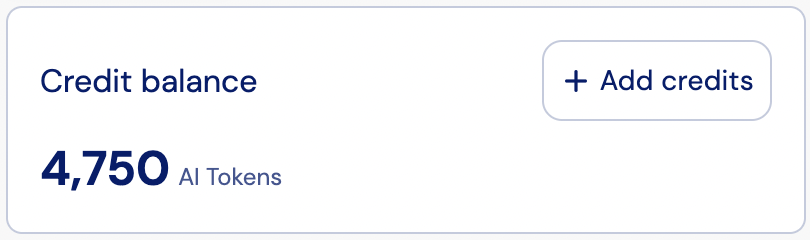
The Credits Balance widget displays a customer’s current prepaid credit balance. It provides visibility into how many credits remain in the account, and includes an Add credits call-to-action button for prompting customers to top up their balance.
Layout

The Credit balance widget displays the customer’s current available credit amount in a clear and prominent format. The layout includes the following elements:
  • The customer’s current credit balance in tokens (or other configured unit).
  • The balance updates in real time after purchases or top-ups.
  • An Add credits CTA button for prompting customers to top up their balance.

Add credits

The Add credits button is shown automatically when both of the following conditions are met:
  • Credit top-ups are allowed for the customer’s account.
  • The customer’s current plan includes add-ons that can grant additional credits.
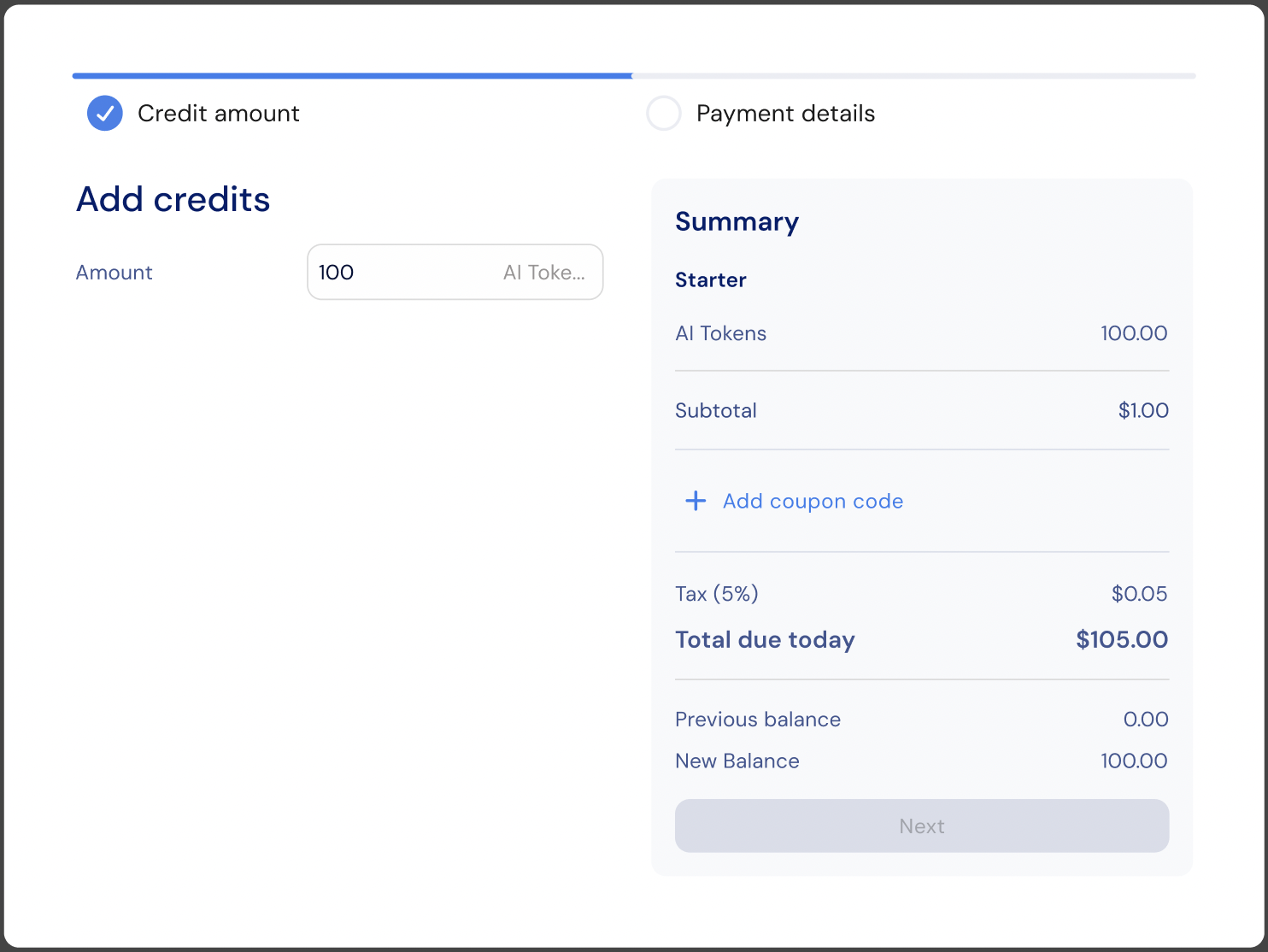
When clicked, Stigg opens a checkout flow that allows the customer to purchase additional credits. The credit amount and pricing are determined by the billing model configured in the top-up add-on within the price wizard. Use the onAddCredits prop to hook into the button click, for example to open a custom modal, trigger analytics, or redirect to a dedicated top-up page:
<CreditBalance
  currencyId="cred-type-ai-tokens"
  onAddCredits={() => {
    // Custom behavior when "Add credits" is clicked
  }}
/>

Customization

No-code widget designer

The Stigg app offers a no-code widget designer, which allows you to control the widget colors, typography and layout.

Custom CSS

For more advanced customization, custom CSS can be applied using the widget designer of the Stigg app. Alternatively, custom CSS can also be applied using code. Below you can find a list of the supported CSS classes:

Main container classes

Class nameDescription
stigg-credit-balance-containerMain wrapper container for the entire CreditBalance widget
stigg-credit-balance-cardCard container with border and padding that wraps the content

Content classes

Class nameDescription
stigg-credit-balance-titleTitle/header text at the top of the widget
stigg-credit-balance-value-amountMain balance amount (large number)
stigg-credit-balance-value-suffixUnits or symbol text next to the amount
stigg-credit-balance-value-errorError message when balance fails to load
stigg-credit-balance-value-loadingLoading skeleton state
stigg-credit-balance-value-no-balanceMessage shown when no balance data is available

CTA button classes

Class nameDescription
stigg-credit-balance-add-credits-button”Add credits” CTA button
stigg-credit-balance-add-credits-iconIcon inside the “Add credits” button

Snippet

import { StiggProvider, CreditBalance } from '@stigg/react-sdk';

function App() {
  return (
    <StiggProvider
      apiKey="your-stigg-api-key"
      customerId="customer-demo-01"
    >
      <div className="credit-widgets">
        {/* Basic Credit Balance */}
        <CreditBalance
          currencyId="cred-type-ai-tokens" // Required: currency identifier
          showUnits={true} // Optional: show units text
          showSymbol={false} // Optional: show currency symbol
          decimalPlaces={2} // Optional: limit decimal places (null = no limit)
          localization={{
            title: "Available Credits" // Optional: custom title
          }}
          onAddCredits={() => {
            // Optional: callback invoked when the "Add credits" button is clicked
            // The button is displayed when top-ups are allowed and
            // the plan has add-ons that can grant additional credits
          }}
        />
      </div>
    </StiggProvider>
  );
}

export default App;

Props

currencyId
string
required
Currency or credit type identifier used to fetch the credit balance.
decimalPlaces
number
Number of decimal places to display for the balance value. Defaults to no limit when not set.
showSymbol
boolean
Whether to display the currency symbol next to the balance.
showUnits
boolean
Whether to display the currency unit label (for example, "tokens" or "credits").
onAddCredits
() => void
Callback invoked when the Add credits button is clicked. Use this to open a checkout flow, a modal, or redirect the customer to a top-up page.
localization
object
Text overrides for customizing widget labels, messages, and states.
className
string
Additional CSS class applied to the root container.

Additional resources

Get credit balance