

Overview
The Auto-recharge configuration widget allows customers to configure how credits are automatically recharged when their balance runs low. It enables users to define recharge thresholds, target balances, and optional monthly spending limits, as well as to enable or disable auto-recharge entirely. The Auto-recharge configuration widget is designed to be used together with the Auto-recharge status widget.Layout
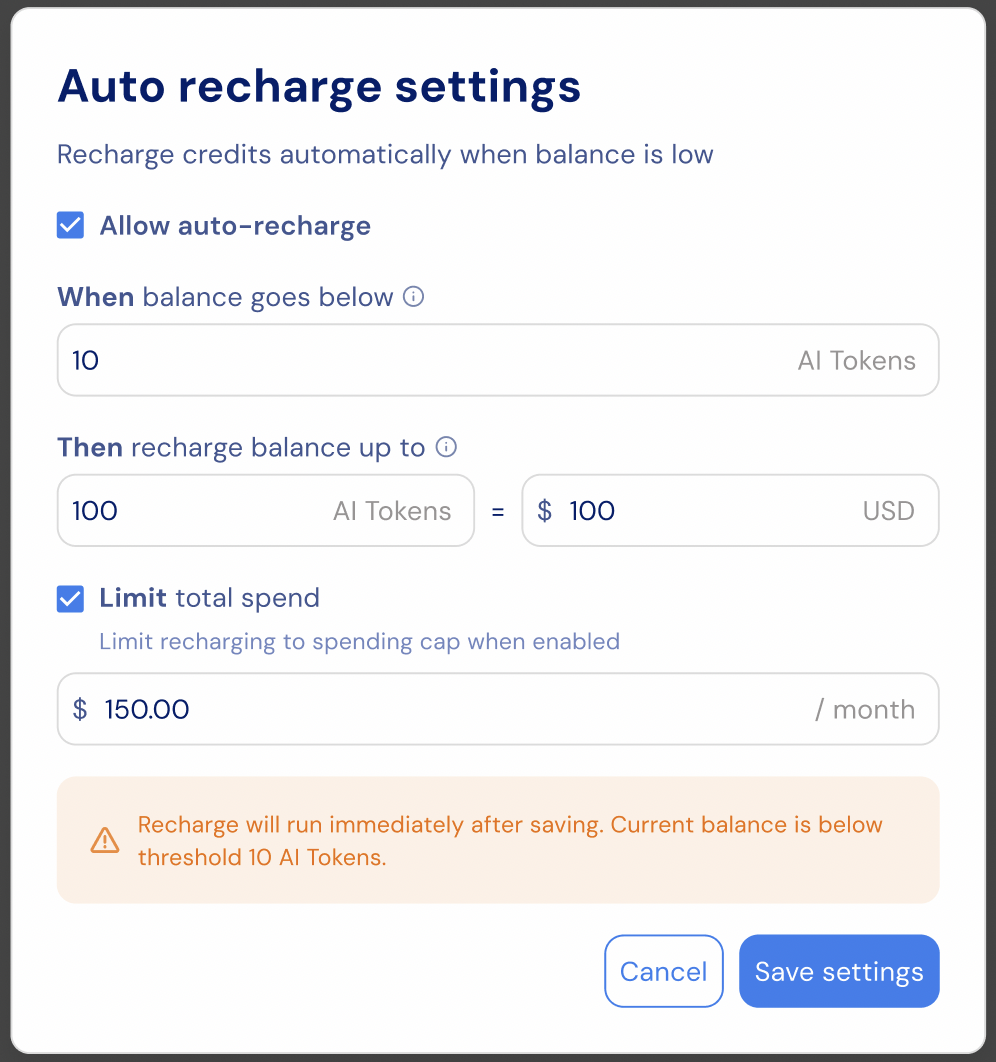
Auto-recharge settings include controls that automatically top up your balance when it falls below a defined threshold. The auto-recharge configuration includes the following options:- A toggle to enable or disable auto-recharge.
- A balance threshold that determines when a recharge is triggered.
- A target balance that the system recharges up to once the threshold is crossed.
- An optional monthly spending limit to cap total recharge spend.
- A warning message when saving will immediately trigger a recharge due to the current balance.
- Save and Cancel actions to apply or discard changes.
Customization
Custom CSS
The widget styling can be customized by applying custom CSS using code. Below you can find a list of the supported CSS classes:Snippet
Props
string
required
Customer identifier used to fetch and save auto-recharge configuration.
string
required
Currency or credit type identifier.
string
Display name for the currency (for example,
"Credits" or "Stigg Coins").string
Billing currency symbol (for example,
"$").() => void
Callback triggered when the Manage button is clicked.
string
Additional CSS class applied to the root container.
object
Text overrides for customizing widget labels and messages.
Texts
The default widget texts can currently be overridden using code:You can find additional text override options here
Additional resources
Auto recharge configuration
Related SDKs


