Documentation Index Fetch the complete documentation index at: https://docs.stigg.io/llms.txt
Use this file to discover all available pages before exploring further.
Overview
The Credit Usage Chart widget provides a visual breakdown of how credits are consumed over time. It helps customers understand their spending patterns and identify which features or services drive the most usage.
Layout
The Usage widget displays usage over time in a stacked bar chart, providing a clear view of total spend and feature-level consumption for the selected period.
The layout includes the following elements:
Stacked bar chart : shows daily credit consumption across different features or services.
Color-coded legend : distinguishes usage by feature (e.g., Feature 1, Feature 2, Feature 3).
Total spend : aggregate credits consumed over the selected timeframe.
Date range selector : allows filtering usage data (e.g., last 7 days, last 30 days).
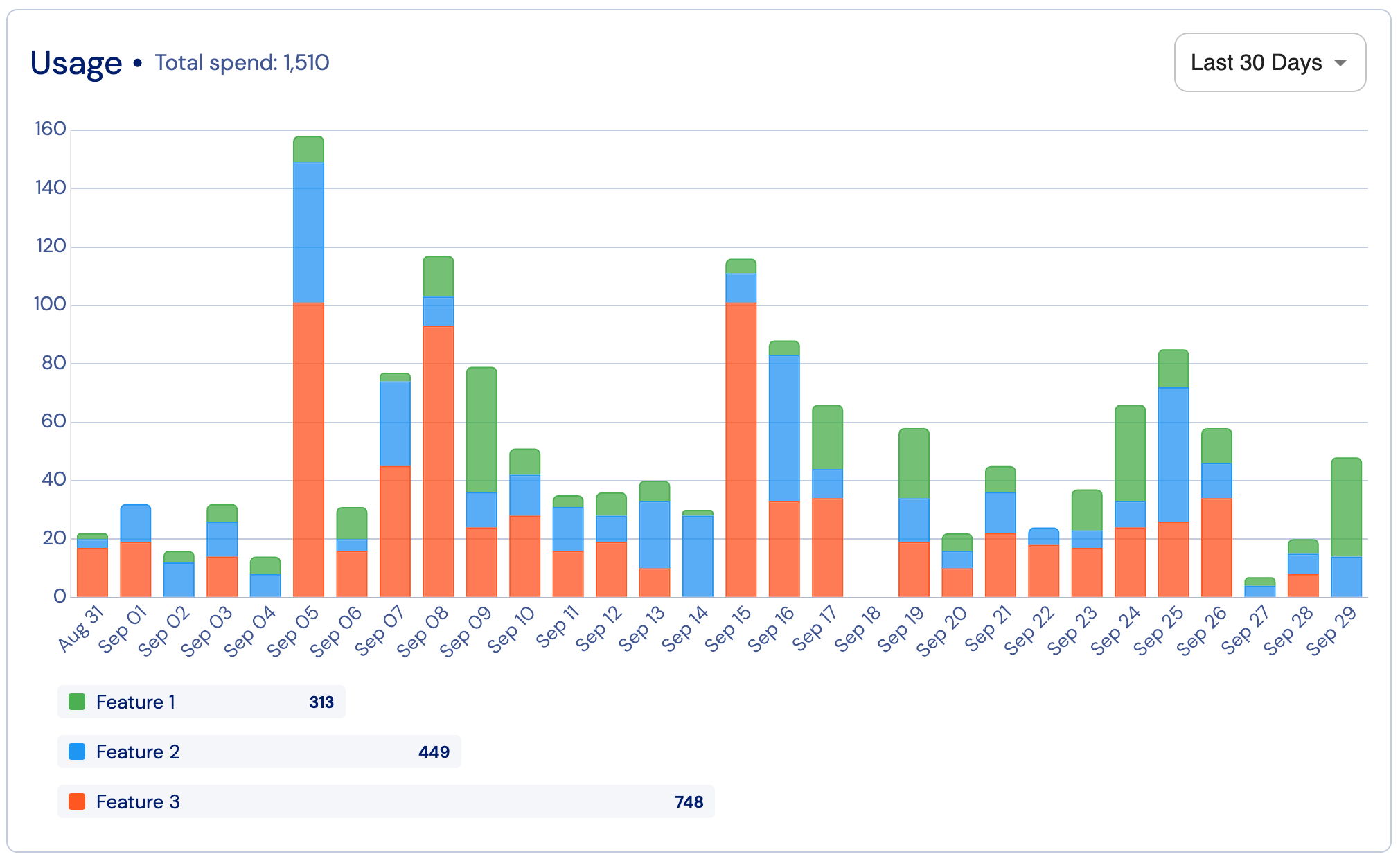
This widget is especially useful for monitoring consumption trends, analyzing feature-level usage, and forecasting future credit needs.
Customization
The Stigg app offers a no-code widget designer, which allows you to control the widget colors, typography and layout.
Custom CSS
For more advanced customization, custom CSS can be applied using the widget designer of the Stigg app. Alternatively, custom CSS can also be applied using code.
Below you can find a list of the supported CSS classes:
Main component
Class name Description stigg-credit-usage-chart-containerMain wrapper for the entire CreditUsageChart component stigg-credit-usage-chart-cardCard container that holds the chart layout and styling stigg-credit-usage-chart-skeletonLoading skeleton displayed while usage data is being fetched stigg-credit-usage-chart-barBar element used in the usage visualization
Class name Description stigg-credit-usage-chart-headerHeader container at the top of the chart stigg-credit-usage-chart-titleChart title text stigg-credit-usage-chart-totalDisplays the total spend or usage amount stigg-credit-usage-chart-time-range-selectSelector used to change the chart’s time range
Class name Description stigg-credit-usage-chart-tooltipTooltip showing detailed usage values on hover
Legend component
Class name Description stigg-credit-usage-chart-legendWrapper for the entire legend section stigg-credit-usage-chart-legend-titleTitle for the legend block stigg-credit-usage-chart-legend-title-currency-unitsCurrency or unit label in the legend header stigg-credit-usage-chart-legend-itemBase class for each legend row stigg-credit-usage-chart-legend-item-{featureId}Feature-specific legend item class ({featureId} = feature ID) stigg-credit-usage-chart-legend-bar-containerContainer holding the color bar for each feature stigg-credit-usage-chart-legend-feature-nameWrapper for the feature name in the legend stigg-credit-usage-chart-legend-feature-name-textText label displaying the feature name stigg-credit-usage-chart-legend-valueUsage amount displayed for each feature
Empty state component
Class name Description stigg-credit-usage-chart-empty-stateDisplayed when no usage data is available
Error state component
Class name Description stigg-credit-usage-chart-error-stateShown when the chart fails to load due to error
Snippet
import React from 'react' ;
import { StiggProvider , CreditUsageChart , CreditUsageTimeRange } from '@stigg/react-sdk' ;
function App () {
return (
< StiggProvider
apiKey = "your-stigg-api-key"
customerId = "customer-demo-01"
>
< div className = "credit-widgets" >
< CreditUsageChart
currencyId = "cred-type-ai-tokens" // Required: currency identifier
timeRange = { CreditUsageTimeRange . LastMonth }
// Optional: Custom column labels and messages
localization = { {
title: 'Usage' ,
totalSpend: 'Total spend' , '
} }
/>
</div>
</StiggProvider>
);
}
export default App;
Additional resources
Global Theming Customization
React Vue.js Next.js Webflow, Wordpress, HTML