

Overview
Stigg can redirect customers to a Stripe-hosted checkout page to collect payment details, while Stigg continues to manage the subscription lifecycle. This is the lowest-effort way to collect payment, since Stripe builds and hosts the entire payment page - there’s no need to build a custom checkout form with Stripe Elements or embed the Stigg checkout widget. To use it, pass acheckoutOptions object when calling Provision Subscription. If the customer doesn’t have a payment method on file and the plan requires payment, Stigg creates a Stripe Checkout Session and returns its URL so your application can redirect the customer to it.
Before implementing this flow, review the checkout experience comparison - a Stripe-hosted checkout page can only be used to provision a new subscription, not to update an existing one (upgrades/downgrades of an existing paid subscription require a different checkout experience).
Before we begin
In order to complete this guide in your application code, please make sure that you have:- Modeled your pricing in Stigg
- A Stigg environment that’s integrated with Stripe
- Installed the Stigg Node.js server SDK
- A Stigg full access key
- Provisioned a customer
How it works
When provisioning a subscription, Stigg checks whether the environment has a billing integration and whether the customer already has a payment method on file. Only when payment is required and no payment method exists does Stigg return a checkout URL instead of an active subscription: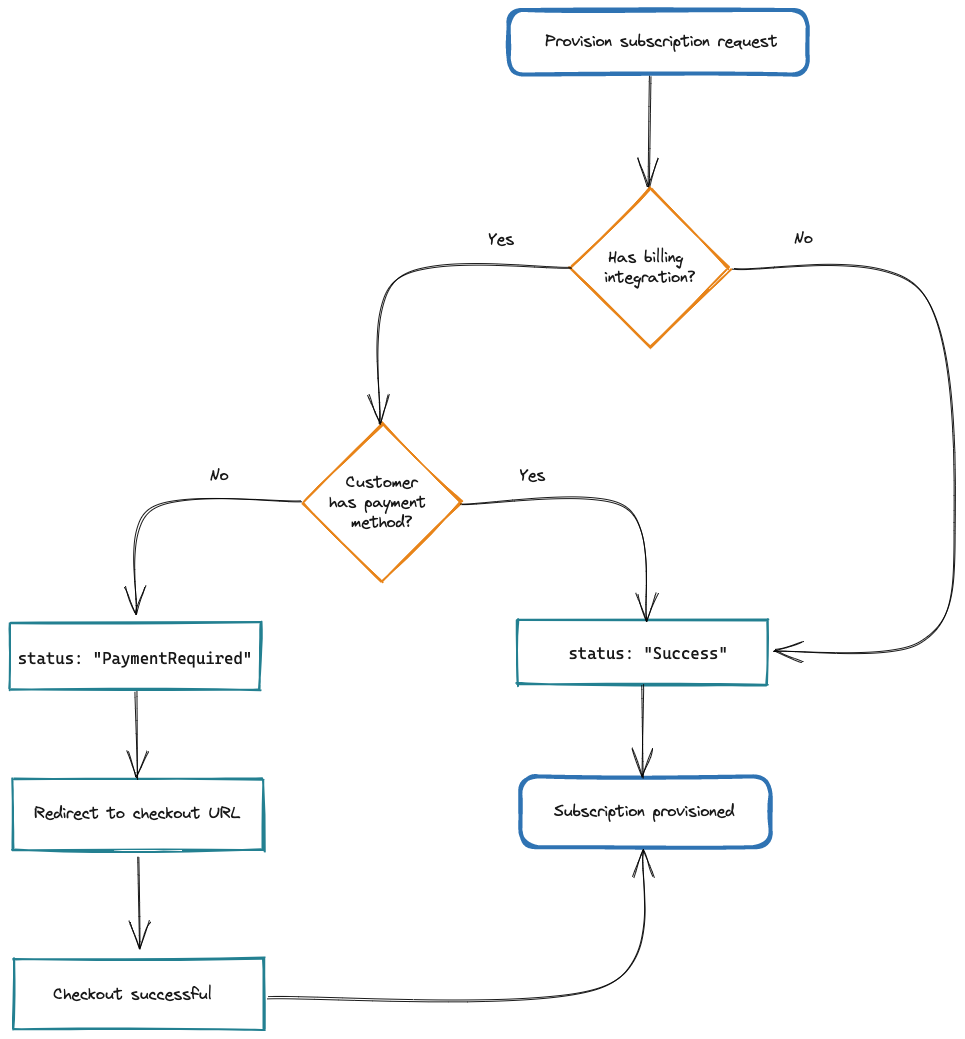
Provisioning a subscription with checkoutOptions
PasscheckoutOptions on the same call you’d otherwise use to provision a subscription. At minimum, successUrl and cancelUrl are required:
billingPeriod is mandatory when checkoutOptions is provided - Stigg needs it to price the checkout session. The full list of provisionSubscription parameters is available in the Node.js SDK reference and the REST API reference.Redirecting the customer to checkout
When payment is required, the result ofprovisionSubscription includes a checkoutUrl instead of an active subscription. Redirect the customer’s browser to that URL to complete payment on Stripe’s hosted page:
What happens after checkout
Successful payment
Once the customer completes payment, Stripe redirects them tosuccessUrl and Stigg automatically creates the subscription and grants the associated entitlements. Stigg also fires the subscription.created webhook.
On the successUrl page, call refresh() to re-fetch the current customer data and entitlements on the client:
Customer cancels or abandons checkout
No subscription is created in Stigg unless the customer completes payment -provisionSubscription only returns a checkoutUrl, without a subscription. If the customer clicks Stripe’s back/cancel link, they’re redirected to cancelUrl with no subscription ever having been created in Stigg. The same applies if the customer simply closes the tab without completing checkout, or if the Stripe Checkout Session expires (24 hours after creation, by default).
Because no subscription exists until checkout completes, avoid granting entitlements based on the
provisionSubscription call itself - wait for the subscription.created webhook before granting access.Payment is declined during checkout
Card declines and other in-session payment errors (for example, insufficient funds or a failed 3D Secure challenge) are handled entirely by Stripe’s hosted checkout page - Stripe surfaces the error to the customer and lets them retry with a different payment method without leaving the page. Stigg isn’t notified of these in-page retries; it only receives a result once the session succeeds or expires.Failed recurring payments
The behavior above applies only to the initial checkout. Once the subscription is active, a failed renewal charge instead fires thecustomer.payment_failed webhook so you can start dunning or notify the customer.