

Adding a credit entitlement
- Click + Add under the Entitlements section of the selected add-on.
- Select the credit type from the list (e.g., API Credits).
- Enter the amount of credits to grant per cadence (e.g.,
10,000). - Select the cadence: Monthly or Yearly.
- (Optional) Set the Entitlement behavior - see below for details.
- Click Add to confirm.
Entitlement behavior
The Entitlement behavior setting controls how add-on credits interact with the credits already included in the base plan:- Increment plan limit (default): The add-on credits are added on top of the base plan’s credit limit. For example, a plan with 100 credits + an add-on for 50 credits = 150 total credits.
- Override plan limit: The add-on completely replaces the base plan’s credit limit. For example, a plan with 100 credits + an override add-on for 500 credits = 500 total credits.
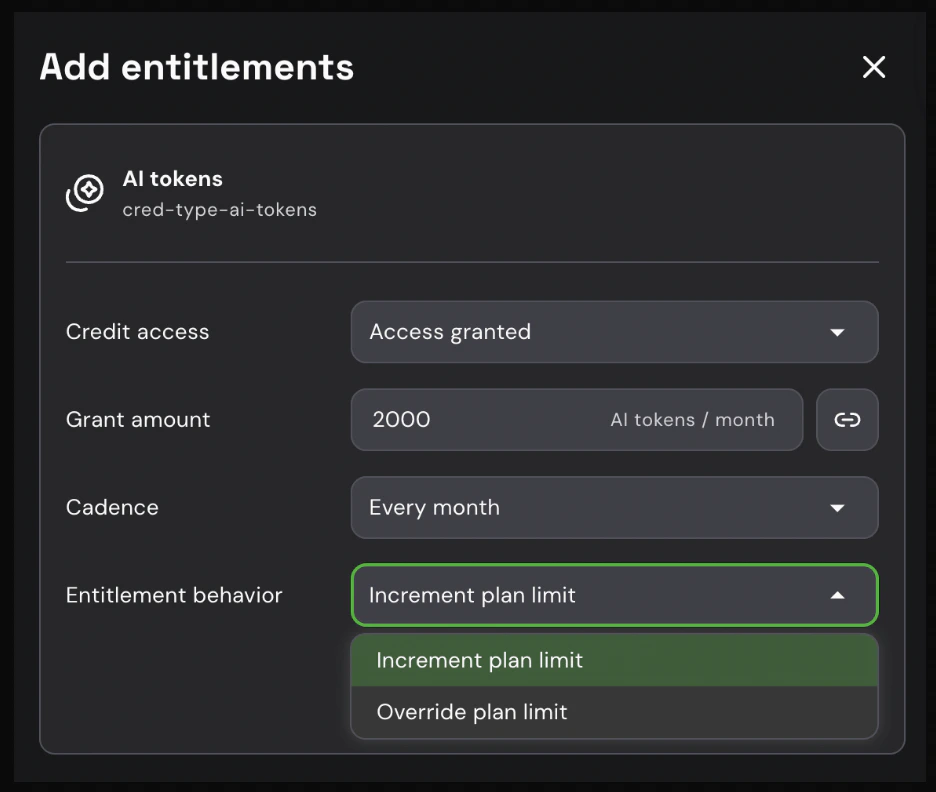
Entitlement behavior options for a credit add-on entitlement
The credit type must already exist in your product catalog before it can be assigned as an add-on entitlement. To create a new credit type, go to Product Catalog > Credit types.
Example use case: Extra API Credits add-on
Suppose your base plan includes 50,000 API credits per month. You want to offer customers the ability to purchase additional credit capacity without upgrading their plan. Setup:- Create an add-on named Extra API Credits with Multiple instance type, so customers can purchase more than one unit.
- Add a credit entitlement:
- Credit type: API Credits
- Amount: 10,000
- Cadence: Monthly
- Set the add-on price and publish it.
- 50,000 credits from the plan
- 30,000 credits from the add-on (10,000 × 3)
- 80,000 API credits per month in total