
Overview

Seat-based credit pools let you link a recurring credit grant to a metered feature (such as seats), so that the customer’s credit balance automatically scales as their team grows. When a seat is added to a subscription, Stigg automatically grants the configured number of credits to the customer’s shared pool. Credits are not siloed per user — the entire organization draws from a single unified balance, maximizing utilization across the team. Example: Configure “1,000 AI credits per seat per month”. A team of 5 seats gets 5,000 credits/month. When they add a 6th seat, Stigg automatically provisions 1,000 more credits to their shared pool.

Configuration

To configure a seat-based recurring credit grant on a plan or add-on:
  1. Go to Product Catalog → Plans (or Add-ons).
  2. Create or select the plan or add-on to edit.
  3. In the Entitlements section, add your credit feature as an entitlement.
  4. Click the Link icon next to the credit grant to associate it with another entitlement — select the metered feature that represents seats (or another unit of growth).
  5. Define the number of credits to grant per unit of the linked feature (e.g., 1,000 credits per seat).
  6. Set the grant cadence (e.g., every month).
  7. Click Add, then Publish the plan or add-on.
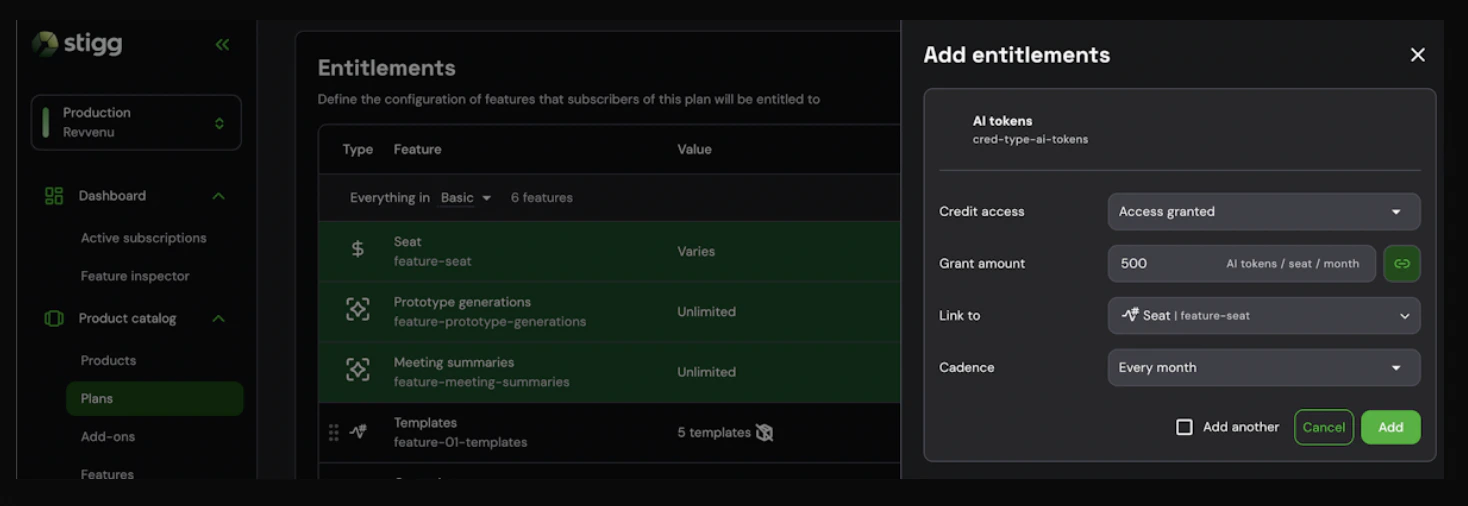
Once a customer subscribes, their shared credit pool updates automatically whenever a seat is added or removed.
Seat-based credit pools require Stigg’s integration with Stripe and are available on plans and add-ons that include both a credit entitlement and a metered seat feature.