> ## Documentation Index
> Fetch the complete documentation index at: https://docs.stigg.io/llms.txt
> Use this file to discover all available pages before exploring further.
# How can I migrate my existing customer-base into Stigg?
## Overview
Importing your existing data into Stigg is a key milestone in the integration process. This guide will walk you through the process step-by-step, ensuring a smooth transition and uninterrupted operations.
## Entities that can be imported
1. Customers
2. Subscriptions
3. Usage data
**Data should be imported to Stigg according to the above order.**
 ## Prerequisites
* Your pricing has been [modeled in Stigg](/documentation/modeling-your-pricing-in-stigg/overview).
* [NodeJS](https://nodejs.org/en/download/) must be installed.
* [Obtain](/documentation/managing-your-account/environments/api-keys) the full access key of the environment that you'd like to import the data to.
* Export the above full access key as an environment variable:
```shell shell theme={null}
export STIGG_FULL_ACCESS_KEY=''
```
## Importing customers
### Using the CLI
Create a file called `customers.json` that contains all the customers that will be imported to the environment.
The file should be in the following schema:
```json JSON theme={null}
{
"customers": [
{
"customerId": "lorem-ipsum",
"email": "john@example.com", // optional
"name": "Lorem-ipsum", // optional
"billingId": "cus_MvdQq1bVD1BQHe", // optional - if an existing customer in Stripe
"paymentMethodId": "pm_1N04AHEdaKWoSZ0OgP78RflV", // required for paid customers
"updatedAt": "2022-01-01T00:00:00.000Z", // optional - indicates the last update of the customer. In case there's already existing customer that was updated after that date, it will skip import this customer
"metadata": { // optional - set metadata for the customer
"isTest": "true",
},
},
// ...
],
}
```
Initiate the bulk import process:
```shell shell theme={null}
npx @stigg/bulk-import --customers-file customers.json
```
### Using the API and SDKs
Using the `importCustomerBulk` endpoint.
The `importCustomerBulk` endpoint supports up to **1,000 customers per request** and has a rate limit of **250 requests per minute**.
## Importing subscriptions
Before importing subscriptions, ensure that the relevant customers have been imported to Stigg.
### Free plans
#### Using the CLI
To migrate subscriptions to [free plans](/documentation/modeling-your-pricing-in-stigg/plans/defining-plan-pricing/free), create a file called `free-subscriptions.json` that contains all of the subscriptions that should be imported.
The file should be in the following schema:
```json JSON theme={null}
{
"subscriptions": [
{
"customerId": "lorem-ipsum",
"planId": "plan-1",
"resourceId": "site-1", // optional - required for multiple subscriptions product
"startDate": "2022-01-01T00:00:00.000Z", // optional - used for backdating
"endDate": "2022-01-01T00:00:00.000Z", // optional - end date for the subscription
}
],
"additionalMetaData": { // optional - set metadata for the subscription
"isTest": "true"
}
},
// ...
]
}
```
Initiate the bulk import process:
```shell shell theme={null}
npx @stigg/bulk-import --subscriptions-file free-subscriptions.json
```
#### Using the API and SDKs
Using the `importSubscriptionsBulk` mutation.
### Paid plans
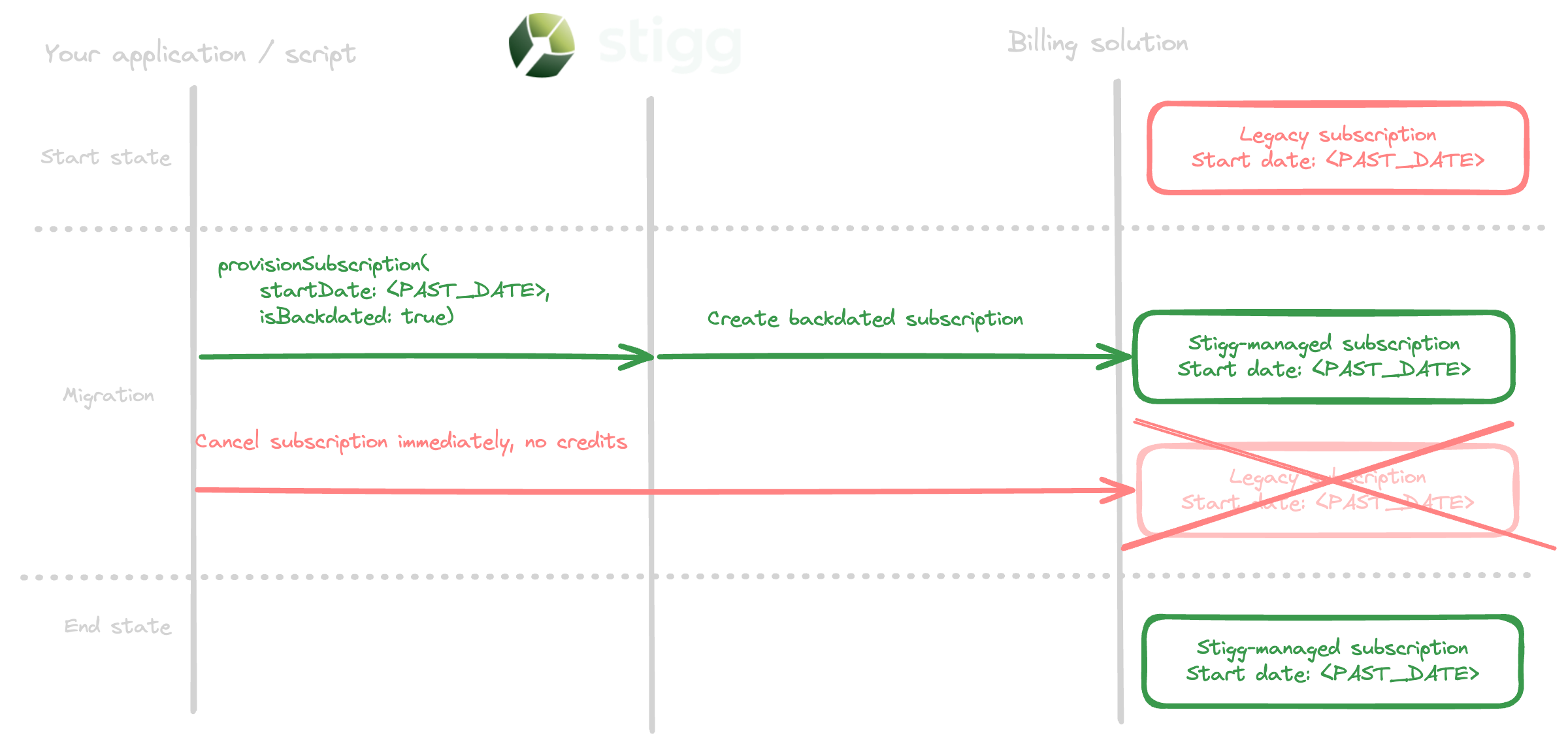
To migrate subscriptions to [paid plans](/documentation/modeling-your-pricing-in-stigg/plans/defining-plan-pricing/paid/paid), repeat the below process for each subscription:
1. [Provision](/guides/quick-start-guides/creating-subscriptions) a subscription in Stigg with the start date of the subscription that currently exists in your billing provider and include the `billingInformation.isBackdated: true` property. Doing so will create the subscription as backdated in the billing provider and ensure that customers will be billed again for the subscription starting from the **next** billing period. You may optionally sync additional metadata for the subscription that's synced to the billing provider to indicate that this is a migrated subscription by passing the `billingInformation.metadata` property when provisioning the subscription Stigg.
2. [Cancel](https://docs.stripe.com/billing/subscriptions/cancel) the original subscription in your billing provider immediately and without prorations.
## Prerequisites
* Your pricing has been [modeled in Stigg](/documentation/modeling-your-pricing-in-stigg/overview).
* [NodeJS](https://nodejs.org/en/download/) must be installed.
* [Obtain](/documentation/managing-your-account/environments/api-keys) the full access key of the environment that you'd like to import the data to.
* Export the above full access key as an environment variable:
```shell shell theme={null}
export STIGG_FULL_ACCESS_KEY=''
```
## Importing customers
### Using the CLI
Create a file called `customers.json` that contains all the customers that will be imported to the environment.
The file should be in the following schema:
```json JSON theme={null}
{
"customers": [
{
"customerId": "lorem-ipsum",
"email": "john@example.com", // optional
"name": "Lorem-ipsum", // optional
"billingId": "cus_MvdQq1bVD1BQHe", // optional - if an existing customer in Stripe
"paymentMethodId": "pm_1N04AHEdaKWoSZ0OgP78RflV", // required for paid customers
"updatedAt": "2022-01-01T00:00:00.000Z", // optional - indicates the last update of the customer. In case there's already existing customer that was updated after that date, it will skip import this customer
"metadata": { // optional - set metadata for the customer
"isTest": "true",
},
},
// ...
],
}
```
Initiate the bulk import process:
```shell shell theme={null}
npx @stigg/bulk-import --customers-file customers.json
```
### Using the API and SDKs
Using the `importCustomerBulk` endpoint.
The `importCustomerBulk` endpoint supports up to **1,000 customers per request** and has a rate limit of **250 requests per minute**.
## Importing subscriptions
Before importing subscriptions, ensure that the relevant customers have been imported to Stigg.
### Free plans
#### Using the CLI
To migrate subscriptions to [free plans](/documentation/modeling-your-pricing-in-stigg/plans/defining-plan-pricing/free), create a file called `free-subscriptions.json` that contains all of the subscriptions that should be imported.
The file should be in the following schema:
```json JSON theme={null}
{
"subscriptions": [
{
"customerId": "lorem-ipsum",
"planId": "plan-1",
"resourceId": "site-1", // optional - required for multiple subscriptions product
"startDate": "2022-01-01T00:00:00.000Z", // optional - used for backdating
"endDate": "2022-01-01T00:00:00.000Z", // optional - end date for the subscription
}
],
"additionalMetaData": { // optional - set metadata for the subscription
"isTest": "true"
}
},
// ...
]
}
```
Initiate the bulk import process:
```shell shell theme={null}
npx @stigg/bulk-import --subscriptions-file free-subscriptions.json
```
#### Using the API and SDKs
Using the `importSubscriptionsBulk` mutation.
### Paid plans
To migrate subscriptions to [paid plans](/documentation/modeling-your-pricing-in-stigg/plans/defining-plan-pricing/paid/paid), repeat the below process for each subscription:
1. [Provision](/guides/quick-start-guides/creating-subscriptions) a subscription in Stigg with the start date of the subscription that currently exists in your billing provider and include the `billingInformation.isBackdated: true` property. Doing so will create the subscription as backdated in the billing provider and ensure that customers will be billed again for the subscription starting from the **next** billing period. You may optionally sync additional metadata for the subscription that's synced to the billing provider to indicate that this is a migrated subscription by passing the `billingInformation.metadata` property when provisioning the subscription Stigg.
2. [Cancel](https://docs.stripe.com/billing/subscriptions/cancel) the original subscription in your billing provider immediately and without prorations.
 ### Custom plans
#### Using the CLI
To migrate subscriptions to [custom plans](/documentation/modeling-your-pricing-in-stigg/plans/custom-plans), create a file called `custom-subscriptions.json` that contains all of the subscriptions that should be imported.
Custom plan subscriptions can optionally include **entitlements** to define the specific access each customer gets. Each item in the `entitlements` array must contain either a `feature` or a `credit` key — not both:
* **Feature entitlements** — set usage limits for features (e.g., number of seats or projects).
* **Credit entitlements** — grant a recurring credit allowance for a specific currency. The imported credits appear as recurring credit grants on the customer's subscription. The `cadence` field determines the grant renewal period: `MONTH` or `YEAR`.
The file should be in the following schema:
```json JSON theme={null}
{
"subscriptions": [
{
"customerId": "lorem-ipsum",
"planId": "plan-1",
"resourceId": "site-1", // optional - required for multiple subscriptions product
"startDate": "2022-01-01T00:00:00.000Z", // optional - used for backdating
"endDate": "2022-01-01T00:00:00.000Z", // optional - end date for the subscription
"entitlements": [ // optional - override plan entitlements per customer
{
"feature": {
"featureId": "feature-seats", // feature ID as defined in Stigg
"usageLimit": 10 // usage limit for this customer
}
},
{
"feature": {
"featureId": "feature-projects",
"usageLimit": 25
}
},
{
"credit": {
"customCurrencyId": "currency-api-credits", // credit currency ID as defined in Stigg
"amount": 50000, // credits granted per period
"cadence": "MONTH" // renewal period: "MONTH" or "YEAR"
}
}
],
"addons": [ // optional - set subscription addons
{ "addonId": "addon-1", "quantity": 6 },
{ "addonId": "addon-2", "quantity": 3 },
],
"additionalMetaData": { // optional - set metadata for the subscription
"isTest": "true"
}
},
// ...
]
}
```
Initiate the bulk import process:
```shell shell theme={null}
npx @stigg/bulk-import --subscriptions-file custom-subscriptions.json
```
#### Using the API and SDKs
Use the [`importSubscriptionsBulk`](/api-and-sdks/api-reference/mutations/import-subscriptions-bulk) mutation — see the API reference for all available fields and examples.
## Importing feature usage
Importing feature usage is supported only for metered features with a Calculated Usage meter type.
Before importing feature usage, ensure that the relevant customers have been imported to Stigg.
### Using the CLI
Create a file called `usage.json` that contains all the features' up-to-date usage.
The file should be in the following schema:
```json JSON theme={null}
{
"usages": [
{
"customerId": "lorem-ipsum",
"resourceId": "site-1", // optional - required for multiple subscriptions product
"featureId": "feature-seats",
"usage": 5
}
// ...
]
}
```
Initiate the bulk import process:
```shell shell theme={null}
npx @stigg/bulk-import --usage-file usage.json
```
The import function is idempotent; therefore, attempting to import usage multiple time will yield the same result.
### Using the API and SDKs
Leverage the [Report Usage Bulk](/api-and-sdks/api-reference/mutations/report-usage-bulk) endpoint while passing the `updateBehavior: UsageUpdateBehavior.SET` property in each of the usage reports.
### Custom plans
#### Using the CLI
To migrate subscriptions to [custom plans](/documentation/modeling-your-pricing-in-stigg/plans/custom-plans), create a file called `custom-subscriptions.json` that contains all of the subscriptions that should be imported.
Custom plan subscriptions can optionally include **entitlements** to define the specific access each customer gets. Each item in the `entitlements` array must contain either a `feature` or a `credit` key — not both:
* **Feature entitlements** — set usage limits for features (e.g., number of seats or projects).
* **Credit entitlements** — grant a recurring credit allowance for a specific currency. The imported credits appear as recurring credit grants on the customer's subscription. The `cadence` field determines the grant renewal period: `MONTH` or `YEAR`.
The file should be in the following schema:
```json JSON theme={null}
{
"subscriptions": [
{
"customerId": "lorem-ipsum",
"planId": "plan-1",
"resourceId": "site-1", // optional - required for multiple subscriptions product
"startDate": "2022-01-01T00:00:00.000Z", // optional - used for backdating
"endDate": "2022-01-01T00:00:00.000Z", // optional - end date for the subscription
"entitlements": [ // optional - override plan entitlements per customer
{
"feature": {
"featureId": "feature-seats", // feature ID as defined in Stigg
"usageLimit": 10 // usage limit for this customer
}
},
{
"feature": {
"featureId": "feature-projects",
"usageLimit": 25
}
},
{
"credit": {
"customCurrencyId": "currency-api-credits", // credit currency ID as defined in Stigg
"amount": 50000, // credits granted per period
"cadence": "MONTH" // renewal period: "MONTH" or "YEAR"
}
}
],
"addons": [ // optional - set subscription addons
{ "addonId": "addon-1", "quantity": 6 },
{ "addonId": "addon-2", "quantity": 3 },
],
"additionalMetaData": { // optional - set metadata for the subscription
"isTest": "true"
}
},
// ...
]
}
```
Initiate the bulk import process:
```shell shell theme={null}
npx @stigg/bulk-import --subscriptions-file custom-subscriptions.json
```
#### Using the API and SDKs
Use the [`importSubscriptionsBulk`](/api-and-sdks/api-reference/mutations/import-subscriptions-bulk) mutation — see the API reference for all available fields and examples.
## Importing feature usage
Importing feature usage is supported only for metered features with a Calculated Usage meter type.
Before importing feature usage, ensure that the relevant customers have been imported to Stigg.
### Using the CLI
Create a file called `usage.json` that contains all the features' up-to-date usage.
The file should be in the following schema:
```json JSON theme={null}
{
"usages": [
{
"customerId": "lorem-ipsum",
"resourceId": "site-1", // optional - required for multiple subscriptions product
"featureId": "feature-seats",
"usage": 5
}
// ...
]
}
```
Initiate the bulk import process:
```shell shell theme={null}
npx @stigg/bulk-import --usage-file usage.json
```
The import function is idempotent; therefore, attempting to import usage multiple time will yield the same result.
### Using the API and SDKs
Leverage the [Report Usage Bulk](/api-and-sdks/api-reference/mutations/report-usage-bulk) endpoint while passing the `updateBehavior: UsageUpdateBehavior.SET` property in each of the usage reports.