> ## Documentation Index
> Fetch the complete documentation index at: https://docs.stigg.io/llms.txt
> Use this file to discover all available pages before exploring further.
# Credits auto-recharge status
## Overview
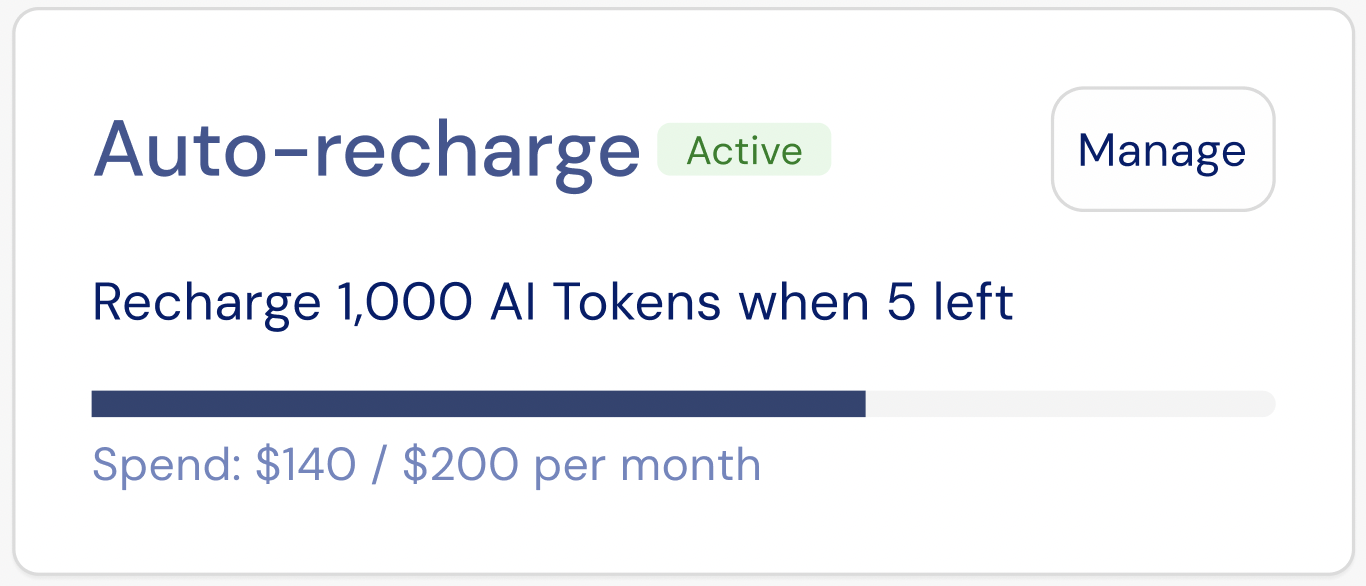
The **Auto-recharge status** widget displays the customer’s current auto-recharge configuration and monthly spend status. It provides a read-only summary of when auto-recharge is triggered, the target balance after recharge, and how much of the monthly spending limit has been used.
The **Auto-recharge status** widget is designed to be used together with the [**Auto-recharge configuration** widget](./credit-auto-recharge-configuration).
## Layout
Auto-recharge status includes a compact summary card that shows whether auto-recharge is currently enabled and what rules are in effect.
The status layout includes the following elements:
* Indicates whether auto-recharge is **active** or **inactive**.
* Shows the configured recharge rule (for example, recharge to 50 coins when the balance drops below 31).
* Displays the current monthly spend relative to the configured monthly limit.
* Includes a **Manage** action that opens the [auto-recharge configuration widget](./credit-auto-recharge-configuration).
 ## Customization
### No-code widget designer
The Stigg app offers a no-code widget designer, which allows you to control the widget colors, typography and layout.
### Custom CSS
For more advanced customization, custom CSS can be applied using the widget designer of the Stigg app. Alternatively, custom CSS can also be applied using code.
Below you can find a list of the supported CSS classes:
#### Main container classes
| Class name | Description |
| ---------------------------------------------------------------------------------- | -------------------------------------------- |
| `stigg-auto-recharge-status-container` | Outer container for the Auto-recharge widget |
#### Status widget classes
| Class name | Description |
| ------------------------------------------------------------------------------- | ----------------------------------------- |
| `stigg-auto-recharge-status` | Main status card container |
| `stigg-auto-recharge-status-error` | Error state variant of the status card |
| `stigg-auto-recharge-title` | Widget title text |
| `stigg-auto-recharge-status-chip` | Status indicator chip (Active / Inactive) |
| `stigg-auto-recharge-manage-button` | Manage auto-recharge button |
| `stigg-auto-recharge-description` | Description or helper text |
| `stigg-auto-recharge-progress` | Progress bar for spend tracking |
| `stigg-auto-recharge-spend` | Spend amount text |
| `stigg-auto-recharge-empty` | Empty state container |
| `stigg-auto-recharge-empty-text` | Empty state message text |
## Snippet
```jsx theme={null}
import { AutoRechargeStatus } from '@Stigg/react-sdk';
// Basic usage
console.log('Manage clicked')}
/>
```
### Props
Customer identifier used to fetch auto-recharge status.
Currency or credit type identifier.
Display name for the currency (for example, `"Credits"` or `"Stigg Coins"`).
Billing currency symbol (for example, `"$"`).
Callback triggered when the **Manage** button is clicked.
Additional CSS class applied to the root container.
Text overrides for customizing widget labels and messages.
### Texts
The default widget texts can currently be overridden using code:
```tsx React theme={null}
import { AutoRechargeStatus } from "@stigg/react-sdk";
export function CreditsAutoRechargeStatus() {
return (
{
// Handle manage click
}}
/>
);
}
```
```bash bash theme={null}
```
You can find additional text override options [here](https://react-sdk-docs.stigg.io/interfaces/autorechargestatuslocalization)
## Additional resources
## Related SDKs
## Customization
### No-code widget designer
The Stigg app offers a no-code widget designer, which allows you to control the widget colors, typography and layout.
### Custom CSS
For more advanced customization, custom CSS can be applied using the widget designer of the Stigg app. Alternatively, custom CSS can also be applied using code.
Below you can find a list of the supported CSS classes:
#### Main container classes
| Class name | Description |
| ---------------------------------------------------------------------------------- | -------------------------------------------- |
| `stigg-auto-recharge-status-container` | Outer container for the Auto-recharge widget |
#### Status widget classes
| Class name | Description |
| ------------------------------------------------------------------------------- | ----------------------------------------- |
| `stigg-auto-recharge-status` | Main status card container |
| `stigg-auto-recharge-status-error` | Error state variant of the status card |
| `stigg-auto-recharge-title` | Widget title text |
| `stigg-auto-recharge-status-chip` | Status indicator chip (Active / Inactive) |
| `stigg-auto-recharge-manage-button` | Manage auto-recharge button |
| `stigg-auto-recharge-description` | Description or helper text |
| `stigg-auto-recharge-progress` | Progress bar for spend tracking |
| `stigg-auto-recharge-spend` | Spend amount text |
| `stigg-auto-recharge-empty` | Empty state container |
| `stigg-auto-recharge-empty-text` | Empty state message text |
## Snippet
```jsx theme={null}
import { AutoRechargeStatus } from '@Stigg/react-sdk';
// Basic usage
console.log('Manage clicked')}
/>
```
### Props
Customer identifier used to fetch auto-recharge status.
Currency or credit type identifier.
Display name for the currency (for example, `"Credits"` or `"Stigg Coins"`).
Billing currency symbol (for example, `"$"`).
Callback triggered when the **Manage** button is clicked.
Additional CSS class applied to the root container.
Text overrides for customizing widget labels and messages.
### Texts
The default widget texts can currently be overridden using code:
```tsx React theme={null}
import { AutoRechargeStatus } from "@stigg/react-sdk";
export function CreditsAutoRechargeStatus() {
return (
{
// Handle manage click
}}
/>
);
}
```
```bash bash theme={null}
```
You can find additional text override options [here](https://react-sdk-docs.stigg.io/interfaces/autorechargestatuslocalization)
## Additional resources
## Related SDKs
 React
React
 Vue.js
 Next.js
 Webflow, Wordpress, HTML