> ## Documentation Index
> Fetch the complete documentation index at: https://docs.stigg.io/llms.txt
> Use this file to discover all available pages before exploring further.
# Choosing a checkout experience
## Overview
The checkout experience is the most important stage in a customer's purchasing journey, and has a direct effect on your conversion rates.
Stigg works with the checkout experience of your [billing provider](/documentation/native-integrations/overview#billing) and supports 3 checkout experiences, each with a varying degree of required development effort and level of customization:
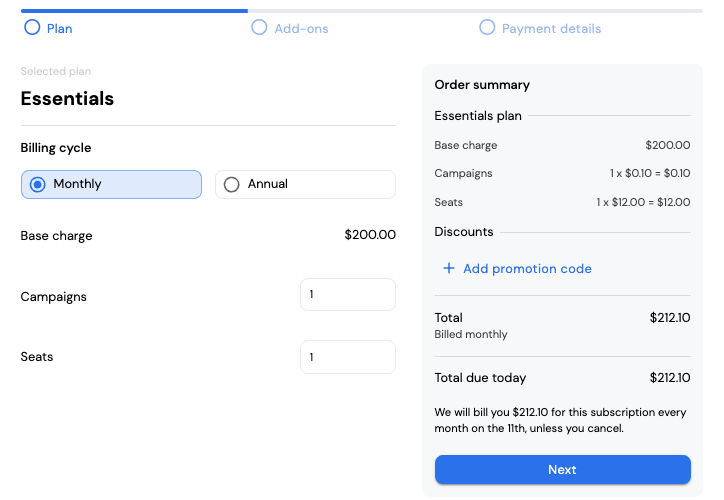
### Stigg checkout widget
A flexible and customizable checkout experience that can be embedded into your web application or even a standalone page with only [a few lines of code](/documentation/snap-in-widgets/checkout).
 ### Stripe-hosted checkout page
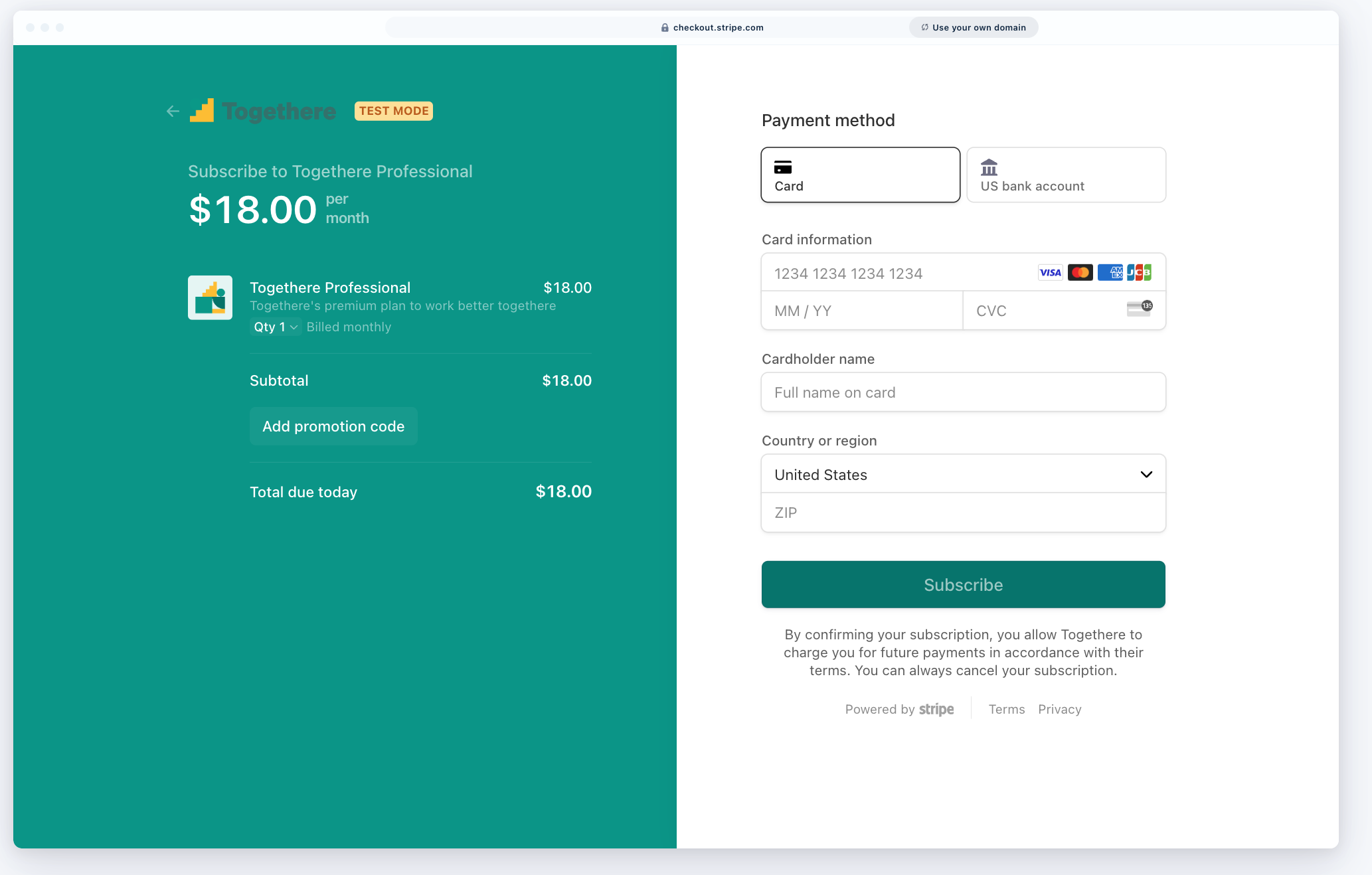
Available when Stigg is integrated with Stripe. Using Stripe's checkout experience, while delegating the subscription lifecycle management to Stigg. See [Integration when using Stripe-hosted checkout](/documentation/native-integrations/billing/stripe/integration-when-using-stripe-hosted-checkout) for implementation instructions.
### Stripe-hosted checkout page
Available when Stigg is integrated with Stripe. Using Stripe's checkout experience, while delegating the subscription lifecycle management to Stigg. See [Integration when using Stripe-hosted checkout](/documentation/native-integrations/billing/stripe/integration-when-using-stripe-hosted-checkout) for implementation instructions.
 ### Custom checkout page
In-house built and maintained checkout page that is fully customizable to your brand and needs. Payment details are collected using your billing provider. See the implementation instructions for [Stripe](/documentation/native-integrations/billing/stripe/integration-when-using-stripe-elements-for-checkout) and [Airwallex](/documentation/native-integrations/billing/airwallex#custom-checkout-experience).
## Checkout experience comparison
Use this comparison to decide which checkout method would work best for your customers and help you achieve your business goals. The following table compares these options:
| Checkout method / Feature | Stigg Checkout widget | Stripe-hosted checkout page | Custom checkout experience |
| - | - | - | - |
| **Integration effort** | Low ([only a few lines of code](/documentation/snap-in-widgets/checkout#rendering-a-checkout-session)) | [Low](/documentation/native-integrations/billing/stripe/integration-when-using-stripe-hosted-checkout) | [High](/documentation/native-integrations/billing/stripe/integration-when-using-stripe-elements-for-checkout) |
| **Customization** | Very high using [no-code](/documentation/snap-in-widgets/checkout#no-code-widget-designer) and [custom CSS](https://node-sdk-docs.stigg.io/types/checkoutoptions) | [Very limited](https://docs.stripe.com/checkout/customization): colors, buttons and font | Most customizable |
| **Price localization** | ✅ | ✅ | Needs to be manually implemented |
| **Supported payment methods** | Credit card (additional payment methods will be supported soon) | Credit card | Depends on implementation |
| **Supported pricing models** | Any pricing model including: tiered pricing, add-ons, scheduled downgrades, etc. | Any pricing model, including tiered pricing and add-ons, for the initial subscription | Depends on implementation + needs to be updated manually upon every pricing change |
| **Can be used for subscription updates?** | ✅ | ❌ | Depends on implementation |
| **Promo code support** | ✅ | ✅ | Depends on implementation |
| **Tax integration** | Stripe Tax, [Avalara](/documentation/snap-in-widgets/checkout#via-integration-with-third-party-tax-providers), [TaxJar](/documentation/snap-in-widgets/checkout#via-integration-with-third-party-tax-providers) | Stripe Tax | Needs to be manually implemented |
## What use-cases does the Stigg checkout widget cover
The Stigg checkout widget is perfectly aligned with Stigg's capabilities and provides full coverage for all supported use cases during the checkout process, for example:
* Multiple billable metrics
* Volume pricing
* Pay-as-you-go pricing
* Scheduled downgrades
* Downgrade to free
* Handling of prorations and credits
* Using promo codes
* Grandfathering
## The bottom line
The Stigg checkout widget is optimized for SaaS and allows - with minimal effort - to create a complete checkout experience for smooth and easy conversion. The widget allows you to easily make pricing changes and have them automatically reflected in the checkout widget without any additional line of code.
On the other hand, you may want to keep your current checkout experience at this point, or use Stripe’s solution, being a leader in the billing industry. In that case, take into consideration that additional effort will be required on Stigg end.
## Related topics
- [Checkout widget](/documentation/snap-in-widgets/checkout.md)
- [Stripe integration with Stripe Elements checkout](/documentation/native-integrations/billing/stripe/integration-when-using-stripe-elements-for-checkout.md)
- [Stripe integration with Stripe-hosted checkout](/documentation/native-integrations/billing/stripe/integration-when-using-stripe-hosted-checkout.md)
This documentation is built and hosted on [Mintlify](https://mintlify.com), a developer documentation platform.
### Custom checkout page
In-house built and maintained checkout page that is fully customizable to your brand and needs. Payment details are collected using your billing provider. See the implementation instructions for [Stripe](/documentation/native-integrations/billing/stripe/integration-when-using-stripe-elements-for-checkout) and [Airwallex](/documentation/native-integrations/billing/airwallex#custom-checkout-experience).
## Checkout experience comparison
Use this comparison to decide which checkout method would work best for your customers and help you achieve your business goals. The following table compares these options:
| Checkout method / Feature | Stigg Checkout widget | Stripe-hosted checkout page | Custom checkout experience |
| - | - | - | - |
| **Integration effort** | Low ([only a few lines of code](/documentation/snap-in-widgets/checkout#rendering-a-checkout-session)) | [Low](/documentation/native-integrations/billing/stripe/integration-when-using-stripe-hosted-checkout) | [High](/documentation/native-integrations/billing/stripe/integration-when-using-stripe-elements-for-checkout) |
| **Customization** | Very high using [no-code](/documentation/snap-in-widgets/checkout#no-code-widget-designer) and [custom CSS](https://node-sdk-docs.stigg.io/types/checkoutoptions) | [Very limited](https://docs.stripe.com/checkout/customization): colors, buttons and font | Most customizable |
| **Price localization** | ✅ | ✅ | Needs to be manually implemented |
| **Supported payment methods** | Credit card (additional payment methods will be supported soon) | Credit card | Depends on implementation |
| **Supported pricing models** | Any pricing model including: tiered pricing, add-ons, scheduled downgrades, etc. | Any pricing model, including tiered pricing and add-ons, for the initial subscription | Depends on implementation + needs to be updated manually upon every pricing change |
| **Can be used for subscription updates?** | ✅ | ❌ | Depends on implementation |
| **Promo code support** | ✅ | ✅ | Depends on implementation |
| **Tax integration** | Stripe Tax, [Avalara](/documentation/snap-in-widgets/checkout#via-integration-with-third-party-tax-providers), [TaxJar](/documentation/snap-in-widgets/checkout#via-integration-with-third-party-tax-providers) | Stripe Tax | Needs to be manually implemented |
## What use-cases does the Stigg checkout widget cover
The Stigg checkout widget is perfectly aligned with Stigg's capabilities and provides full coverage for all supported use cases during the checkout process, for example:
* Multiple billable metrics
* Volume pricing
* Pay-as-you-go pricing
* Scheduled downgrades
* Downgrade to free
* Handling of prorations and credits
* Using promo codes
* Grandfathering
## The bottom line
The Stigg checkout widget is optimized for SaaS and allows - with minimal effort - to create a complete checkout experience for smooth and easy conversion. The widget allows you to easily make pricing changes and have them automatically reflected in the checkout widget without any additional line of code.
On the other hand, you may want to keep your current checkout experience at this point, or use Stripe’s solution, being a leader in the billing industry. In that case, take into consideration that additional effort will be required on Stigg end.
## Related topics
- [Checkout widget](/documentation/snap-in-widgets/checkout.md)
- [Stripe integration with Stripe Elements checkout](/documentation/native-integrations/billing/stripe/integration-when-using-stripe-elements-for-checkout.md)
- [Stripe integration with Stripe-hosted checkout](/documentation/native-integrations/billing/stripe/integration-when-using-stripe-hosted-checkout.md)
This documentation is built and hosted on [Mintlify](https://mintlify.com), a developer documentation platform.