> ## Documentation Index
> Fetch the complete documentation index at: https://docs.stigg.io/llms.txt
> Use this file to discover all available pages before exploring further.
# Automation flows
## Create provisioning automation flows
In [Salesforce](https://login.salesforce.com), click the **Setup** gear icon in the top-right corner and select **Setup** from the dropdown.
 In the **Quick Find** search box at the top of the left sidebar, type `"flows"`.
* Under the **Process Automation** section, select **Flows**.
Before using the default provisioning automation (including the CPQ flow), make sure your Salesforce org has at least one product with **`Stigg Type = Plan`**.
Provisioning can’t run on entitlements alone. Even if you mark a CPQ product as entitlements, the flow still needs a Plan to:
* Recognize which Opportunity Products map to a Stigg plan
* Build a complete provisioning payload when an Opportunity is marked **Closed Won**
* Create / attach the subscription in Stigg with a valid plan ID
If no Plan-type product exists on the Opportunity, the subscription input step will produce an empty plan ID, and the Stigg Subscription node will fail or skip execution.
## Default template
To help you get started quickly, the **Stigg app for Salesforce** includes a default [Salesforce Flow](https://help.salesforce.com/s/articleView?id=sf.flow.htm) template.
* This flow automates the provisioning of customers and subscriptions in Stigg when a Salesforce opportunity is marked as **Closed - Won**.
* The template is fully customizable to fit your specific business logic.
The default template uses an **Opportunity** as its trigger, but the Stigg flow actions (**Create Stigg Customer**, **Create Stigg Subscription**, **Create Stigg Credit Grant**) are standard Salesforce Flow actions and can be embedded in any flow. You can trigger provisioning from any Salesforce entity — Accounts, Contacts, Cases, custom objects, or any other object — simply by building a flow that starts from that object and includes the relevant Stigg actions.
In the **Quick Find** search box at the top of the left sidebar, type `"flows"`.
* Under the **Process Automation** section, select **Flows**.
Before using the default provisioning automation (including the CPQ flow), make sure your Salesforce org has at least one product with **`Stigg Type = Plan`**.
Provisioning can’t run on entitlements alone. Even if you mark a CPQ product as entitlements, the flow still needs a Plan to:
* Recognize which Opportunity Products map to a Stigg plan
* Build a complete provisioning payload when an Opportunity is marked **Closed Won**
* Create / attach the subscription in Stigg with a valid plan ID
If no Plan-type product exists on the Opportunity, the subscription input step will produce an empty plan ID, and the Stigg Subscription node will fail or skip execution.
## Default template
To help you get started quickly, the **Stigg app for Salesforce** includes a default [Salesforce Flow](https://help.salesforce.com/s/articleView?id=sf.flow.htm) template.
* This flow automates the provisioning of customers and subscriptions in Stigg when a Salesforce opportunity is marked as **Closed - Won**.
* The template is fully customizable to fit your specific business logic.
The default template uses an **Opportunity** as its trigger, but the Stigg flow actions (**Create Stigg Customer**, **Create Stigg Subscription**, **Create Stigg Credit Grant**) are standard Salesforce Flow actions and can be embedded in any flow. You can trigger provisioning from any Salesforce entity — Accounts, Contacts, Cases, custom objects, or any other object — simply by building a flow that starts from that object and includes the relevant Stigg actions.
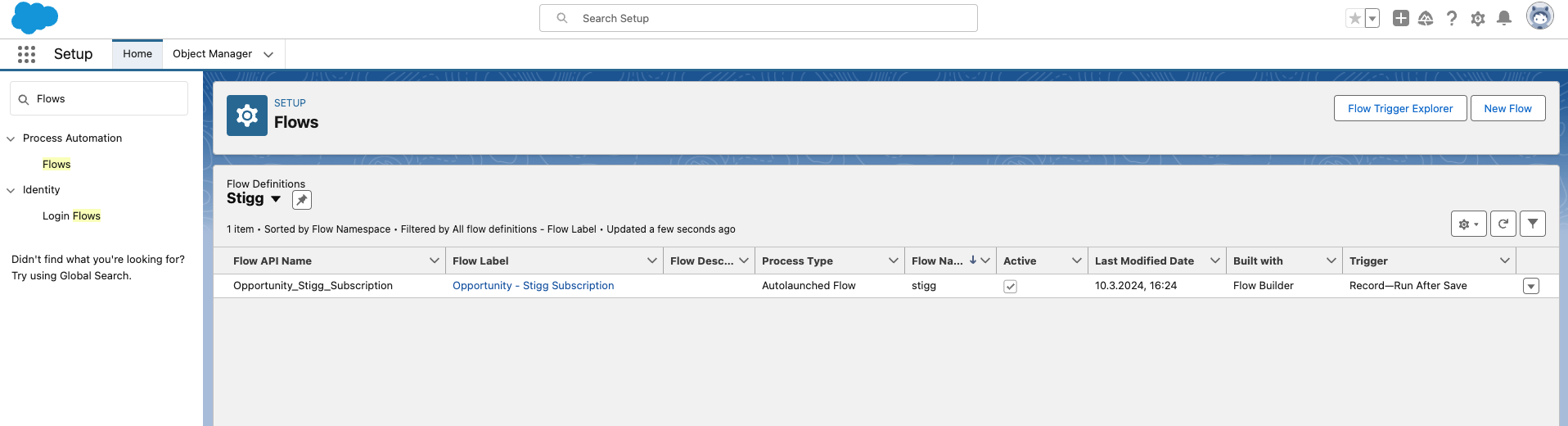
 In the list of flows, search for:\
**Opportunity - Stigg Subscription Template**
In the list of flows, search for:\
**Opportunity - Stigg Subscription Template**
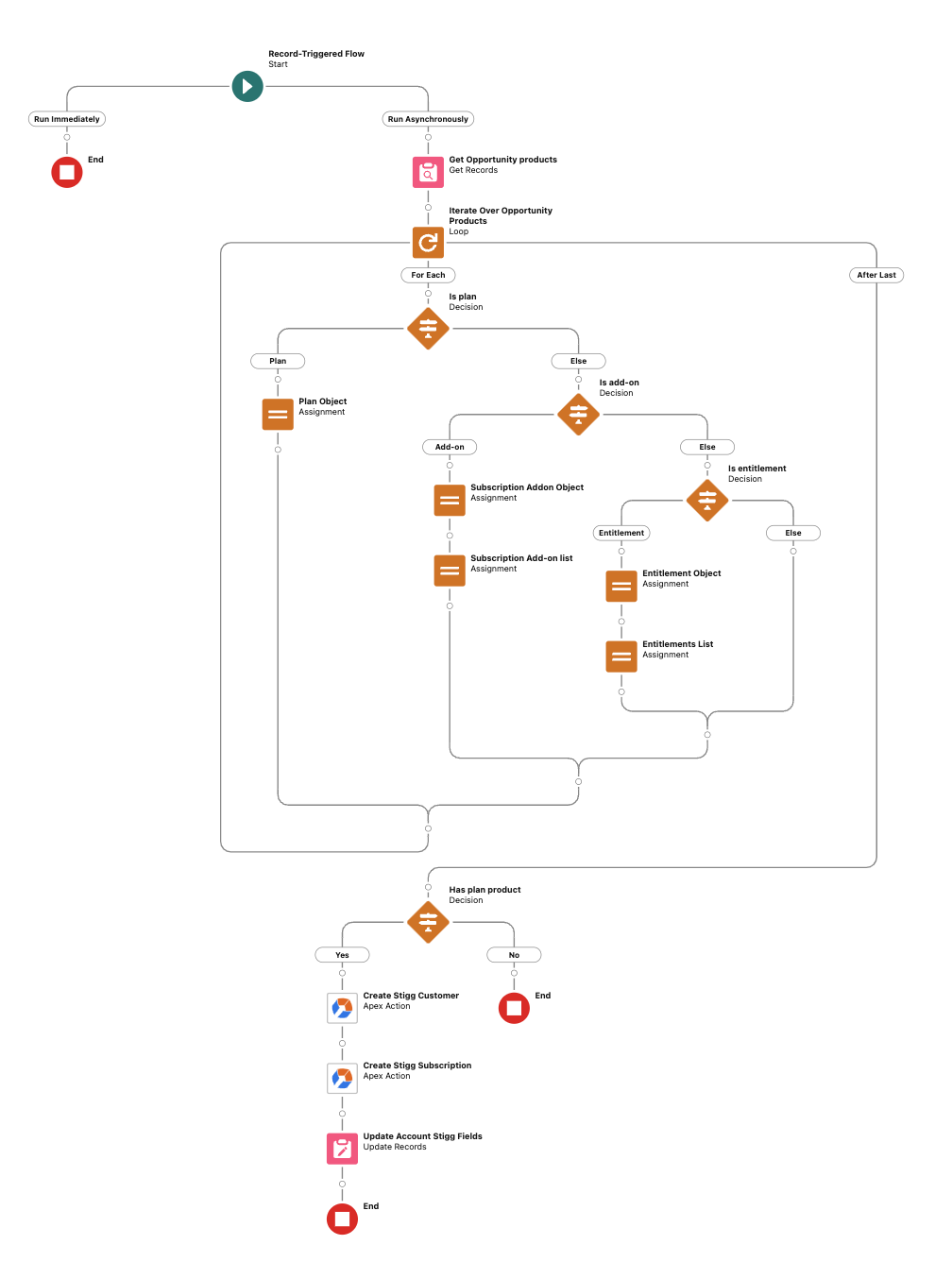
 The default template flow does the following:
1. Triggered when the status of Opportunity in Salesforce changes to **Closed won**.
2. Iterates over the opportunity's products and compiles the input for provisioning subscriptions in Stigg using the [defined entity mapping](#map-salesforce-and-stigg-entities).
3. Provisions a customer in Stigg.
4. Provisions a subscription in Stigg.
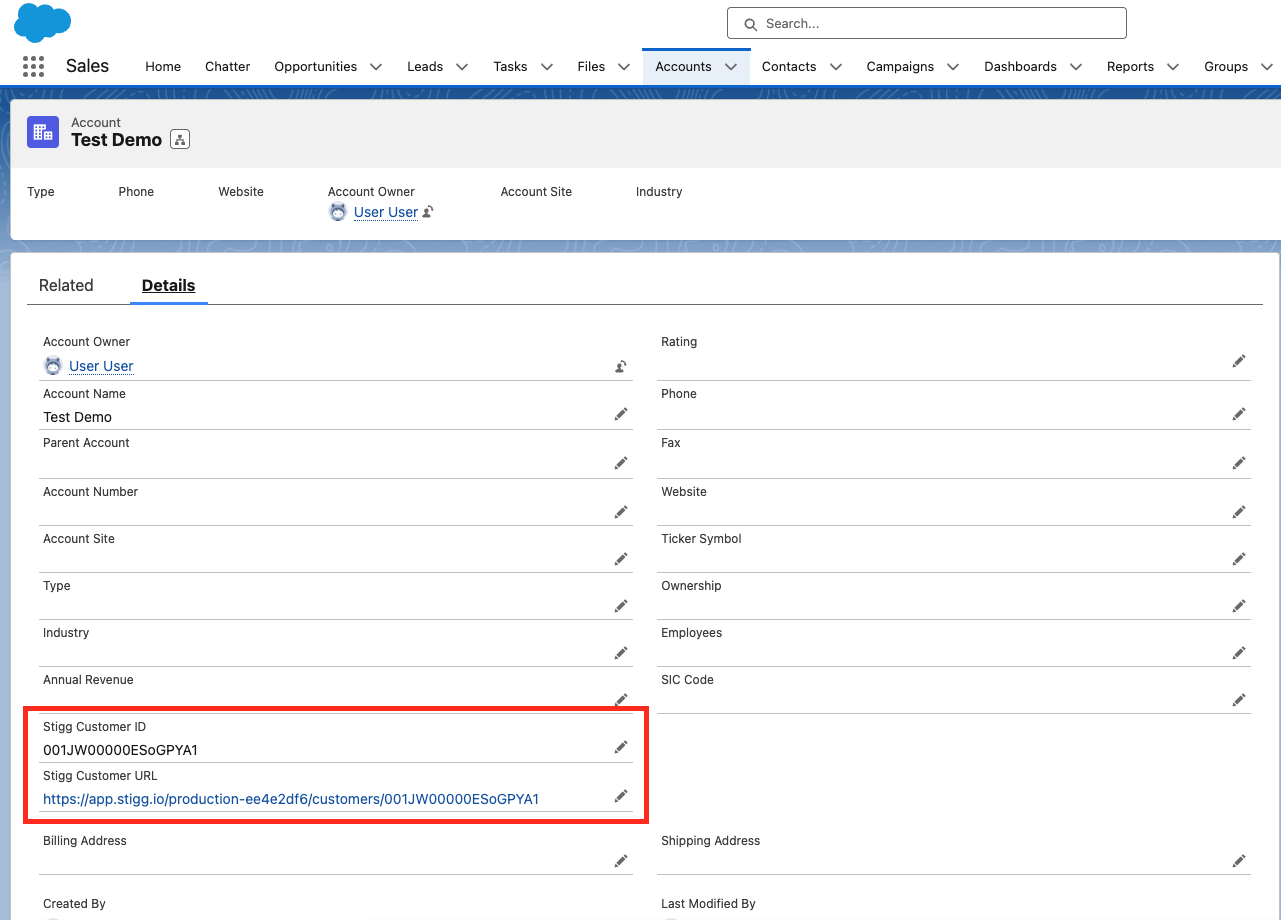
5. Updates the opportunity's account with the **Stigg Customer ID** and **Stigg Customer URL**. The latter serves as a deep-link to the relevant customer in Stigg.
The default template flow does the following:
1. Triggered when the status of Opportunity in Salesforce changes to **Closed won**.
2. Iterates over the opportunity's products and compiles the input for provisioning subscriptions in Stigg using the [defined entity mapping](#map-salesforce-and-stigg-entities).
3. Provisions a customer in Stigg.
4. Provisions a subscription in Stigg.
5. Updates the opportunity's account with the **Stigg Customer ID** and **Stigg Customer URL**. The latter serves as a deep-link to the relevant customer in Stigg.
 **Error handling:** Use the Flow's built-in [fault path](https://help.salesforce.com/s/articleView?id=sf.flow_build_logic_fault.htm) to handle failures gracefully. When a Stigg API call fails, the fault connector lets you log the error, send a notification, or retry the provisioning request - without silently dropping it.
## Stigg items in the Flow
In the standard Stigg flow, there are four Stigg nodes:
* **Create Stigg Customer without email**: used when the customer Contact does not have an email address assigned in Salesforce.
* **Create Stigg Customer with email**: used when the customer Contact has an email address assigned in Salesforce.
* **Create Stigg Subscription**: creates a subscription in Stigg.
* **Create Stigg Credit Grant**: grants credits to a customer in Stigg.
### Create Stigg Subscription parameters
| Parameter | Description |
| ------------------------------------ | ------------------------------------------------------------------------------------------------------------------------------------------------------------------------------------------------------------------ |
| **Salesforce Account ID** | The Salesforce Account ID. Stigg uses this to reference your Salesforce instance. |
| **Stigg Customer ID** | Customer ID in the Stigg app. |
| **Customer Email** | Toggles whether to pass the email address to Stigg (comes from your customer details flow). |
| **Customer Name** | Customer name as stored in Stigg. |
| **Plan Base Charge Override** | Value in Salesforce assigned to the plan; overrides the base plan charge in Stigg on the invoice. |
| **Plan ID** | Plan ID for this customer in Stigg. You can find it in Stigg: **Customers → select customer → Subscription details → ID**. |
| **Add-ons** | Add-ons included in the subscription. Must first be mapped as separate products in Salesforce. View in Stigg: **Customers → select customer → Subscription details → Add-ons**. |
| **Billing Period** | Must be a billing period that's supported by the associated Stigg plan, such as monthly or annually. You can find this in **Product catalog → Plans → Price**. |
| **Payment Collection Method** | Specifies how the subscription will be billed. Supported values include `PAYMENT_METHOD_ON_FILE` and `INVOICE`. If set to `INVOICE`, this corresponds to **Payment method - Generate an invoice to pay manually.** |
| **Trial** | Boolean flag to enable trial; set to `true` to activate trial mode. |
| **Trial End Date** | The trial end date to assign to the subscription. |
| **Subscription Credit Entitlements** | List of credit entitlements to include in the subscription. Each entry specifies a `customCurrencyId`, `amount`, `cadence` (`MONTH` or `YEAR`), and optionally a `price` override (for paid plans). |
### Create Stigg Credit Grant parameters
| Parameter | Description |
| ----------------------------- | ---------------------------------------------------------------------------------------------------------------------- |
| **Stigg Customer ID** | The ID of the customer receiving the credit grant. |
| **Grant Type** | Type of grant. Supported values: `PROMOTIONAL` (free credits), `PAID` (credits tied to a payment). |
| **Currency ID** | The ID of the custom currency in Stigg to grant (e.g. `cred-type-test`). |
| **Display Name** | A label for the credit grant. |
| **Amount** | The number of credits to grant. |
| **Resource ID** | *(Optional)* An external resource ID to associate with the grant. |
| **Comment** | *(Optional)* A free-text comment describing the reason for the grant. |
| **Effective Date** | *(Optional)* The date from which the credits become available. |
| **Expiration Date** | *(Optional)* The date after which unused credits expire. |
| **Priority** | *(Optional)* Determines the order in which credits are consumed when multiple grants exist. |
| **Payment Collection Method** | *(Optional)* Specifies how the credit grant will be charged. Supported values: `PAYMENT_METHOD_ON_FILE`, `INVOICE`. |
| **Currency** | *(Optional)* The currency of the credit grant cost (used together with **Payment Collection Method** for paid grants). |
## Deep-links
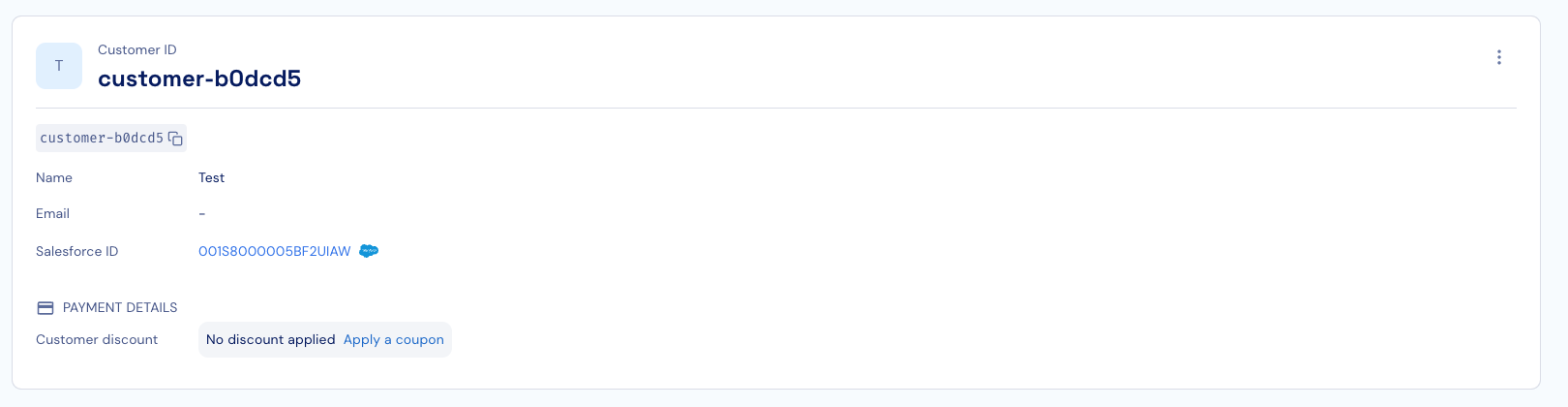
When customer and subscriptions are created in Stigg through the Salesforce integration, in both places you will see a deep link to the matching entity in the other system, so it's easier to navigate and find the corresponding entity in the other system:
**Error handling:** Use the Flow's built-in [fault path](https://help.salesforce.com/s/articleView?id=sf.flow_build_logic_fault.htm) to handle failures gracefully. When a Stigg API call fails, the fault connector lets you log the error, send a notification, or retry the provisioning request - without silently dropping it.
## Stigg items in the Flow
In the standard Stigg flow, there are four Stigg nodes:
* **Create Stigg Customer without email**: used when the customer Contact does not have an email address assigned in Salesforce.
* **Create Stigg Customer with email**: used when the customer Contact has an email address assigned in Salesforce.
* **Create Stigg Subscription**: creates a subscription in Stigg.
* **Create Stigg Credit Grant**: grants credits to a customer in Stigg.
### Create Stigg Subscription parameters
| Parameter | Description |
| ------------------------------------ | ------------------------------------------------------------------------------------------------------------------------------------------------------------------------------------------------------------------ |
| **Salesforce Account ID** | The Salesforce Account ID. Stigg uses this to reference your Salesforce instance. |
| **Stigg Customer ID** | Customer ID in the Stigg app. |
| **Customer Email** | Toggles whether to pass the email address to Stigg (comes from your customer details flow). |
| **Customer Name** | Customer name as stored in Stigg. |
| **Plan Base Charge Override** | Value in Salesforce assigned to the plan; overrides the base plan charge in Stigg on the invoice. |
| **Plan ID** | Plan ID for this customer in Stigg. You can find it in Stigg: **Customers → select customer → Subscription details → ID**. |
| **Add-ons** | Add-ons included in the subscription. Must first be mapped as separate products in Salesforce. View in Stigg: **Customers → select customer → Subscription details → Add-ons**. |
| **Billing Period** | Must be a billing period that's supported by the associated Stigg plan, such as monthly or annually. You can find this in **Product catalog → Plans → Price**. |
| **Payment Collection Method** | Specifies how the subscription will be billed. Supported values include `PAYMENT_METHOD_ON_FILE` and `INVOICE`. If set to `INVOICE`, this corresponds to **Payment method - Generate an invoice to pay manually.** |
| **Trial** | Boolean flag to enable trial; set to `true` to activate trial mode. |
| **Trial End Date** | The trial end date to assign to the subscription. |
| **Subscription Credit Entitlements** | List of credit entitlements to include in the subscription. Each entry specifies a `customCurrencyId`, `amount`, `cadence` (`MONTH` or `YEAR`), and optionally a `price` override (for paid plans). |
### Create Stigg Credit Grant parameters
| Parameter | Description |
| ----------------------------- | ---------------------------------------------------------------------------------------------------------------------- |
| **Stigg Customer ID** | The ID of the customer receiving the credit grant. |
| **Grant Type** | Type of grant. Supported values: `PROMOTIONAL` (free credits), `PAID` (credits tied to a payment). |
| **Currency ID** | The ID of the custom currency in Stigg to grant (e.g. `cred-type-test`). |
| **Display Name** | A label for the credit grant. |
| **Amount** | The number of credits to grant. |
| **Resource ID** | *(Optional)* An external resource ID to associate with the grant. |
| **Comment** | *(Optional)* A free-text comment describing the reason for the grant. |
| **Effective Date** | *(Optional)* The date from which the credits become available. |
| **Expiration Date** | *(Optional)* The date after which unused credits expire. |
| **Priority** | *(Optional)* Determines the order in which credits are consumed when multiple grants exist. |
| **Payment Collection Method** | *(Optional)* Specifies how the credit grant will be charged. Supported values: `PAYMENT_METHOD_ON_FILE`, `INVOICE`. |
| **Currency** | *(Optional)* The currency of the credit grant cost (used together with **Payment Collection Method** for paid grants). |
## Deep-links
When customer and subscriptions are created in Stigg through the Salesforce integration, in both places you will see a deep link to the matching entity in the other system, so it's easier to navigate and find the corresponding entity in the other system: