> ## Documentation Index
> Fetch the complete documentation index at: https://docs.stigg.io/llms.txt
> Use this file to discover all available pages before exploring further.
# Salesforce
## Overview
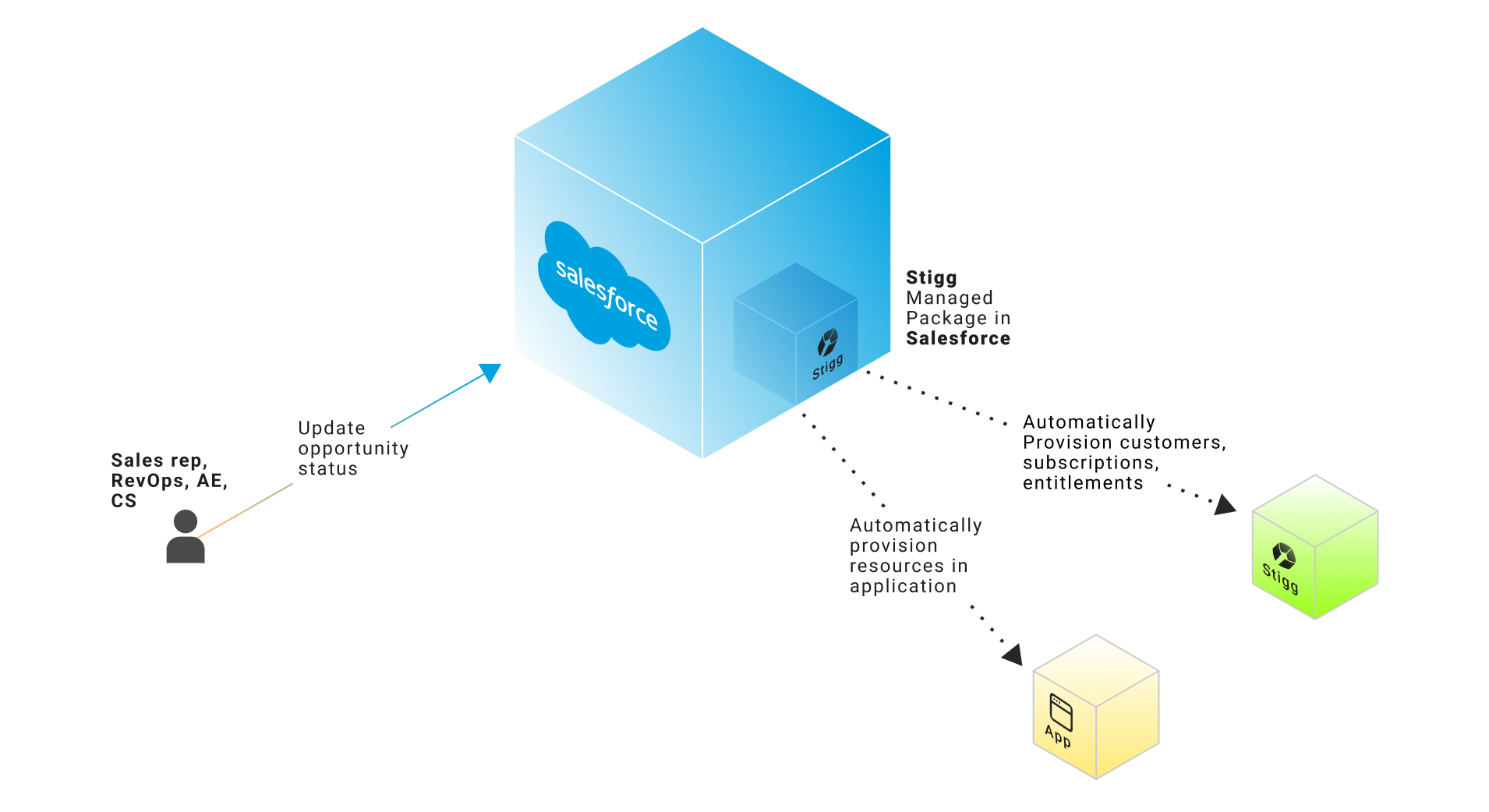
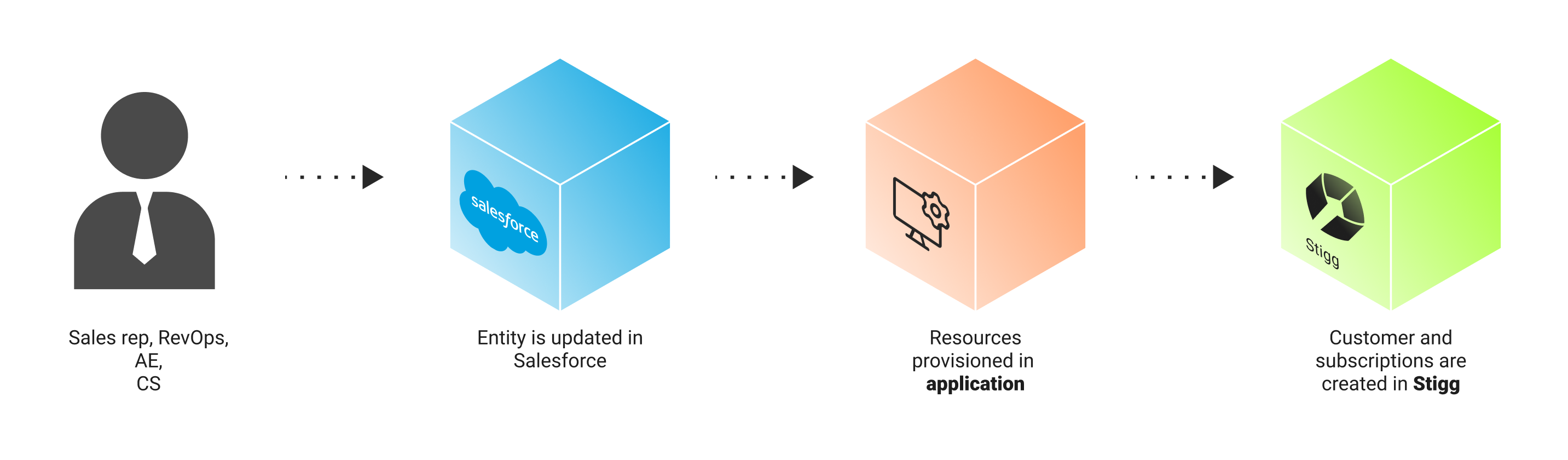
Stigg's native integration with [Salesforce](https://www.salesforce.com/) streamlines sales processes by automating fine-grained provisioning of bespoke enterprise accounts directly from Salesforce.
 ### Benefits
1. **Reduce time** from opportunity close to account provisioned from days and hours to 0.
2. **Ensure alignment** between the customer's contract and the level of access that they were provisioned.
3. Leverage the **same** entitlement management and metering infrastructure for access enforcement and usage reporting regardless of how your product is sold - via self-service, sales-led, sales-assisted, or all of the above.
### Example use-cases
1. Provisioning trial access when an opportunity reaches a POC status.
2. Provisioning subscriptions upon opportunity close.
3. Updating customers' entitlements upon contract amendment and renewals.
### Customization
The integration can be fully customized to your existing business process and needs by leveraging [Salesforce Flow](https://help.salesforce.com/s/articleView?id=sf.flow.htm\&type=5) workflows.
## Integration with Salesforce CPQ
Stigg's native integration with Salesforce works seamlessly with Salesforce CPQ.
## Availability
Stigg's native integration with Salesforce is included in the Scale plan, and is also available as an optional add-on to the Growth plan. See Stigg's pricing for more details.
## Setting up the integration
### Prerequisites
* A Salesforce organization with Enterprise edition or higher
* A user with admin access to the Salesforce organization, that you'll be integrating with Stigg
### Connect your Salesforce domain
In the [Stigg app](https://app.stigg.io), navigate to the Integrations section and click on the Salesforce tile.
Enter the domain of the Salesforce instance that will be integrated with Stigg.
Click **Continue**.
### Install the Stigg app
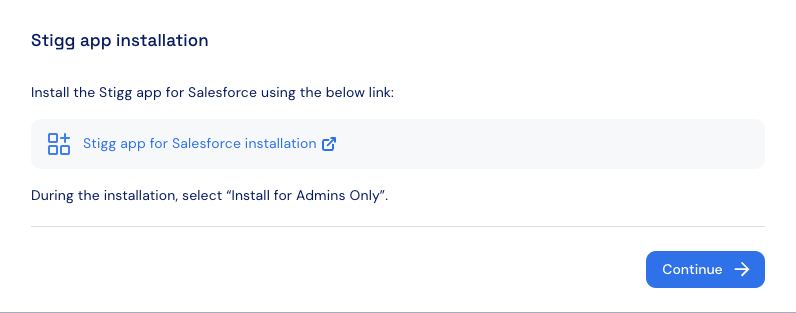
Install the Stigg app for Salesforce by clicking on **Stigg app for Salesforce installation** link:
### Benefits
1. **Reduce time** from opportunity close to account provisioned from days and hours to 0.
2. **Ensure alignment** between the customer's contract and the level of access that they were provisioned.
3. Leverage the **same** entitlement management and metering infrastructure for access enforcement and usage reporting regardless of how your product is sold - via self-service, sales-led, sales-assisted, or all of the above.
### Example use-cases
1. Provisioning trial access when an opportunity reaches a POC status.
2. Provisioning subscriptions upon opportunity close.
3. Updating customers' entitlements upon contract amendment and renewals.
### Customization
The integration can be fully customized to your existing business process and needs by leveraging [Salesforce Flow](https://help.salesforce.com/s/articleView?id=sf.flow.htm\&type=5) workflows.
## Integration with Salesforce CPQ
Stigg's native integration with Salesforce works seamlessly with Salesforce CPQ.
## Availability
Stigg's native integration with Salesforce is included in the Scale plan, and is also available as an optional add-on to the Growth plan. See Stigg's pricing for more details.
## Setting up the integration
### Prerequisites
* A Salesforce organization with Enterprise edition or higher
* A user with admin access to the Salesforce organization, that you'll be integrating with Stigg
### Connect your Salesforce domain
In the [Stigg app](https://app.stigg.io), navigate to the Integrations section and click on the Salesforce tile.
Enter the domain of the Salesforce instance that will be integrated with Stigg.
Click **Continue**.
### Install the Stigg app
Install the Stigg app for Salesforce by clicking on **Stigg app for Salesforce installation** link:
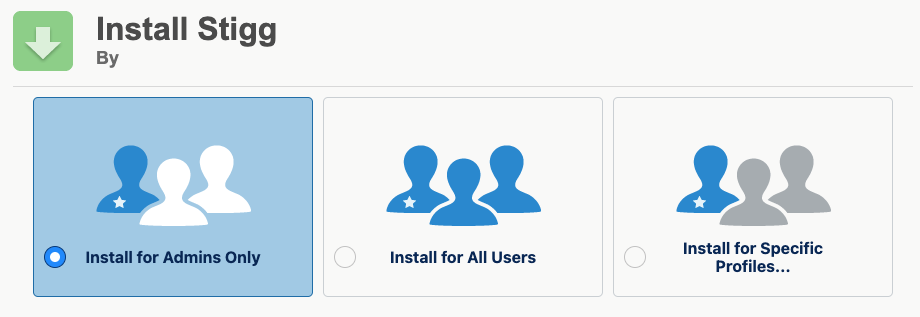
 Click on **Install for Admins Only**.
 ### Configure API key
1. In the [Stigg app](https://app.stigg.io), copy the generated API key.
2. [In Salesforce](https://login.salesforce.com), click the settings icon in the right corner of the screen.
### Configure API key
1. In the [Stigg app](https://app.stigg.io), copy the generated API key.
2. [In Salesforce](https://login.salesforce.com), click the settings icon in the right corner of the screen.
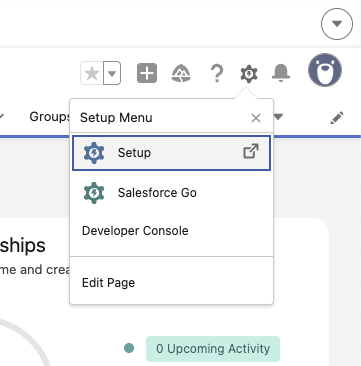 3. Click **Setup**.
4. In the search bar on the right, type **Named Credentials** and select it from the results.
5. In the **Named Credentials** screen, click the **External Credentials** tab at the top.
6. Locate and select **Stigg** from the list.
3. Click **Setup**.
4. In the search bar on the right, type **Named Credentials** and select it from the results.
5. In the **Named Credentials** screen, click the **External Credentials** tab at the top.
6. Locate and select **Stigg** from the list.
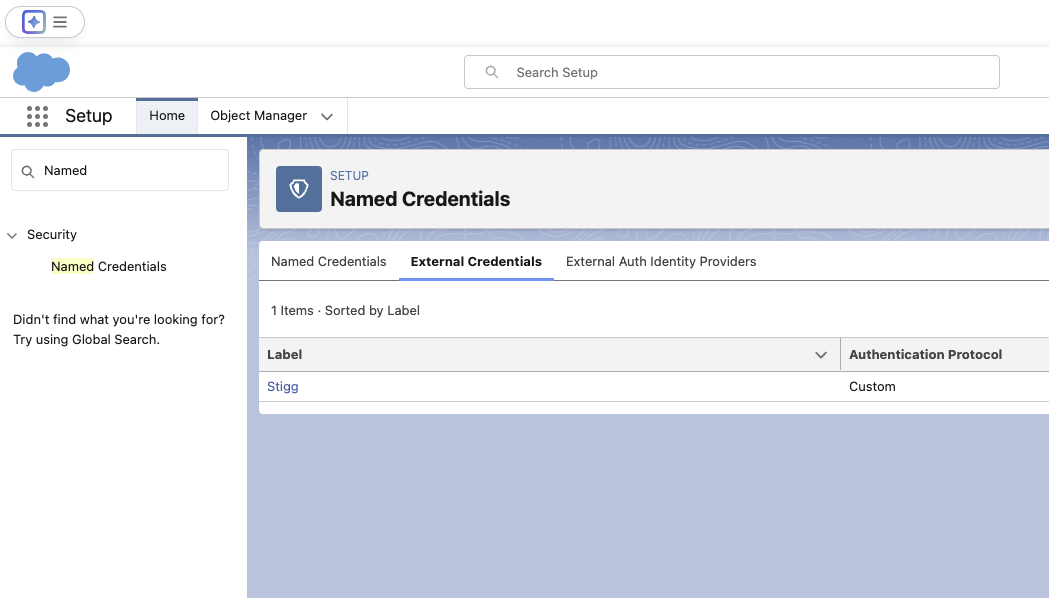 7. Local the **Principals** panel and select the **Edit** action on the right side.
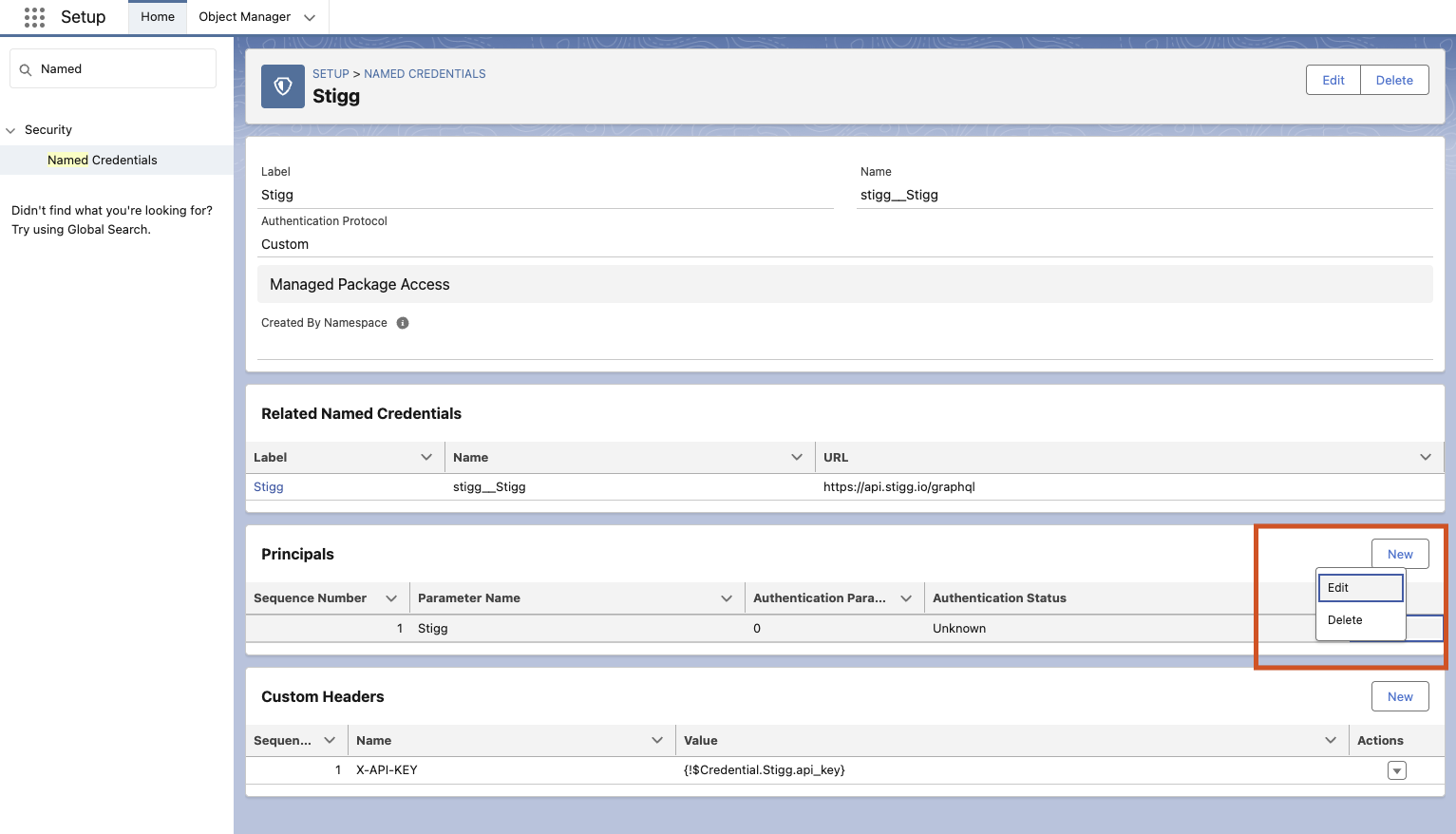 8. In the **Edit Principal** modal, set:
* **Name**: api\_key
* **Value**: Integration API key that you copied from the Stigg app
8. In the **Edit Principal** modal, set:
* **Name**: api\_key
* **Value**: Integration API key that you copied from the Stigg app
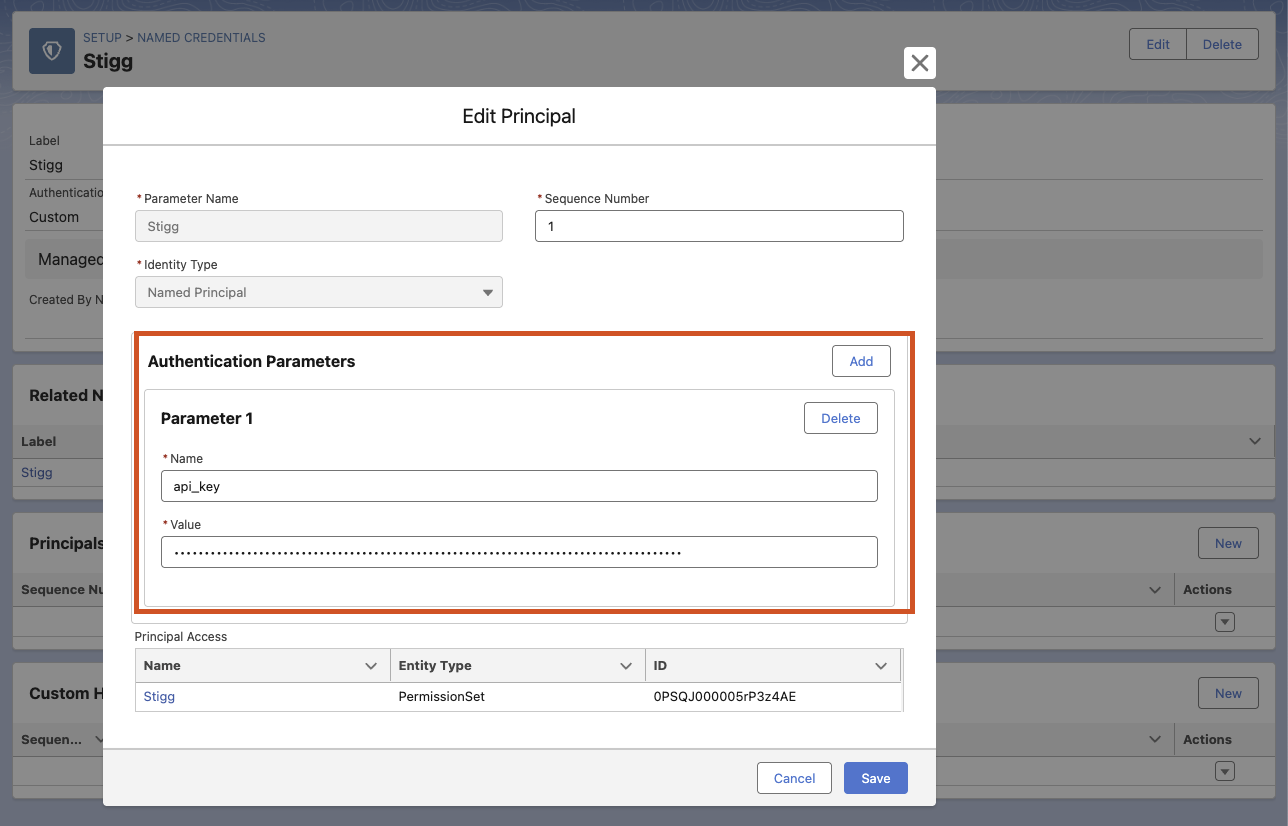 9. Click **Save**.
10. Go to **Setup > Users**.
9. Click **Save**.
10. Go to **Setup > Users**.
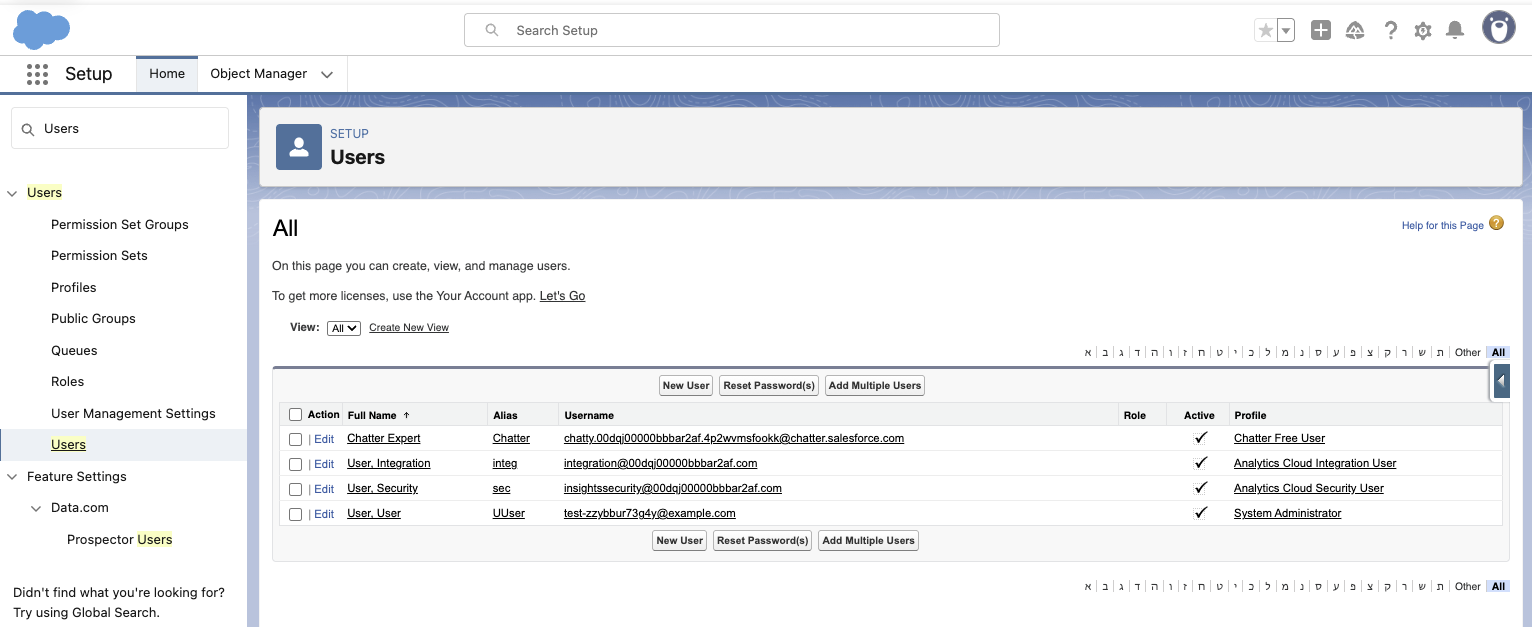 11. Select the required user and click their name or email address.
12. Locate the **Permission Set Assignments** section and click **Edit Assignments**.
11. Select the required user and click their name or email address.
12. Locate the **Permission Set Assignments** section and click **Edit Assignments**.
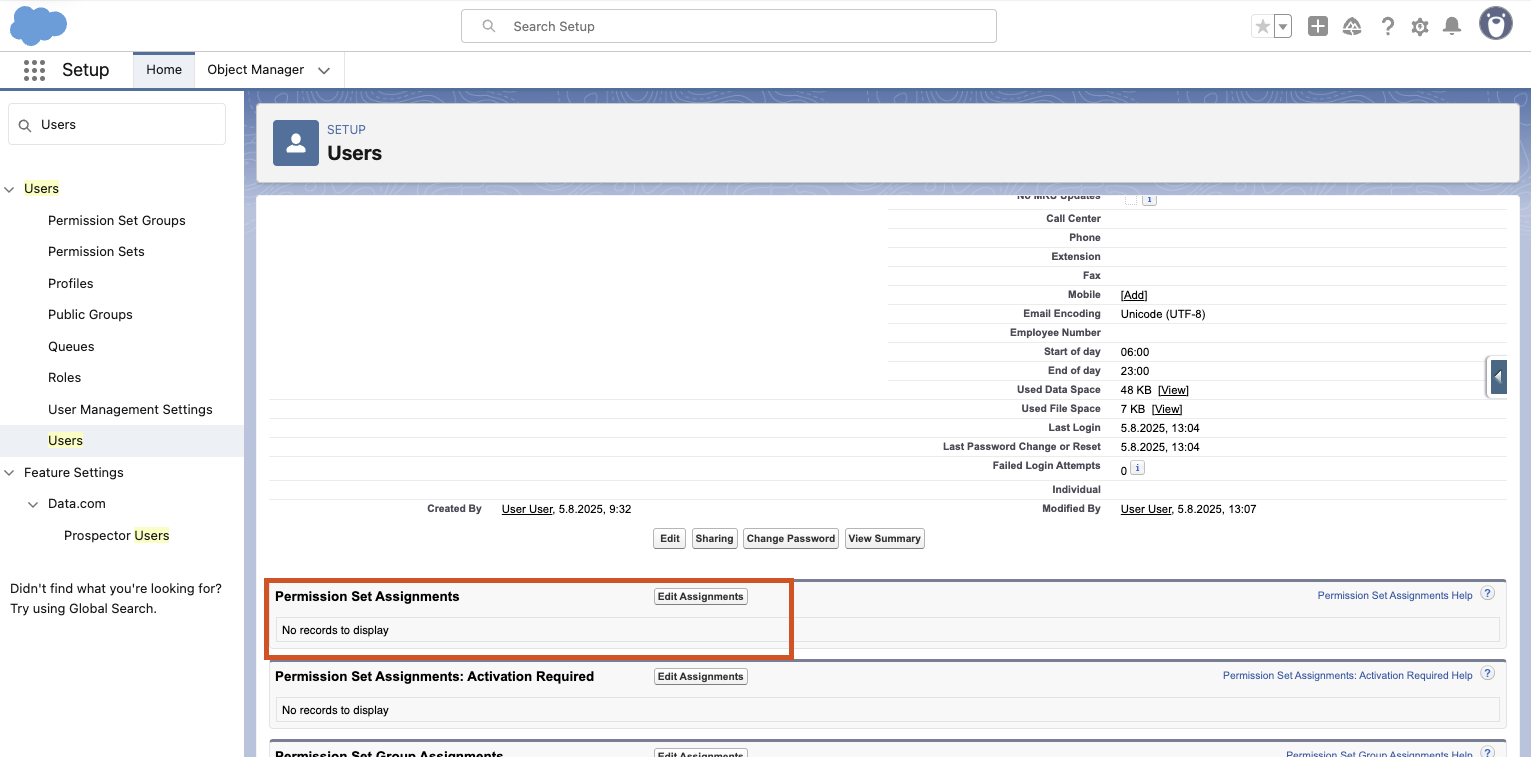 13. In the **Available Permission Sets** section, find **Stigg** and move it to the right side.
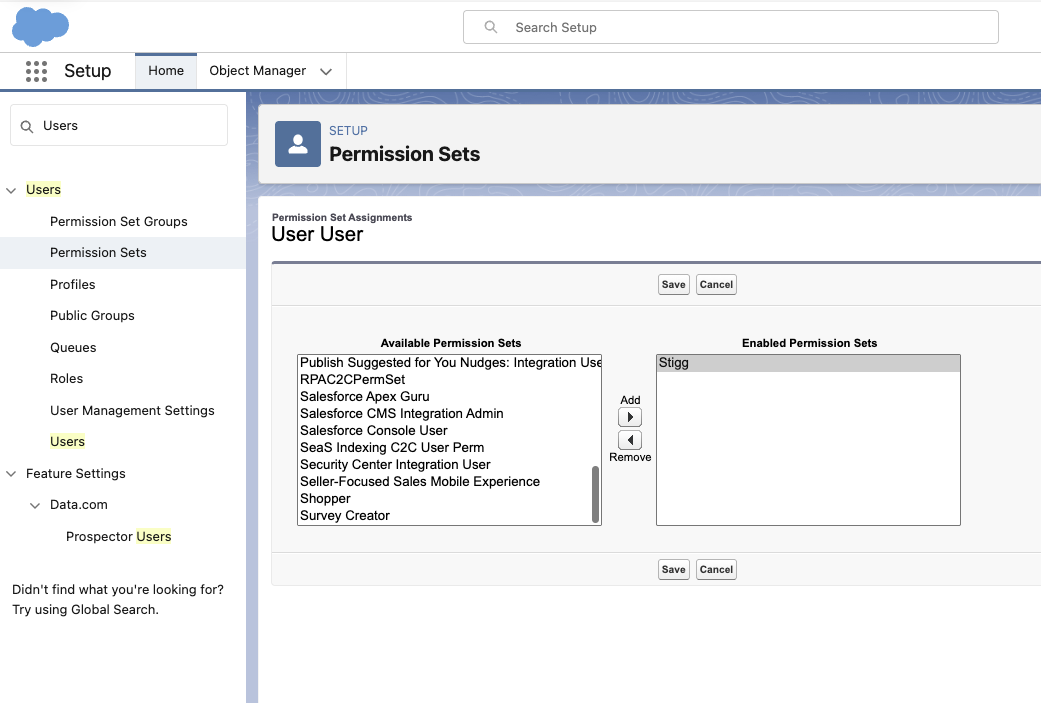 14. Click **Save**.
15. Now, on the user page, you should see **Stigg** listed under **Permission Set Assignments**.
### Map Salesforce and Stigg entities
Provisioning entities in Stigg according to entities in Salesforce requires mapping between these two entities to be defined. This mapping is defined in Salesforce.
[In Salesforce](https://login.salesforce.com), under the relevant Salesforce entity that you'd like to map to Stigg:
1. Stigg type - an **enum** with following possible values:
1. **Plan** - represents a [custom plan](../../modeling-your-pricing-in-stigg/plans/custom-plans) in Stigg
2. **Add-on** - represents an [add-on](../../modeling-your-pricing-in-stigg/add-ons/overview) Stigg
3. **Entitlement** - represents plan's a [custom entitlement](../../modeling-your-pricing-in-stigg/plans/variable-entitlement-values)
4. **Credit entitlement** - represents a recurring credit grant entitlement in Stigg. The credit amount is passed dynamically via the **Subscription Credit Entitlements** parameter during provisioning.
2. Stigg ID - the ID of the matching entity in Stigg, for example: plans would start with a "plan-" prefix, add-ons start with an "addon-" prefix, and entitlements start with a "feature-" prefix
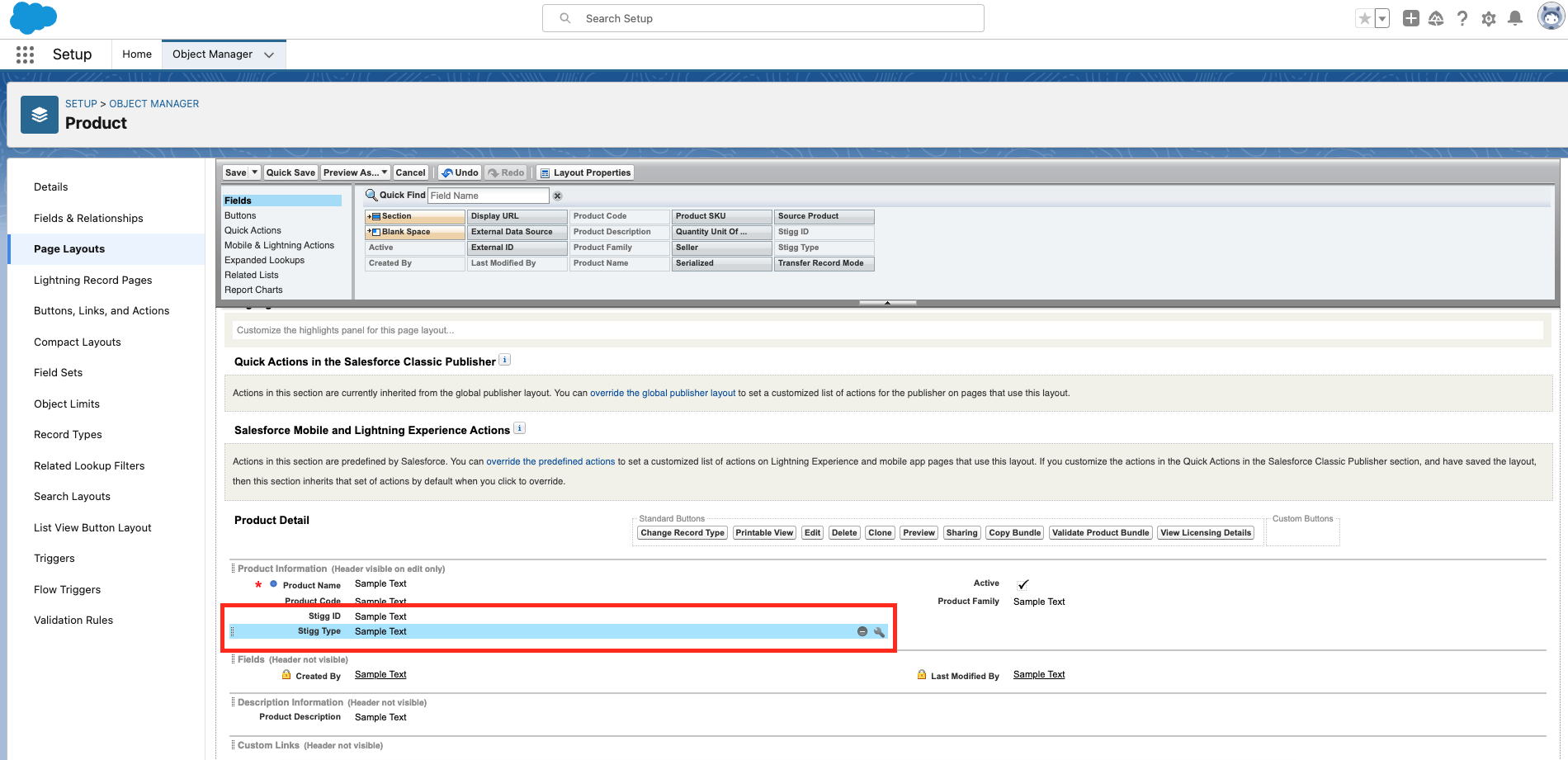
Add these new custom fields to the entity's [default page layout](https://help.salesforce.com/s/articleView?id=000385416\&type=1).
If you're using Salesforce price books, Salesforce products or Salesforce CPQ, it's high recommended to add these custom fields to the Salesforce **product** entity, as can seen below:
14. Click **Save**.
15. Now, on the user page, you should see **Stigg** listed under **Permission Set Assignments**.
### Map Salesforce and Stigg entities
Provisioning entities in Stigg according to entities in Salesforce requires mapping between these two entities to be defined. This mapping is defined in Salesforce.
[In Salesforce](https://login.salesforce.com), under the relevant Salesforce entity that you'd like to map to Stigg:
1. Stigg type - an **enum** with following possible values:
1. **Plan** - represents a [custom plan](../../modeling-your-pricing-in-stigg/plans/custom-plans) in Stigg
2. **Add-on** - represents an [add-on](../../modeling-your-pricing-in-stigg/add-ons/overview) Stigg
3. **Entitlement** - represents plan's a [custom entitlement](../../modeling-your-pricing-in-stigg/plans/variable-entitlement-values)
4. **Credit entitlement** - represents a recurring credit grant entitlement in Stigg. The credit amount is passed dynamically via the **Subscription Credit Entitlements** parameter during provisioning.
2. Stigg ID - the ID of the matching entity in Stigg, for example: plans would start with a "plan-" prefix, add-ons start with an "addon-" prefix, and entitlements start with a "feature-" prefix
Add these new custom fields to the entity's [default page layout](https://help.salesforce.com/s/articleView?id=000385416\&type=1).
If you're using Salesforce price books, Salesforce products or Salesforce CPQ, it's high recommended to add these custom fields to the Salesforce **product** entity, as can seen below:
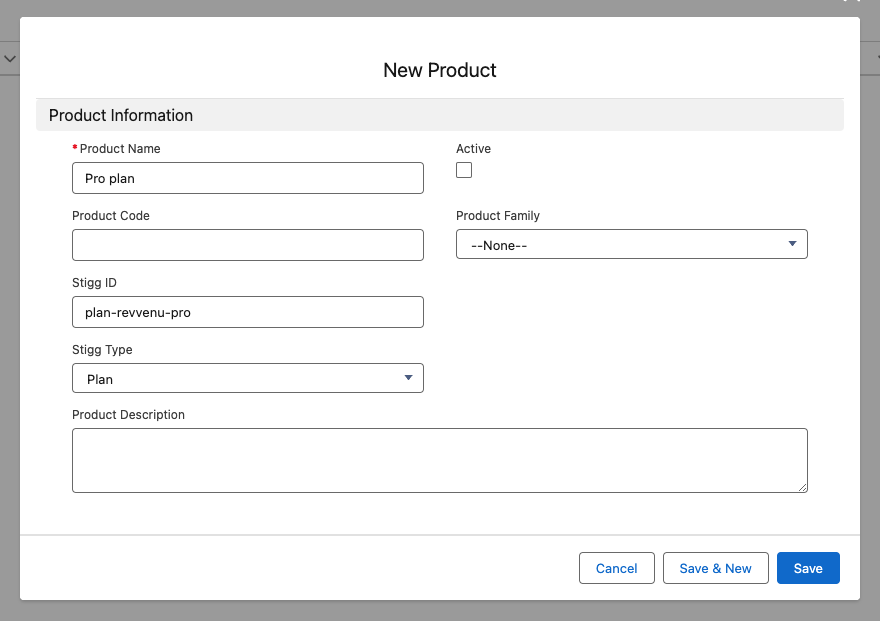
 When creating or editing the relevant Salesforce entities that are mapped to Stigg entities, set the values of these custom fields:
 ### Create provisioning automation flows
[In Salesforce](https://login.salesforce.com) click on the **Setup** icon and open the **Setup** action.
### Create provisioning automation flows
[In Salesforce](https://login.salesforce.com) click on the **Setup** icon and open the **Setup** action.
 In the search box that appears at the top of the page, enter "flows".
Select the **Flows** item under **Process Automation**.
#### Default template
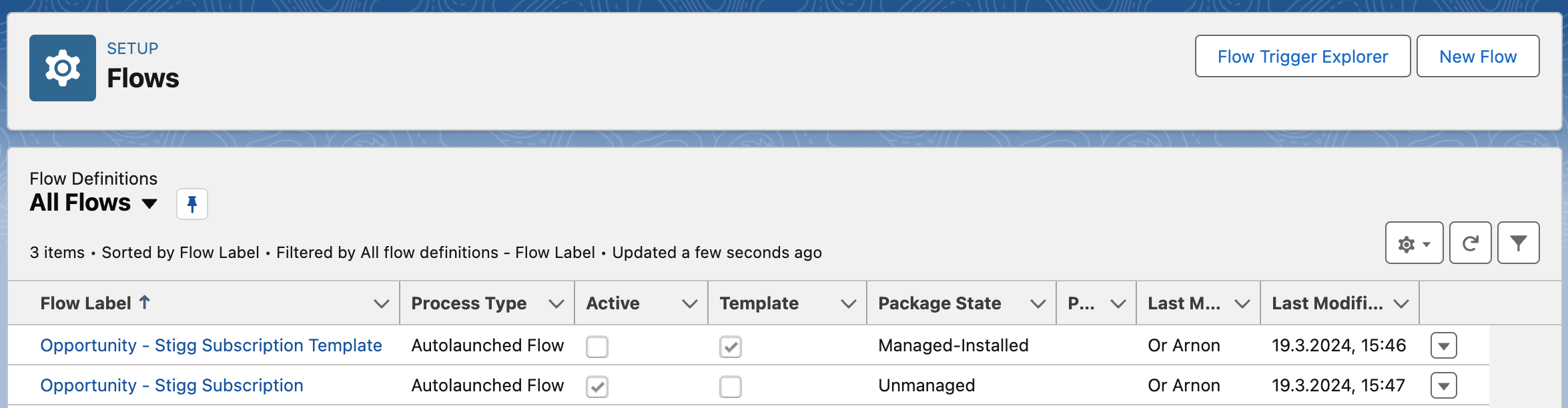
To help you get up-and-running, the Stigg app for Salesforce includes a default [Salesforce Flow](https://help.salesforce.com/s/articleView?id=sf.flow.htm) template for automating provisioning of customers and subscriptions in Stigg when an opportunity in Salesforce is marked as **Closed - Won**.
This template can be fully customized to cater to your business needs.
In the search box that appears at the top of the page, enter "flows".
Select the **Flows** item under **Process Automation**.
#### Default template
To help you get up-and-running, the Stigg app for Salesforce includes a default [Salesforce Flow](https://help.salesforce.com/s/articleView?id=sf.flow.htm) template for automating provisioning of customers and subscriptions in Stigg when an opportunity in Salesforce is marked as **Closed - Won**.
This template can be fully customized to cater to your business needs.
 In the opened list, search for a flow called **Opportunity - Stigg Subscription Template**.
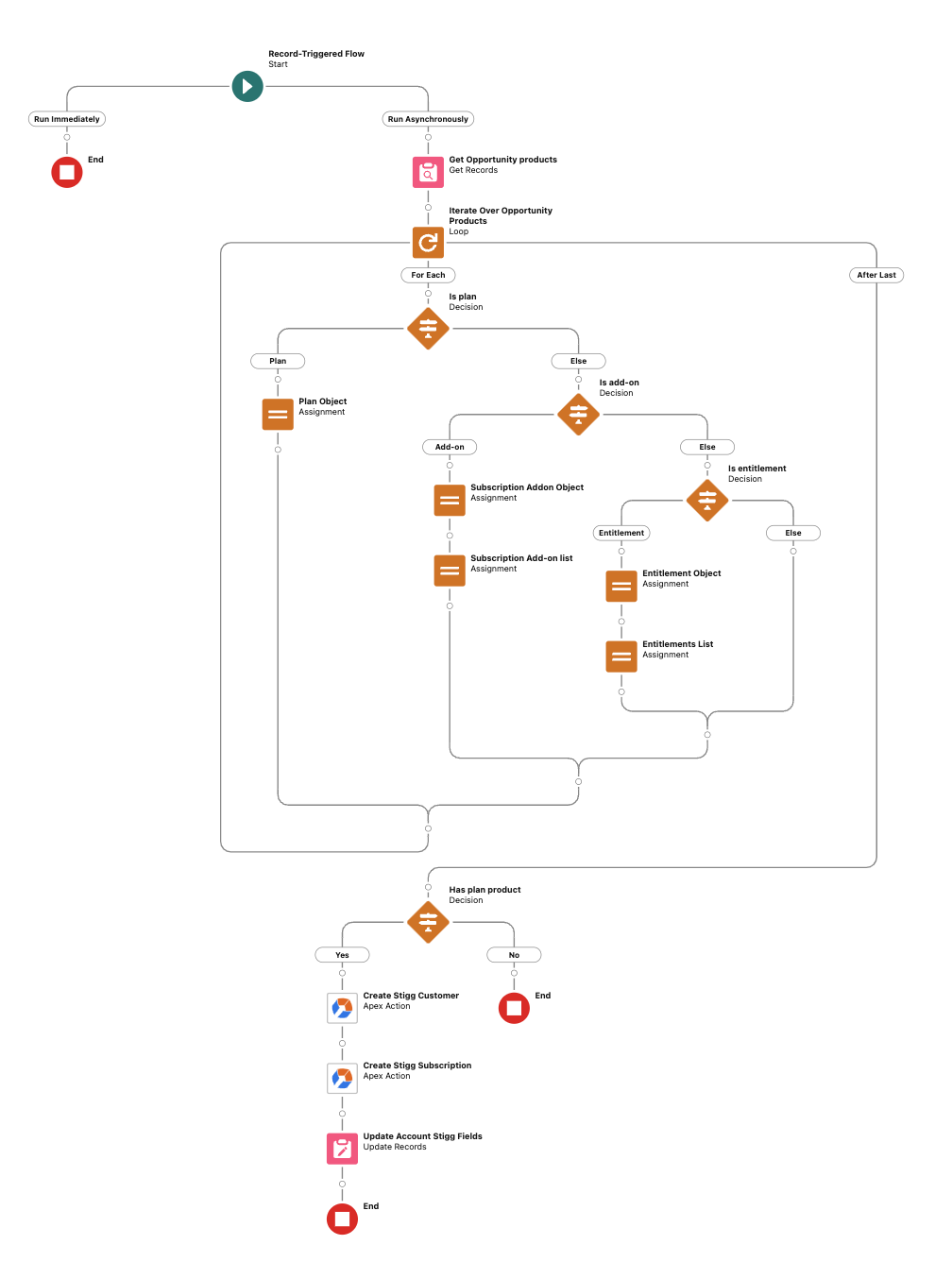
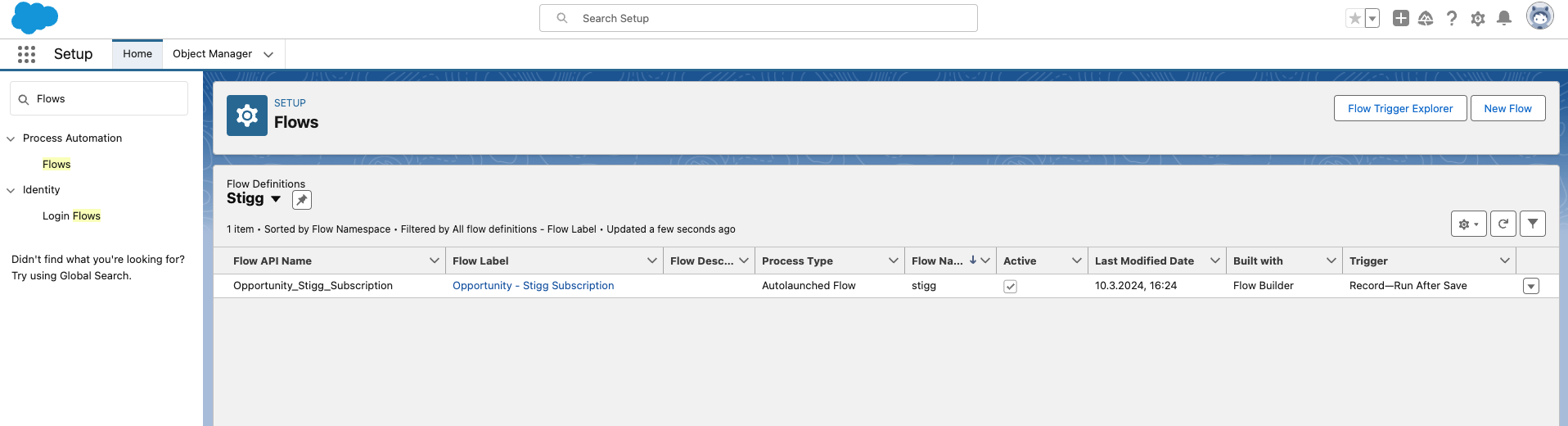 The default template flow does the following:
1. Triggered when the status of Opportunity in Salesforce changes to **Closed won**.
2. Iterates over the opportunity's products and compiles the input for provisioning subscriptions in Stigg using the [defined entity mapping](#map-salesforce-and-stigg-entities).
3. Provisions a customer in Stigg.
4. Provisions a subscription in Stigg.
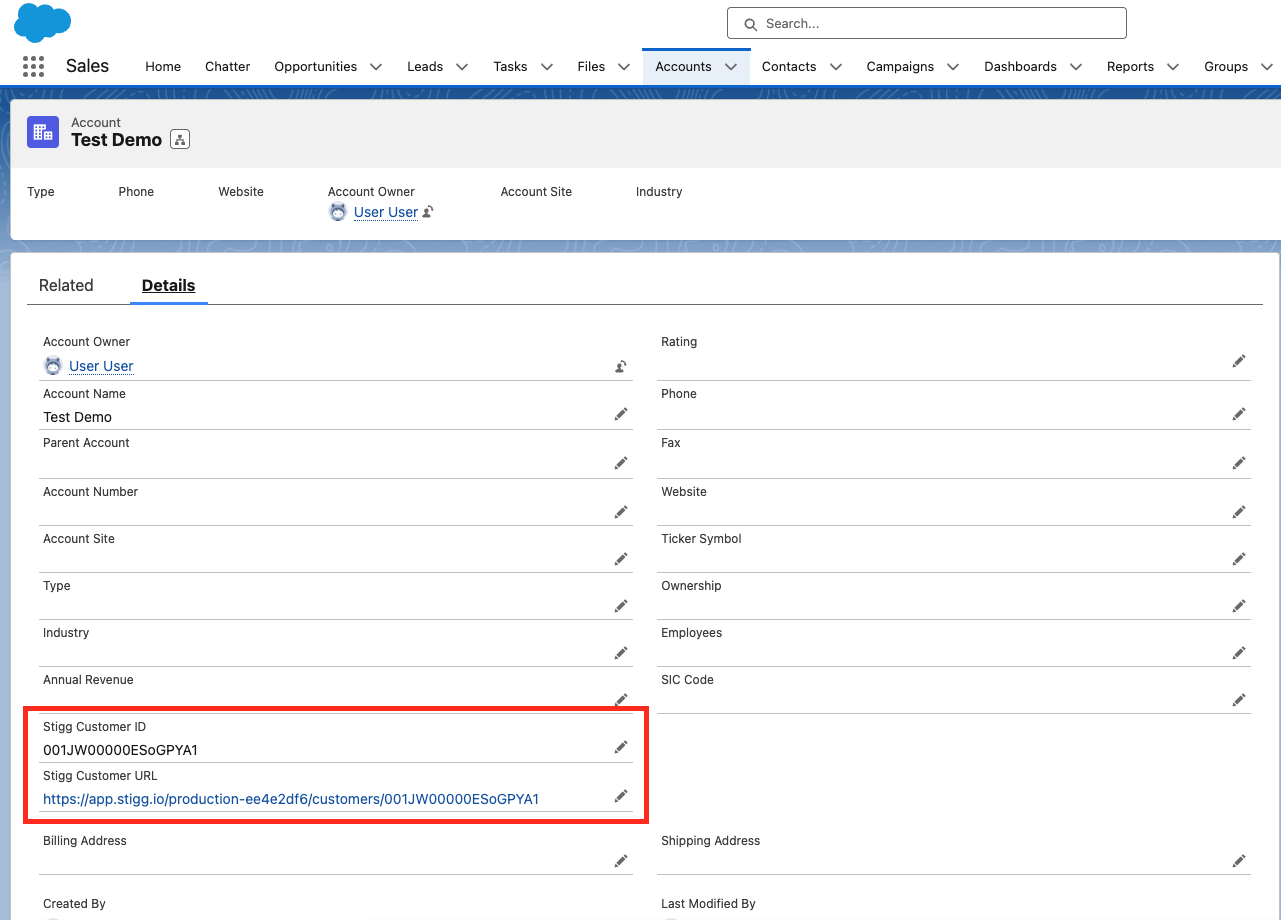
5. Updates the opportunity's account with the **Stigg Customer ID** and **Stigg Customer URL**. The latter serves as a deep-link to the relevant customer in Stigg.
The default template flow does the following:
1. Triggered when the status of Opportunity in Salesforce changes to **Closed won**.
2. Iterates over the opportunity's products and compiles the input for provisioning subscriptions in Stigg using the [defined entity mapping](#map-salesforce-and-stigg-entities).
3. Provisions a customer in Stigg.
4. Provisions a subscription in Stigg.
5. Updates the opportunity's account with the **Stigg Customer ID** and **Stigg Customer URL**. The latter serves as a deep-link to the relevant customer in Stigg.
 #### Creating your own flow
Leverage the default template flow to create flows that meet your business needs.
To do so, apply the relevant changes to the default template flow.
Specifically, provision resources (i.e. accounts, organizations, workspaces) in your application **before** provisioning the resources in Stigg (between steps 2 and 3 of the [default template](#default-template)) by adding a new [HTTP callout action](https://help.salesforce.com/s/articleView?id=sf.flow_http_callout_configure.htm) which will make an API request to your application to provision those resources.
#### Creating your own flow
Leverage the default template flow to create flows that meet your business needs.
To do so, apply the relevant changes to the default template flow.
Specifically, provision resources (i.e. accounts, organizations, workspaces) in your application **before** provisioning the resources in Stigg (between steps 2 and 3 of the [default template](#default-template)) by adding a new [HTTP callout action](https://help.salesforce.com/s/articleView?id=sf.flow_http_callout_configure.htm) which will make an API request to your application to provision those resources.
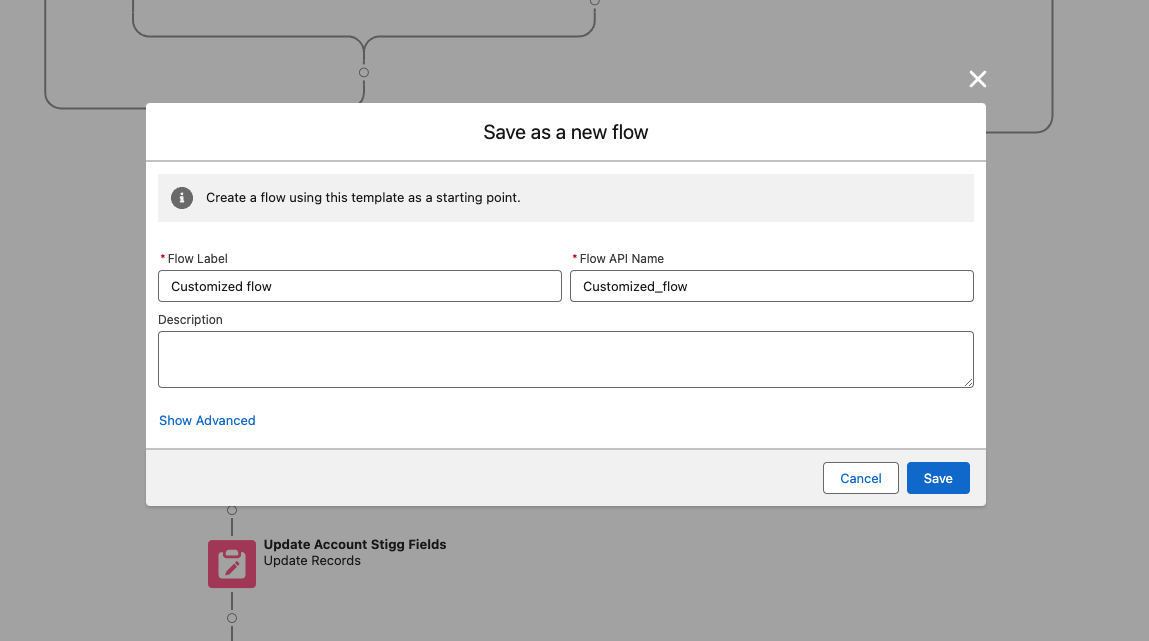
 Update the **Create Stigg Customer** and **Create Stigg Subscription** actions to use IDs of the generated resources when creating customers and subscriptions in Stigg.
One done, click on the **Save as** link to create a new flow with your changes.
Update the **Create Stigg Customer** and **Create Stigg Subscription** actions to use IDs of the generated resources when creating customers and subscriptions in Stigg.
One done, click on the **Save as** link to create a new flow with your changes.
 Ensure that the default flow is deactivated and that the new flow is active.
 ## Deep-links
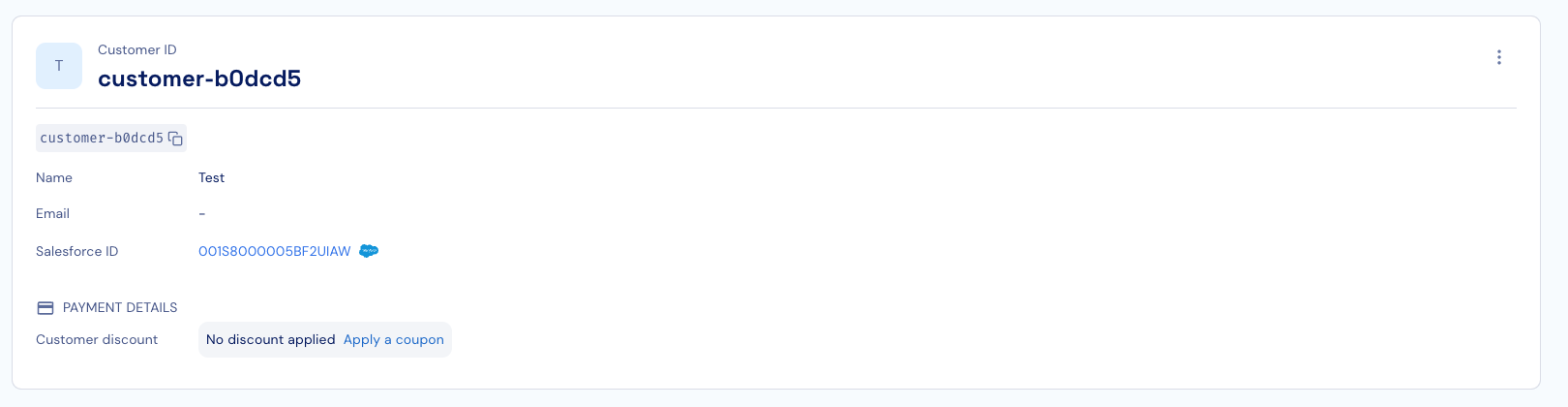
When customer and subscriptions are created in Stigg through the Salesforce integration, in both places you will see a deep link to the matching entity in the other system, so it's easier to navigate and find the corresponding entity in the other system:
## Deep-links
When customer and subscriptions are created in Stigg through the Salesforce integration, in both places you will see a deep link to the matching entity in the other system, so it's easier to navigate and find the corresponding entity in the other system:
 ## Removing the integration
To remove the integration, click on the dotted menu icon and select the **Remove** action.
Confirm the action by clicking on the **Remove** button in the opened modal.
## Package components
### Pages
| Action | Component Name | Parent Object | Component Type | Installation Notes |
| ------ | -------------------- | ------------- | -------------- | ------------------------------ |
| Create | Stigg\_UtilityBar | | Lightning Page | This is a brand new component. |
| Create | Stigg\_Configuration | | Lightning Page | This is a brand new component. |
| Create | API Configuration | | Lightning Page | This is a brand new component. |
### Tabs
| Action | Component Name | Parent Object | Component Type | Installation Notes |
| ------ | ------------------- | ------------- | -------------- | ------------------------------ |
| Create | Stigg Configuration | | Tab | This is a brand new component. |
| Create | API Configuration | | Tab | This is a brand new component. |
### Flows
| Action | Component Name | Parent Object | Component Type | Installation Notes |
| ------ | -------------------------------- | ------------- | -------------- | ------------------------------ |
| Create | Stigg Configuration Screen | | Flow Version | This is a brand new component. |
| Create | Opportunity - Stigg Subscription | | Flow Version | This is a brand new component. |
### Code
| Action | Component Name | Parent Object | Component Type | Installation Notes |
| ------ | --------------------------------- | ------------------ | -------------- | ------------------------------------------------------------------------------------------------------------------------------------------------------- |
| Create | MockProvider | Package Components | Apex Class | This is a brand new component. |
| Create | StiggCreateCustomer | Package Components | Apex Class | This is a brand new component. |
| Create | SubscriptionEntitlement | Package Components | Apex Class | This is a brand new component. |
| Update | StiggCreateSubscription | Package Components | Apex Class | Updated to support credit entitlements (`subscriptionCreditEntitlements`). |
| Create | StiggCreateSubscriptionWithReturn | Package Components | Apex Class | This is a brand new component. Includes support for credit entitlements. |
| Create | SubscriptionCreditEntitlement | Package Components | Apex Class | This is a brand new component. DTO for credit entitlements with fields: `customCurrencyId`, `amount`, `cadence` (`MONTH`/`YEAR`), and optional `price`. |
| Create | StiggCreateCreditGrant | Package Components | Apex Class | This is a brand new component. Invocable method for granting credits to a customer. |
| Create | SubscriptionPlan | Package Components | Apex Class | This is a brand new component. |
| Create | SubscriptionAddon | Package Components | Apex Class | This is a brand new component. |
| Create | StiggCreateCustomerTests | Package Components | Apex Class | This is a brand new component. |
| Create | GraphQLClient | Package Components | Apex Class | This is a brand new component. |
### Fields
| Action | Component Name | Parent Object | Component Type | Installation Notes |
| ------ | -------------------- | ---------------------- | -------------- | --------------------------------------------------------------------------------------------------------------------------------------------------------------------------------------------- |
| Create | Stigg Type | Product | Custom Field | This is a brand new component. |
| Create | API Key | Stigg\_Configuration\_ | Custom Field | This is a brand new component. |
| Create | Stigg ID | Product | Custom Field | This is a brand new component. |
| Create | Stigg Customer ID | Account | Custom Field | This is a brand new component. |
| Create | Stigg Customer URL | Account | Custom Field | This is a brand new component. |
| Create | Stigg Billing Period | Product | Custom Field | This is a brand new component. For upgraded installations, you must manually set this field to Active under “Fields & Relationships” in the Product Object Manager, and add it to the layout. |
### Objects
| Action | Component Name | Parent Object | Component Type | Installation Notes |
| ------ | ------------------- | ------------- | -------------- | ------------------------------ |
| Create | Stigg Configuration | | Custom Object | This is a brand new component. |
### Apps
| Action | Component Name | Parent Object | Component Type | Installation Notes |
| ------ | -------------- | ------------- | -------------- | ------------------------------ |
| Create | Stigg | | App | This is a brand new component. |
### Resources
| Action | Component Name | Parent Object | Component Type | Installation Notes |
| ------ | -------------- | ------------- | --------------- | -------------------------------------------------------------------- |
| Update | Account Layout | Account | Page Layout | This is an upgraded component. It will be updated to the new version |
| Create | Stiggicon | | Static Resource | This is a brand new component. |
| Create | Group\_19769 | | Asset File | This is a brand new component. |
| Create | Stigg \_API | | Remote Site | This is a brand new component. |
| Update | Product Layout | Product | Page Layout | This is an upgraded component. It will be updated to the new version |
## Removing the integration
To remove the integration, click on the dotted menu icon and select the **Remove** action.
Confirm the action by clicking on the **Remove** button in the opened modal.
## Package components
### Pages
| Action | Component Name | Parent Object | Component Type | Installation Notes |
| ------ | -------------------- | ------------- | -------------- | ------------------------------ |
| Create | Stigg\_UtilityBar | | Lightning Page | This is a brand new component. |
| Create | Stigg\_Configuration | | Lightning Page | This is a brand new component. |
| Create | API Configuration | | Lightning Page | This is a brand new component. |
### Tabs
| Action | Component Name | Parent Object | Component Type | Installation Notes |
| ------ | ------------------- | ------------- | -------------- | ------------------------------ |
| Create | Stigg Configuration | | Tab | This is a brand new component. |
| Create | API Configuration | | Tab | This is a brand new component. |
### Flows
| Action | Component Name | Parent Object | Component Type | Installation Notes |
| ------ | -------------------------------- | ------------- | -------------- | ------------------------------ |
| Create | Stigg Configuration Screen | | Flow Version | This is a brand new component. |
| Create | Opportunity - Stigg Subscription | | Flow Version | This is a brand new component. |
### Code
| Action | Component Name | Parent Object | Component Type | Installation Notes |
| ------ | --------------------------------- | ------------------ | -------------- | ------------------------------------------------------------------------------------------------------------------------------------------------------- |
| Create | MockProvider | Package Components | Apex Class | This is a brand new component. |
| Create | StiggCreateCustomer | Package Components | Apex Class | This is a brand new component. |
| Create | SubscriptionEntitlement | Package Components | Apex Class | This is a brand new component. |
| Update | StiggCreateSubscription | Package Components | Apex Class | Updated to support credit entitlements (`subscriptionCreditEntitlements`). |
| Create | StiggCreateSubscriptionWithReturn | Package Components | Apex Class | This is a brand new component. Includes support for credit entitlements. |
| Create | SubscriptionCreditEntitlement | Package Components | Apex Class | This is a brand new component. DTO for credit entitlements with fields: `customCurrencyId`, `amount`, `cadence` (`MONTH`/`YEAR`), and optional `price`. |
| Create | StiggCreateCreditGrant | Package Components | Apex Class | This is a brand new component. Invocable method for granting credits to a customer. |
| Create | SubscriptionPlan | Package Components | Apex Class | This is a brand new component. |
| Create | SubscriptionAddon | Package Components | Apex Class | This is a brand new component. |
| Create | StiggCreateCustomerTests | Package Components | Apex Class | This is a brand new component. |
| Create | GraphQLClient | Package Components | Apex Class | This is a brand new component. |
### Fields
| Action | Component Name | Parent Object | Component Type | Installation Notes |
| ------ | -------------------- | ---------------------- | -------------- | --------------------------------------------------------------------------------------------------------------------------------------------------------------------------------------------- |
| Create | Stigg Type | Product | Custom Field | This is a brand new component. |
| Create | API Key | Stigg\_Configuration\_ | Custom Field | This is a brand new component. |
| Create | Stigg ID | Product | Custom Field | This is a brand new component. |
| Create | Stigg Customer ID | Account | Custom Field | This is a brand new component. |
| Create | Stigg Customer URL | Account | Custom Field | This is a brand new component. |
| Create | Stigg Billing Period | Product | Custom Field | This is a brand new component. For upgraded installations, you must manually set this field to Active under “Fields & Relationships” in the Product Object Manager, and add it to the layout. |
### Objects
| Action | Component Name | Parent Object | Component Type | Installation Notes |
| ------ | ------------------- | ------------- | -------------- | ------------------------------ |
| Create | Stigg Configuration | | Custom Object | This is a brand new component. |
### Apps
| Action | Component Name | Parent Object | Component Type | Installation Notes |
| ------ | -------------- | ------------- | -------------- | ------------------------------ |
| Create | Stigg | | App | This is a brand new component. |
### Resources
| Action | Component Name | Parent Object | Component Type | Installation Notes |
| ------ | -------------- | ------------- | --------------- | -------------------------------------------------------------------- |
| Update | Account Layout | Account | Page Layout | This is an upgraded component. It will be updated to the new version |
| Create | Stiggicon | | Static Resource | This is a brand new component. |
| Create | Group\_19769 | | Asset File | This is a brand new component. |
| Create | Stigg \_API | | Remote Site | This is a brand new component. |
| Update | Product Layout | Product | Page Layout | This is an upgraded component. It will be updated to the new version |