> ## Documentation Index
> Fetch the complete documentation index at: https://docs.stigg.io/llms.txt
> Use this file to discover all available pages before exploring further.
# Termed subscriptions
## Overview
Zuora supports two subscription term types:
* **Evergreen**: subscriptions that renew automatically and have no fixed end date. This is the default behavior in Stigg's Zuora integration.
* **Termed**: subscriptions with a defined start and end date. After the term ends, the subscription can either renew for another specific term or convert to an evergreen subscription, depending on the configured renewal settings.
## Configuring termed subscriptions via metadata
To create a termed subscription in Zuora, add the relevant `ZUORA__` metadata keys to the subscription in Stigg. Stigg will map these to the corresponding Zuora fields when syncing the subscription.
All metadata values are case-insensitive.
| Stigg metadata key | Zuora field | Possible values |
| :------------------------------------------------------------------ | :------------------------------------------------- | :---------------------------------------------------------------------------------------- |
| `ZUORA__TermType` | `initialTerm.termType` | `TERMED` \| `EVERGREEN` |
| `ZUORA__InitialTerm` | `initialTerm.period` | Whole number (e.g. `12`) |
| `ZUORA__RenewalTerm` | `renewalTerm.period` | Whole number (e.g. `12`) |
| `ZUORA__PeriodType` | `initialTerm.periodType`, `renewalTerm.periodType` | `Day` \| `Week` \| `Month` \| `Year` (default: `Month`) |
| `ZUORA__InitialPeriodType` | `initialTerm.periodType` | `Day` \| `Week` \| `Month` \| `Year` (overrides `ZUORA__PeriodType` for the initial term) |
| `ZUORA__RenewalPeriodType` | `renewalTerm.periodType` | `Day` \| `Week` \| `Month` \| `Year` (overrides `ZUORA__PeriodType` for the renewal term) |
| `ZUORA__RenewalSetting` | `renewalSetting` | `RENEW_TO_EVERGREEN` \| `RENEW_WITH_SPECIFIC_TERM` |
| `ZUORA__AutoRenew` | `autoRenew` | `true` \| `false` |
### Renewal behavior
The `ZUORA__RenewalSetting` and `ZUORA__AutoRenew` metadata keys control what happens when a termed subscription reaches its end date:
| `ZUORA__RenewalSetting` | `ZUORA__AutoRenew` | Behavior |
| :--------------------------------------------------------------------- | :----------------- | :-------------------------------------------------------------------------------------------------------------------------------- |
| `RENEW_WITH_SPECIFIC_TERM` | `true` | Subscription automatically renews for the duration set in `ZUORA__RenewalTerm`, indefinitely until cancelled. |
| `RENEW_TO_EVERGREEN` | `true` | Subscription converts to evergreen upon renewal, with no further expiry date. |
| Any | `false` | Subscription is **not** automatically renewed. It becomes **Out of Term** but remains active until manually renewed or cancelled. |
### Example: creating a 12-month termed subscription
To create a subscription with a 12-month initial term that renews for another 12 months automatically, set the following metadata on the subscription:
| Key | Value |
| :------------------------------------------------------------------ | :--------------------------------------------------------------------- |
| `ZUORA__TermType` | `TERMED` |
| `ZUORA__InitialTerm` | `12` |
| `ZUORA__PeriodType` | `Month` |
| `ZUORA__RenewalTerm` | `12` |
| `ZUORA__RenewalSetting` | `RENEW_WITH_SPECIFIC_TERM` |
| `ZUORA__AutoRenew` | `true` |
## Entering metadata in the dashboard
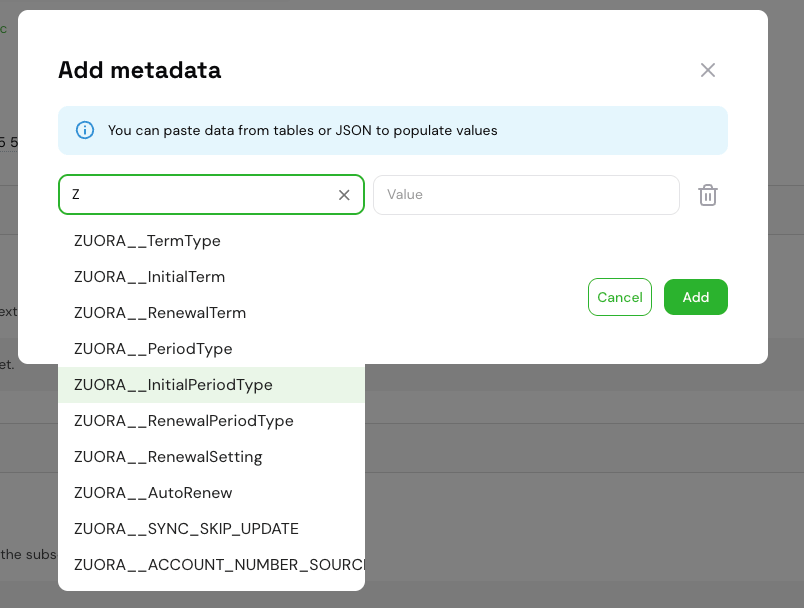
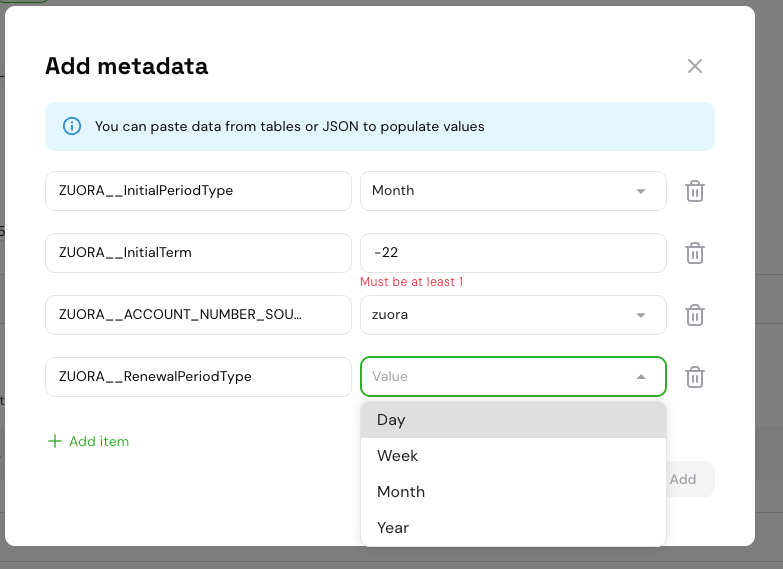
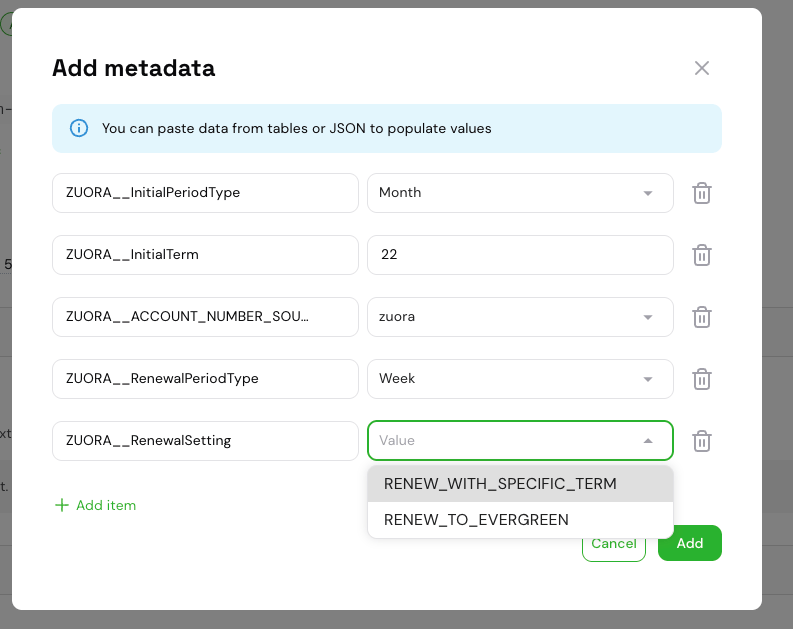
When adding or editing subscription metadata in the Stigg dashboard, `ZUORA__` keys and their allowed values are available via dropdown menus — no need to type them manually.
* **Key field**: typing `Z` or `ZUORA` filters the dropdown to show all supported `ZUORA__` keys.
* **Value field**: for keys with a fixed set of allowed values (e.g. `ZUORA__TermType`, `ZUORA__PeriodType`, `ZUORA__RenewalSetting`), the value field displays a dropdown with the valid options. For numeric keys like `ZUORA__InitialTerm`, a free-text input is shown instead.
 ## Converting an existing subscription to termed
Subscriptions created in the Stigg dashboard are **Evergreen** by default. To convert an existing subscription to a Termed subscription, update its metadata directly from the subscription details page:
1. In the Stigg dashboard, navigate to the **Subscription details** page of the subscription you want to convert.
2. Click **Edit** on the **Metadata** section.
3. Add the relevant `ZUORA__` metadata keys (see the [configuration table](#configuring-termed-subscriptions-via-metadata) above). Use the [key and value dropdowns](#entering-metadata-in-the-dashboard) to reduce errors.
4. Save the changes.
Upon saving, Stigg syncs the updated metadata to Zuora and converts the subscription from Evergreen to Termed with the specified term settings.
If the subscription is already Termed in Zuora, updating these metadata values will issue an amendment to the existing term.
To convert a Termed subscription back to Evergreen, set `ZUORA__TermType` to `EVERGREEN` and save.
For general information on how Stigg metadata is mapped to Zuora custom fields, see the [metadata synchronization](/documentation/native-integrations/billing/zuora/overview#metadata-synchronization) section in the Zuora overview.
## Converting an existing subscription to termed
Subscriptions created in the Stigg dashboard are **Evergreen** by default. To convert an existing subscription to a Termed subscription, update its metadata directly from the subscription details page:
1. In the Stigg dashboard, navigate to the **Subscription details** page of the subscription you want to convert.
2. Click **Edit** on the **Metadata** section.
3. Add the relevant `ZUORA__` metadata keys (see the [configuration table](#configuring-termed-subscriptions-via-metadata) above). Use the [key and value dropdowns](#entering-metadata-in-the-dashboard) to reduce errors.
4. Save the changes.
Upon saving, Stigg syncs the updated metadata to Zuora and converts the subscription from Evergreen to Termed with the specified term settings.
If the subscription is already Termed in Zuora, updating these metadata values will issue an amendment to the existing term.
To convert a Termed subscription back to Evergreen, set `ZUORA__TermType` to `EVERGREEN` and save.
For general information on how Stigg metadata is mapped to Zuora custom fields, see the [metadata synchronization](/documentation/native-integrations/billing/zuora/overview#metadata-synchronization) section in the Zuora overview.