> ## Documentation Index
> Fetch the complete documentation index at: https://docs.stigg.io/llms.txt
> Use this file to discover all available pages before exploring further.
# Creating products
To create a new product:
1. When viewing a specific product, click **+ New product** from the **top action menu**.
 2. If multiple products are already defined, navigate to the **Products** sub-section of the **Product Catalog** and click **+ New product**.
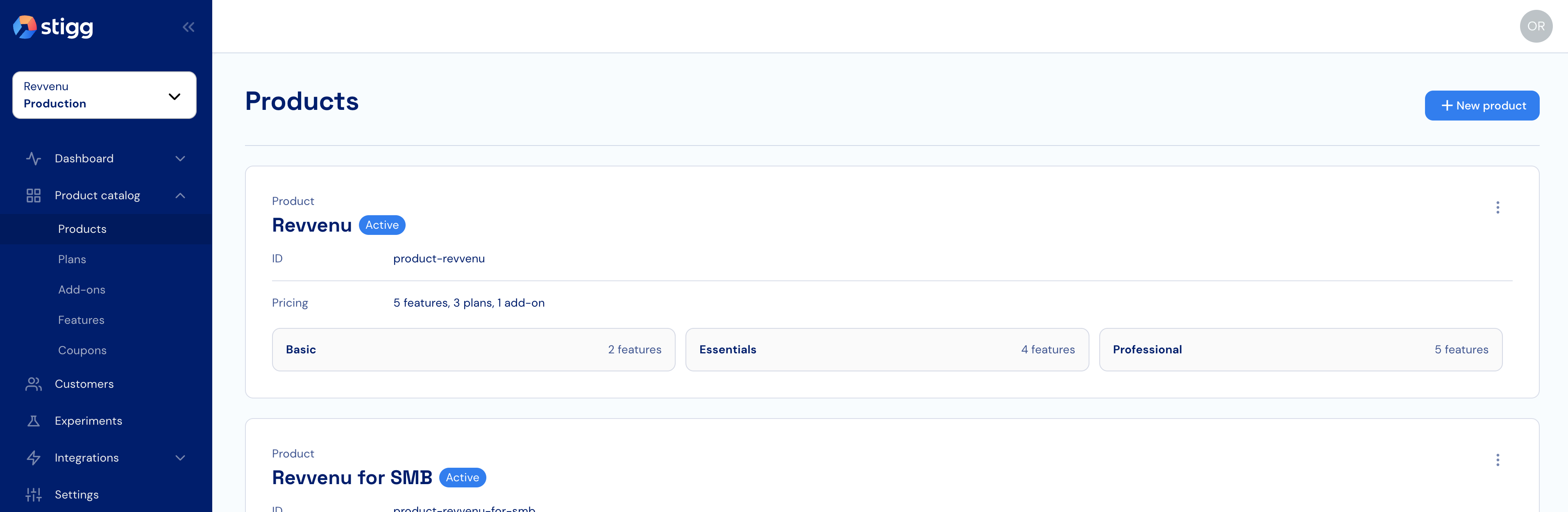 3. In the opened modal, enter the following details:
* **Name**: the name of the product.
* **ID**: auto-generated by Stigg; override this value only if linking an existing product.
* **Description (optional)**: a short description of the product.
* **Subscription type**: determines how many active subscriptions a customer can have for this product:
* **Single active subscription** (also called a *global subscription*): customers can have only one active subscription for this product. No `resourceId` is associated with subscriptions of this type.
* **[Multiple active subscriptions](/guides/i-want-to/add-multiple-subscriptions)**: customers can have multiple active subscriptions, each representing a separate instance (e.g., website, app). A `resourceId` is required when provisioning each subscription to identify the specific instance it belongs to.
4. Review the entered details and click **Create** to confirm.
The **Name** and **Description** fields appear in customer-facing views such as the paywall and customer portal, so use clear, customer-friendly text.
The **Subscription type** cannot be changed after a subscription to the product is provisioned.
You're now ready to model your product's pricing.
3. In the opened modal, enter the following details:
* **Name**: the name of the product.
* **ID**: auto-generated by Stigg; override this value only if linking an existing product.
* **Description (optional)**: a short description of the product.
* **Subscription type**: determines how many active subscriptions a customer can have for this product:
* **Single active subscription** (also called a *global subscription*): customers can have only one active subscription for this product. No `resourceId` is associated with subscriptions of this type.
* **[Multiple active subscriptions](/guides/i-want-to/add-multiple-subscriptions)**: customers can have multiple active subscriptions, each representing a separate instance (e.g., website, app). A `resourceId` is required when provisioning each subscription to identify the specific instance it belongs to.
4. Review the entered details and click **Create** to confirm.
The **Name** and **Description** fields appear in customer-facing views such as the paywall and customer portal, so use clear, customer-friendly text.
The **Subscription type** cannot be changed after a subscription to the product is provisioned.
You're now ready to model your product's pricing.