> ## Documentation Index
> Fetch the complete documentation index at: https://docs.stigg.io/llms.txt
> Use this file to discover all available pages before exploring further.
# Viewing feature usage across plans and add-ons
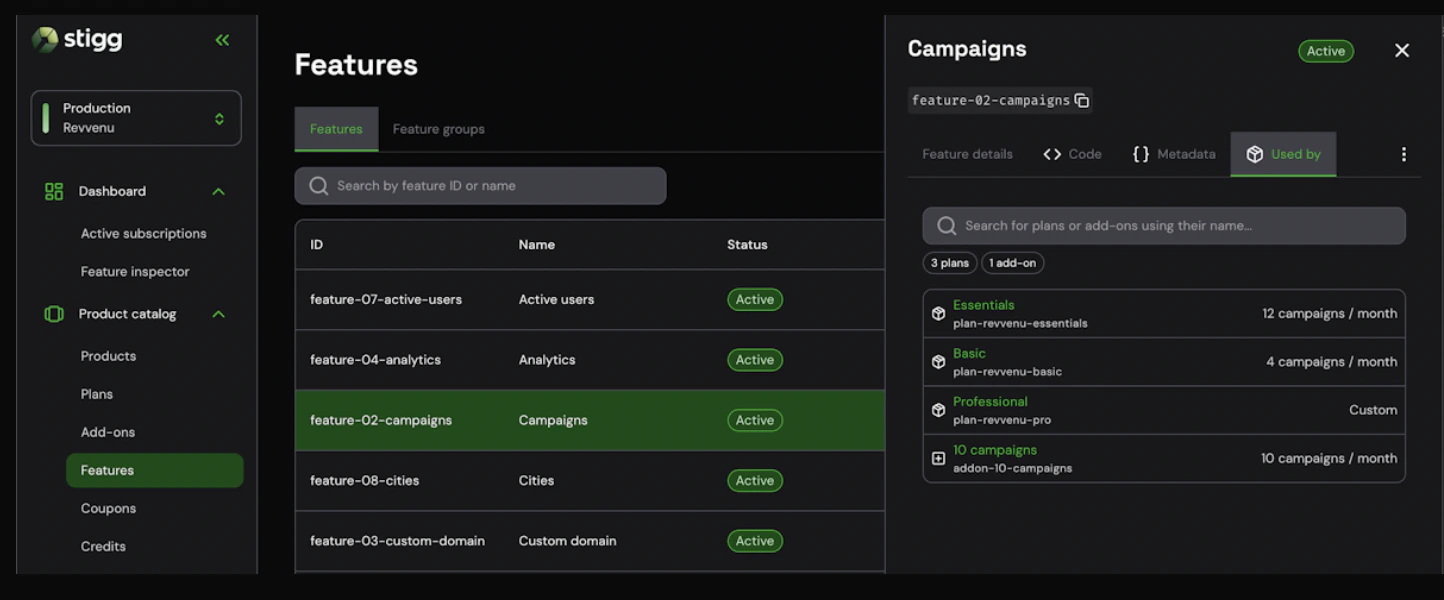
The **Used by** tab in a feature's details screen gives you instant visibility into every plan and add-on that includes a specific feature - along with the entitlement value configured for each one.
This eliminates the need to open each plan or add-on individually to check whether a feature is included and how it's configured.
## Viewing which packages use a feature
To view which plans and add-ons a feature is included in:
1. Open the left navigation pane.
2. Select **Product Catalog**, then choose **Features**.
3. Select the relevant row from the feature list to open the feature details.
4. Click on the **Used by** tab.
The tab displays a list of all plans and add-ons that currently include the selected feature, along with the entitlement value configured for each.
 ## Understanding the **Used by** tab
### Package count summary
At the top of the tab, a summary shows the total number of packages that include the feature, broken down by type - for example: **3 plans | 1 add-on**.
### Package list
Each row in the list represents a plan or add-on that includes the feature and shows:
* **Package name and ID** - the display name and unique identifier of the plan or add-on.
* **Entitlement value** - the value configured for the feature in that package (e.g., *12 campaigns / month*, *unlimited*, *Custom*).
### Filtering the list
You can filter the list to focus on specific packages:
* Use the **search bar** to find packages by name.
* Use the **Charge** / **Entitlement** filter buttons to distinguish between packages where the feature is configured as a billable charge versus a standard entitlement.
## Navigating to a package
To open the details of a specific plan or add-on from the list, click on the relevant row. This takes you directly to that package's configuration screen, where you can review or update its entitlements.
## Understanding the **Used by** tab
### Package count summary
At the top of the tab, a summary shows the total number of packages that include the feature, broken down by type - for example: **3 plans | 1 add-on**.
### Package list
Each row in the list represents a plan or add-on that includes the feature and shows:
* **Package name and ID** - the display name and unique identifier of the plan or add-on.
* **Entitlement value** - the value configured for the feature in that package (e.g., *12 campaigns / month*, *unlimited*, *Custom*).
### Filtering the list
You can filter the list to focus on specific packages:
* Use the **search bar** to find packages by name.
* Use the **Charge** / **Entitlement** filter buttons to distinguish between packages where the feature is configured as a billable charge versus a standard entitlement.
## Navigating to a package
To open the details of a specific plan or add-on from the list, click on the relevant row. This takes you directly to that package's configuration screen, where you can review or update its entitlements.