> ## Documentation Index
> Fetch the complete documentation index at: https://docs.stigg.io/llms.txt
> Use this file to discover all available pages before exploring further.
# Credit entitlements
Credit entitlements grant customers a recurring amount of credits on a set cadence (monthly or yearly) as part of their add-on subscription. This is useful when you want to sell additional credit capacity on top of what a plan already provides.
## Adding a credit entitlement
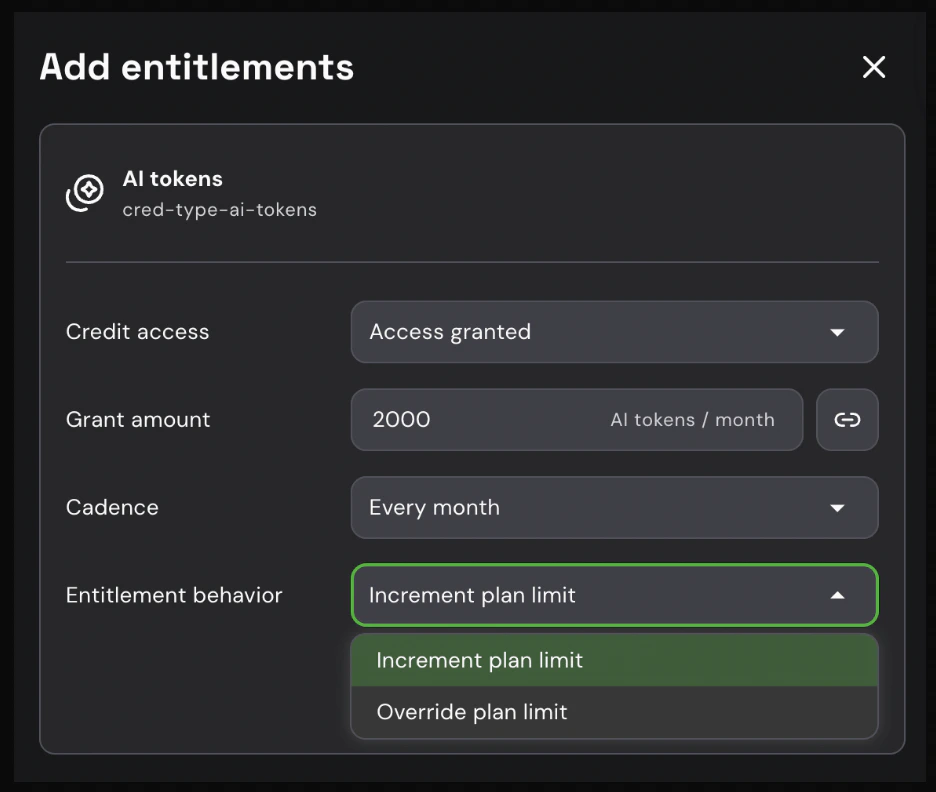
1. Click **+ Add** under the **Entitlements** section of the selected add-on.
2. Select the credit type from the list (e.g., *API Credits*).
3. Enter the **amount** of credits to grant per cadence (e.g., `10,000`).
4. Select the **cadence**: **Monthly** or **Yearly**.
5. (Optional) Set the **Entitlement behavior** - see [below](#entitlement-behavior) for details.
6. Click **Add** to confirm.
## Entitlement behavior
The **Entitlement behavior** setting controls how add-on credits interact with the credits already included in the base plan:
* **Increment plan limit** *(default)*: The add-on credits are added on top of the base plan's credit limit. For example, a plan with 100 credits + an add-on for 50 credits = 150 total credits.
* **Override plan limit**: The add-on completely replaces the base plan's credit limit. For example, a plan with 100 credits + an override add-on for 500 credits = 500 total credits.
 This is useful for offering credit tier upgrades via add-ons - instead of a cumulative top-up, the customer is moved to a specific credit tier.
The credit type must already exist in your product catalog before it can be assigned as an add-on entitlement. To create a new credit type, go to **Product Catalog > Credit types**.
## Example use case: **Extra API Credits** add-on
Suppose your base plan includes 50,000 API credits per month. You want to offer customers the ability to purchase additional credit capacity without upgrading their plan.
**Setup:**
1. Create an add-on named *Extra API Credits* with **Multiple instance** type, so customers can purchase more than one unit.
2. Add a credit entitlement:
* **Credit type**: API Credits
* **Amount**: 10,000
* **Cadence**: Monthly
3. Set the add-on price and publish it.
**Result:**
A customer on the base plan who purchases 3 units of the *Extra API Credits* add-on receives:
* 50,000 credits from the plan
* 30,000 credits from the add-on (10,000 × 3)
* **80,000 API credits per month in total**
Credits from the plan and from the add-on are pooled together in the customer's credit balance and consumed in the order defined by your [credit consumption logic](../../credits/credit-consumption-logic).
To offer a strict credit tier upgrade instead (e.g., moving from 50,000 to 500,000 credits), set the **Entitlement behavior** to **Override plan limit**.
This is useful for offering credit tier upgrades via add-ons - instead of a cumulative top-up, the customer is moved to a specific credit tier.
The credit type must already exist in your product catalog before it can be assigned as an add-on entitlement. To create a new credit type, go to **Product Catalog > Credit types**.
## Example use case: **Extra API Credits** add-on
Suppose your base plan includes 50,000 API credits per month. You want to offer customers the ability to purchase additional credit capacity without upgrading their plan.
**Setup:**
1. Create an add-on named *Extra API Credits* with **Multiple instance** type, so customers can purchase more than one unit.
2. Add a credit entitlement:
* **Credit type**: API Credits
* **Amount**: 10,000
* **Cadence**: Monthly
3. Set the add-on price and publish it.
**Result:**
A customer on the base plan who purchases 3 units of the *Extra API Credits* add-on receives:
* 50,000 credits from the plan
* 30,000 credits from the add-on (10,000 × 3)
* **80,000 API credits per month in total**
Credits from the plan and from the add-on are pooled together in the customer's credit balance and consumed in the order defined by your [credit consumption logic](../../credits/credit-consumption-logic).
To offer a strict credit tier upgrade instead (e.g., moving from 50,000 to 500,000 credits), set the **Entitlement behavior** to **Override plan limit**.