> ## Documentation Index
> Fetch the complete documentation index at: https://docs.stigg.io/llms.txt
> Use this file to discover all available pages before exploring further.
# Updating subscriptions
You can update **active** subscriptions after they are provisioned. The following properties can be modified:
1. **Billing period** (for paid plans): monthly or annual.
2. **Plan configuration**, including:
* Unit quantities for:
* [In-advance commitment charges](../../modeling-your-pricing-in-stigg/plans/defining-plan-pricing/paid/charges/in-advance)
* [Variable entitlements](../../modeling-your-pricing-in-stigg/plans/variable-entitlement-values)
* (Optional for paid plans) Overriding default plan prices.
3. **Add-ons**: add, remove, or update quantities.
4. **Trial period**: extend, shorten, or remove the trial.
5. **Spend management** for on-demand charges:
* Minimum spend
* Maximum spend
6. **Discounts**: add, remove, or modify applied [coupons](../../modeling-your-pricing-in-stigg/coupons/coupons).
To update an active subscription:
1. Click the dotted menu icon next to the subscription.
2. Select **Update subscription**.
3. Apply the desired changes.
4. Review the subscription summary.
5. Select the effective date for the update (for example, immediately, end of billing period, or end of billing month).
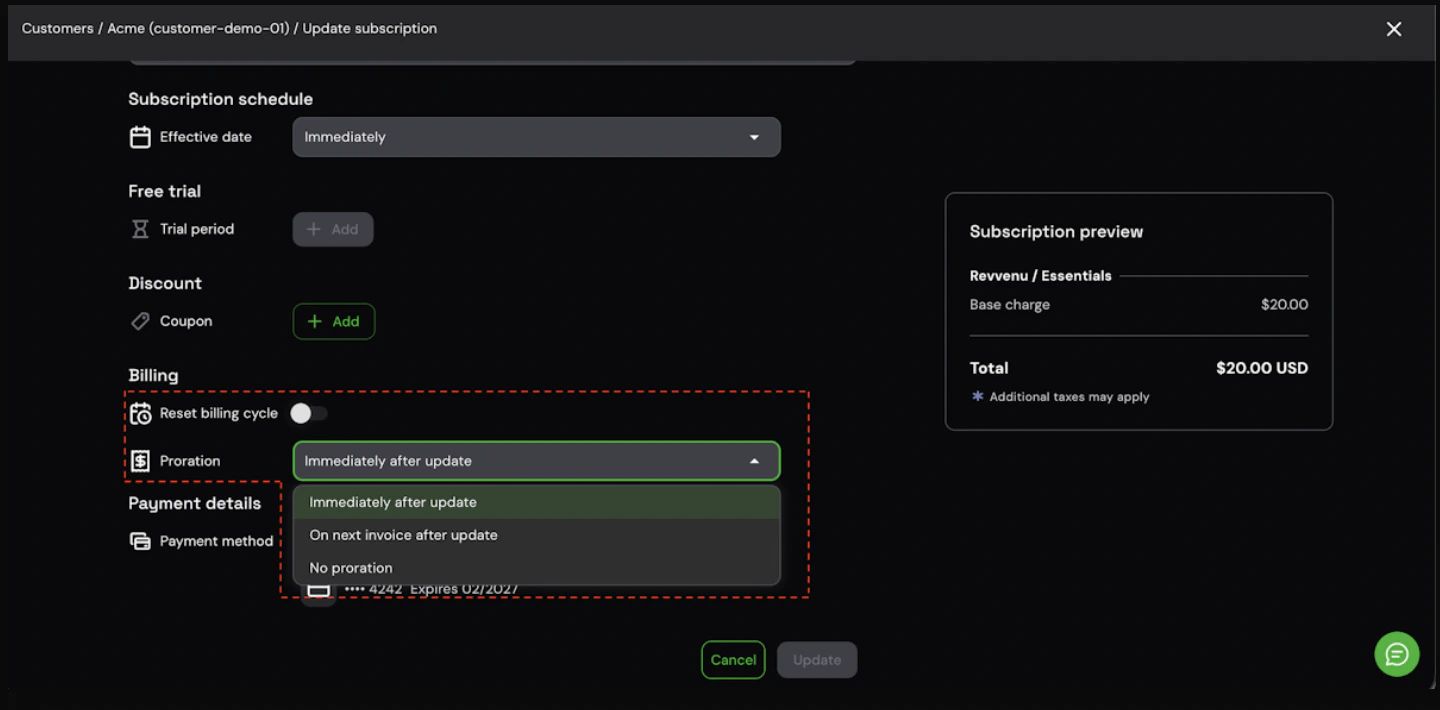
6. (Optional) Configure the **Billing** settings for this update:
* **Reset billing cycle**: choose whether to keep the billing cycle unchanged (default) or reset it to the current timestamp immediately.
* **Proration**: choose how to handle the financial impact of the change:
* **Immediately after update**: generate and collect payment for the prorated amount right now.
* **On next invoice after update**: create proration line items but defer the charge to the next billing cycle.
* **No proration**: disable prorations entirely for this update.
7. Click **Update** to confirm.
 Billing anchor and proration configuration is supported when Stigg is integrated with Stripe, Zuora, or a custom billing solution.
To reset the billing cycle anchor programmatically when provisioning or updating subscriptions via the SDK, pass the `billingCycleAnchor` property with `SubscriptionBillingCycleAnchor.UNCHANGED` (default) or `SubscriptionBillingCycleAnchor.NOW`.
If a subscription already has [scheduled updates](../subscription-updates/scheduled-updates) (e.g., a future downgrade or a scheduled upgrade) and you update it again in the Stigg app:
1. Your new updates will **override** any scheduled updates.
2. The new updates will be applied **immediately**.
Billing anchor and proration configuration is supported when Stigg is integrated with Stripe, Zuora, or a custom billing solution.
To reset the billing cycle anchor programmatically when provisioning or updating subscriptions via the SDK, pass the `billingCycleAnchor` property with `SubscriptionBillingCycleAnchor.UNCHANGED` (default) or `SubscriptionBillingCycleAnchor.NOW`.
If a subscription already has [scheduled updates](../subscription-updates/scheduled-updates) (e.g., a future downgrade or a scheduled upgrade) and you update it again in the Stigg app:
1. Your new updates will **override** any scheduled updates.
2. The new updates will be applied **immediately**.