> ## Documentation Index
> Fetch the complete documentation index at: https://docs.stigg.io/llms.txt
> Use this file to discover all available pages before exploring further.
# Viewing customers entitlement summary
To view a customer’s entitlement summary:
1. Click the **Entitlement summary** tab to see the entitlements associated with the customer’s active subscription.
2. Review the summary, which includes:
* Feature entitlements from the plan and any add-ons included in the subscription.
* Credit entitlements - recurring credit grants attached to the plan or add-on, shown with the grant amount and cadence (e.g., "5,000 credits / month").
* Promotional entitlements granted to the customer.
* Indicators showing how each entitlement value is calculated (e.g., current plan, base plan, multiple add-on instances, promotional entitlements, etc.).
3. Use this overview for troubleshooting and customer support.
4. If the customer has multiple active subscriptions, use the dropdown menu (top-left) to select the relevant subscription.
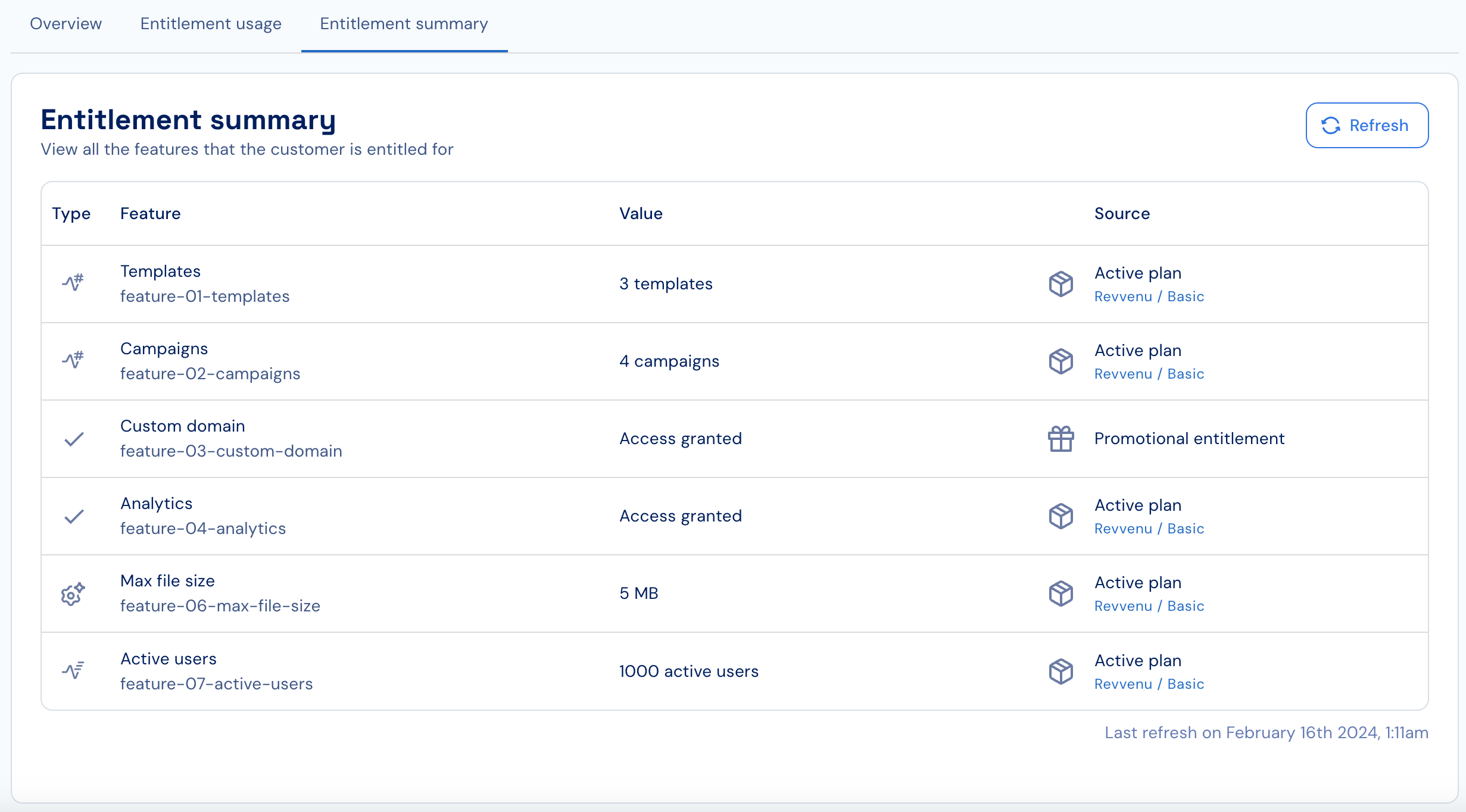 5. When making programmatic changes to subscriptions or promotional entitlements, click **Refresh** to load the most up-to-date entitlement values.
Also see:
5. When making programmatic changes to subscriptions or promotional entitlements, click **Refresh** to load the most up-to-date entitlement values.
Also see: