> ## Documentation Index
> Fetch the complete documentation index at: https://docs.stigg.io/llms.txt
> Use this file to discover all available pages before exploring further.
# Persistent cache
By default, the Node.js SDK and Sidecar store entitlements data in a local in-memory cache for fast and instant entitlement checks. If you restart the host process of the SDK or re-initialize the SDK, the local cache data will be lost. Usually, this behavior is acceptable because if the entitlements data is missing, the SDK will fetch it from the Stigg API over the network.
The in-memory cache is available only in the Node.js SDK and Sidecar. Other backend SDKs (Python, Ruby, Go, Java, .NET) perform direct API calls for every entitlement check and do not maintain a local cache.
Alternatively, you can provide an external store to persist the customer entitlements data which can survive restarts and be accessed by multiple processes. If your application is a fleet consisting of dozens of servers, or if you have a serverless infrastructure where each process is transient and can be de-provisioned after a limited period of time, a persistent cache can significantly reduce cache misses.
Stigg offers a persistent cache setup for backend SDK users (currently supported in the [Node SDK](/api-and-sdks/integration/backend/nodejs) and [Sidecar](/api-and-sdks/integration/backend/sidecar)), providing several advantages over in-memory cache for high-scale services:
* Redundancy - data is available on your Redis cluster even in case of an API outage
* Low latency - including **\< 10ms** credit balance retrieval via `getCreditEntitlement()`
* Fewer requests from your services to the Stigg API
* Reduce the memory footprint of the SDK in your services
* Reducing cache coherence issues
* Increased cache hits/misses ratio
To enable persistent cache in your environment, please [contact the Stigg Support Team](mailto:support@stigg.io).
## Overview
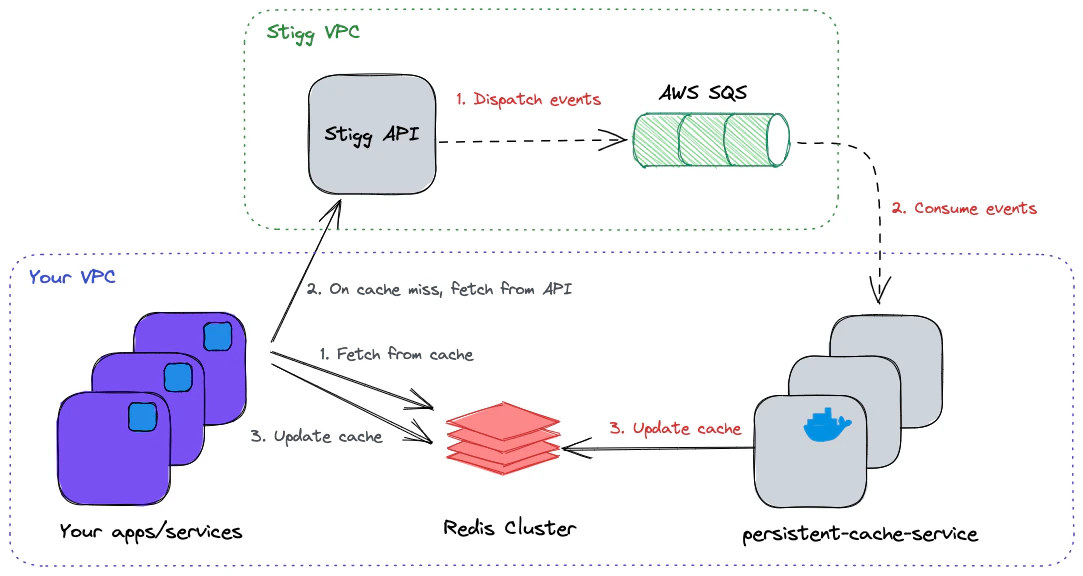
Stigg's persistent cache relies on a running [persistent-cache-service](https://gallery.ecr.aws/p2i1w6c0/persistent-cache-service) as part of your app deployment process. The service connects to a dedicated AWS SQS queue (owned and managed by Stigg), consumes messages that carry the state changes from the originating environment, and keeps your Redis cache instance with up-to-date data. The service can be scaled horizontally to keep up with the rate of arriving messages. In case of a cache miss, the SDK will fetch the data over the network directly from API, and update the cache to serve future requests.
 ## Running the service
In order for the persistent cache to be updated properly in near real-time, you'll need to install and run at least one instance of [persistent-cache-service](https://gallery.ecr.aws/p2i1w6c0/persistent-cache-service).
**Version 3.0.0 breaking change**: persistent-cache-service v3.0.0 introduces a new Redis data structure for credit entitlements. Once v3.0.0 writes data to Redis, older SDK/sidecar versions will return incorrect entitlement data.
**You must upgrade in this order:**
1. Upgrade `@stigg/node-server-sdk` to v4.12.1+ or sidecar-service to v5.194.5+
2. Deploy all updated SDK/sidecar instances
3. Only then deploy persistent-cache-service v3.0.0
See the [persistent-cache-service changelog](/api-and-sdks/changelog/backend-graphql/persistent-cache) for details.
### Prerequisites
* An SQS provisioned by Stigg, to consume messages originating from your environment
* Redis cluster to persist entitlements and usage for a future read operation
### Usage
Run the service, replacing `` with the latest version in the [ECR Public Gallery](https://gallery.ecr.aws/stigg/persistent-cache-service):
Starting from version **2.37.0**, the service uses IAM role-based authentication for SQS access. `AWS_ACCESS_KEY_ID` and `AWS_SECRET_ACCESS_KEY` are no longer required - the service will automatically use the IAM role attached to the host (EC2 instance, ECS task, EKS pod, etc.).
```shell shell theme={null}
docker run --publish=4000:4000 \
--name stigg-persistent-cache \
-e AWS_REGION="us-east-2" \
-e QUEUE_URL="https://sqs.us-east-2.amazonaws.com/..." \
-e REDIS_HOST="host.docker.internal" \
-e SERVER_API_KEY="" \
-e ENVIRONMENT_PREFIX="development" \
public.ecr.aws/stigg/persistent-cache-service:
```
Available options:
| Environment Variable | Type | Default | Description |
| --------------------- | ------------ | ------------------------------------------------------ | ------------------------------------------------------------------------------------------------------------------------------------------------------------------------------------------------------------------------------------------------------------------------------------------------------------------------------------------------------- |
| AWS\_REGION | **String\*** | | The AWS region of the SQS queue |
| QUEUE\_URL | **String\*** | | The URL of the queue to consume from |
| SERVER\_API\_KEY | **String\*** | | Environment's full access key |
| ENVIRONMENT\_PREFIX | String | production | The Identifier of the environment needs to be the same as the one used by the SDK |
| REDIS\_HOST | String | | Redis host address |
| REDIS\_PORT | Number | 6379 | Redis port |
| REDIS\_DB | Number | 0 | Redis DB identifier |
| REDIS\_USERNAME | String | | (Optional) Redis username |
| REDIS\_PASSWORD | String | | (Optional) Redis password |
| REDIS\_TLS | Boolean | 0 | (Optional) Redis use TLS encryption |
| BATCH\_SIZE | Number | 1 | Number of messages to receive in a single batch |
| KEYS\_TTL\_IN\_SECS | Number | 604800 (7 days) | The duration in seconds that data will be kept in the cache before eviction. Set to `-1` to disable expiration entirely, entries persist until invalidated by the persistent-cache-service pipeline. The value must also be set on the application side (SDK `redis.ttl: -1` or Sidecar `REDIS_KEYS_TTL_IN_SECS=-1`) for end-to-end no-expiry behavior. |
| EDGE\_API\_URL | String | [https://edge.api.stigg.io](https://edge.api.stigg.io) | Edge API address URL |
| SENTRY\_DSN | String | Loaded from remote | Sentry DSN used for internal error reporting |
| DISABLE\_SENTRY | Boolean | 0 | Disables reporting internal errors to Sentry |
| PORT | Number | 4000 | HTTP server port |
| CACHE\_UPDATE\_POLICY | String | `UPDATE_IF_EXISTS` | Enum, can be either `UPSERT` (always write new data to cache) or `UPDATE_IF_EXISTS` (update only if the data already exists). |
| LOG\_LEVEL | String | `info` | Log level, can be one of: `error`, `warn`, `info`, `debug`. |
| LOG\_MESSAGE\_KEY | String | `msg` | Log string key for the `message` in the JSON object. |
| LOG\_ERROR\_KEY | String | `err` | Log string key for the `error` in the JSON object. |
\*Required fields
## Health
The service exposes the following HTTP endpoints:
### `GET /livez`
Returns `200` if the service is alive.
Healthy response: `{"status":"UP"}`
### `GET /readyz`
Returns `200` if the service is ready to receive messages.
Healthy response: `{ "status": "UP", "consumers": 10, "redis": "CONNECTED" }`
Unhealthy response: `{ "status": "DOWN", "consumers": 0, "redis": "DISCONNECTED" }`
### `GET /metrics`
Returns service metrics in [Prometheus](https://prometheus.io/) format.
This endpoint includes both system-level and cache specific metrics. These metrics are helpful for monitoring the health and performance of the service.
| Metric Name | Type | Description |
| ------------------------------------------------------------------------------------------------ | --------- | ---------------------------------------------------------- |
| `persistent_cache_write_duration_seconds` | histogram | Time taken to write to Redis cache |
| `persistent_cache_write_errors_total` | counter | Number of failed Redis cache write operations |
| `persistent_cache_hit_ratio` | gauge | Percentage of Redis cache hits vs total cache queries |
| `persistent_cache_memory_usage_bytes` | gauge | Amount of memory used by the Redis cache in bytes |
| `persistent_cache_hits_total` | gauge | Total number of cache hits in Redis |
| `persistent_cache_misses_total` | gauge | Total number of cache misses in Redis |
| `persistent_cache_message_handling_duration_seconds` | histogram | Time taken to process a message from receipt to completion |
| `persistent_cache_messages_processed_total` | counter | Total number of messages processed |
## Configure the SDK
To configure the SDK to use the Redis cache, provide the `redis` config during initialization:
```javascript Node.js theme={null}
const stigg = Stigg.initialize({
apiKey: '',
redis: {
host: 'localhost',
port: '6379',
db: 0, // optionally, the db number to use
environmentPrefix: 'production', // a string, for example 'production', 'staging' & etc
// ttl: -1, // optional — set to a negative value to keep cache entries indefinitely (no expiration)
}
});
```
Please make sure that the SDK and the `persistent-cache-service` are configured to use the same Redis instance, DB number, and the same **environment prefix**.
**Disabling Redis expiration must be set on both sides.** If you want cache entries to persist indefinitely (e.g. to keep serving entitlements through extended Stigg Cloud outages), the negative TTL must be configured on **both** the reader side **and** the writer side:
* Node SDK: `redis.ttl: -1`
* Sidecar: `REDIS_KEYS_TTL_IN_SECS=-1`
* `persistent-cache-service`: `KEYS_TTL_IN_SECS=-1`
Both components write to Redis (the persistent-cache-service from SQS messages, the SDK/Sidecar on cache misses), so whichever writes a given key last decides whether it carries a TTL. Setting the negative value on only one side leaves the cache inconsistent — some entries will expire, others won't. With expiration disabled, the persistent-cache-service pipeline remain responsible for keeping cache entries fresh.
During initialization, the SDK will try to connect to the Redis instance. Once connected, all the entitlement checks will be evaluated against data from the persistent cache instead of fetching it over the network.
The persistent cache is updated the same way the in-memory cache does - if customer data is missing, it will be fetched over the network and persisted in the cache.
## Deploying the Service in Kubernetes
You can install the Service using either `helm` or `kustomize`. For detailed instructions, resources, and examples, visit our [GitHub repository](https://github.com/stiggio/stigg-helm-charts).
## Benchmarks
Based on internal benchmarks, a single instance of the `persistent-cache-service` runs efficiently with the following configuration:
* **CPU and memory**: 1 vCPU and 512MB RAM.
* **CPU usage**: Averages around 60%, with a range between 30% and 90% under constant load (i.e., when messages are consistently present in the queue).
* **Memory footprint**: Approximately 250MB.
* **Throughput**: Handles up to 100 messages per second, depending on message type and processing complexity.
* **Storage**: Does not use any disk storage. The minimal container image size is sufficient.
* **Scalability**: The service is stateless and can be horizontally scaled as needed to meet higher throughput demands.
## Running the service
In order for the persistent cache to be updated properly in near real-time, you'll need to install and run at least one instance of [persistent-cache-service](https://gallery.ecr.aws/p2i1w6c0/persistent-cache-service).
**Version 3.0.0 breaking change**: persistent-cache-service v3.0.0 introduces a new Redis data structure for credit entitlements. Once v3.0.0 writes data to Redis, older SDK/sidecar versions will return incorrect entitlement data.
**You must upgrade in this order:**
1. Upgrade `@stigg/node-server-sdk` to v4.12.1+ or sidecar-service to v5.194.5+
2. Deploy all updated SDK/sidecar instances
3. Only then deploy persistent-cache-service v3.0.0
See the [persistent-cache-service changelog](/api-and-sdks/changelog/backend-graphql/persistent-cache) for details.
### Prerequisites
* An SQS provisioned by Stigg, to consume messages originating from your environment
* Redis cluster to persist entitlements and usage for a future read operation
### Usage
Run the service, replacing `` with the latest version in the [ECR Public Gallery](https://gallery.ecr.aws/stigg/persistent-cache-service):
Starting from version **2.37.0**, the service uses IAM role-based authentication for SQS access. `AWS_ACCESS_KEY_ID` and `AWS_SECRET_ACCESS_KEY` are no longer required - the service will automatically use the IAM role attached to the host (EC2 instance, ECS task, EKS pod, etc.).
```shell shell theme={null}
docker run --publish=4000:4000 \
--name stigg-persistent-cache \
-e AWS_REGION="us-east-2" \
-e QUEUE_URL="https://sqs.us-east-2.amazonaws.com/..." \
-e REDIS_HOST="host.docker.internal" \
-e SERVER_API_KEY="" \
-e ENVIRONMENT_PREFIX="development" \
public.ecr.aws/stigg/persistent-cache-service:
```
Available options:
| Environment Variable | Type | Default | Description |
| --------------------- | ------------ | ------------------------------------------------------ | ------------------------------------------------------------------------------------------------------------------------------------------------------------------------------------------------------------------------------------------------------------------------------------------------------------------------------------------------------- |
| AWS\_REGION | **String\*** | | The AWS region of the SQS queue |
| QUEUE\_URL | **String\*** | | The URL of the queue to consume from |
| SERVER\_API\_KEY | **String\*** | | Environment's full access key |
| ENVIRONMENT\_PREFIX | String | production | The Identifier of the environment needs to be the same as the one used by the SDK |
| REDIS\_HOST | String | | Redis host address |
| REDIS\_PORT | Number | 6379 | Redis port |
| REDIS\_DB | Number | 0 | Redis DB identifier |
| REDIS\_USERNAME | String | | (Optional) Redis username |
| REDIS\_PASSWORD | String | | (Optional) Redis password |
| REDIS\_TLS | Boolean | 0 | (Optional) Redis use TLS encryption |
| BATCH\_SIZE | Number | 1 | Number of messages to receive in a single batch |
| KEYS\_TTL\_IN\_SECS | Number | 604800 (7 days) | The duration in seconds that data will be kept in the cache before eviction. Set to `-1` to disable expiration entirely, entries persist until invalidated by the persistent-cache-service pipeline. The value must also be set on the application side (SDK `redis.ttl: -1` or Sidecar `REDIS_KEYS_TTL_IN_SECS=-1`) for end-to-end no-expiry behavior. |
| EDGE\_API\_URL | String | [https://edge.api.stigg.io](https://edge.api.stigg.io) | Edge API address URL |
| SENTRY\_DSN | String | Loaded from remote | Sentry DSN used for internal error reporting |
| DISABLE\_SENTRY | Boolean | 0 | Disables reporting internal errors to Sentry |
| PORT | Number | 4000 | HTTP server port |
| CACHE\_UPDATE\_POLICY | String | `UPDATE_IF_EXISTS` | Enum, can be either `UPSERT` (always write new data to cache) or `UPDATE_IF_EXISTS` (update only if the data already exists). |
| LOG\_LEVEL | String | `info` | Log level, can be one of: `error`, `warn`, `info`, `debug`. |
| LOG\_MESSAGE\_KEY | String | `msg` | Log string key for the `message` in the JSON object. |
| LOG\_ERROR\_KEY | String | `err` | Log string key for the `error` in the JSON object. |
\*Required fields
## Health
The service exposes the following HTTP endpoints:
### `GET /livez`
Returns `200` if the service is alive.
Healthy response: `{"status":"UP"}`
### `GET /readyz`
Returns `200` if the service is ready to receive messages.
Healthy response: `{ "status": "UP", "consumers": 10, "redis": "CONNECTED" }`
Unhealthy response: `{ "status": "DOWN", "consumers": 0, "redis": "DISCONNECTED" }`
### `GET /metrics`
Returns service metrics in [Prometheus](https://prometheus.io/) format.
This endpoint includes both system-level and cache specific metrics. These metrics are helpful for monitoring the health and performance of the service.
| Metric Name | Type | Description |
| ------------------------------------------------------------------------------------------------ | --------- | ---------------------------------------------------------- |
| `persistent_cache_write_duration_seconds` | histogram | Time taken to write to Redis cache |
| `persistent_cache_write_errors_total` | counter | Number of failed Redis cache write operations |
| `persistent_cache_hit_ratio` | gauge | Percentage of Redis cache hits vs total cache queries |
| `persistent_cache_memory_usage_bytes` | gauge | Amount of memory used by the Redis cache in bytes |
| `persistent_cache_hits_total` | gauge | Total number of cache hits in Redis |
| `persistent_cache_misses_total` | gauge | Total number of cache misses in Redis |
| `persistent_cache_message_handling_duration_seconds` | histogram | Time taken to process a message from receipt to completion |
| `persistent_cache_messages_processed_total` | counter | Total number of messages processed |
## Configure the SDK
To configure the SDK to use the Redis cache, provide the `redis` config during initialization:
```javascript Node.js theme={null}
const stigg = Stigg.initialize({
apiKey: '',
redis: {
host: 'localhost',
port: '6379',
db: 0, // optionally, the db number to use
environmentPrefix: 'production', // a string, for example 'production', 'staging' & etc
// ttl: -1, // optional — set to a negative value to keep cache entries indefinitely (no expiration)
}
});
```
Please make sure that the SDK and the `persistent-cache-service` are configured to use the same Redis instance, DB number, and the same **environment prefix**.
**Disabling Redis expiration must be set on both sides.** If you want cache entries to persist indefinitely (e.g. to keep serving entitlements through extended Stigg Cloud outages), the negative TTL must be configured on **both** the reader side **and** the writer side:
* Node SDK: `redis.ttl: -1`
* Sidecar: `REDIS_KEYS_TTL_IN_SECS=-1`
* `persistent-cache-service`: `KEYS_TTL_IN_SECS=-1`
Both components write to Redis (the persistent-cache-service from SQS messages, the SDK/Sidecar on cache misses), so whichever writes a given key last decides whether it carries a TTL. Setting the negative value on only one side leaves the cache inconsistent — some entries will expire, others won't. With expiration disabled, the persistent-cache-service pipeline remain responsible for keeping cache entries fresh.
During initialization, the SDK will try to connect to the Redis instance. Once connected, all the entitlement checks will be evaluated against data from the persistent cache instead of fetching it over the network.
The persistent cache is updated the same way the in-memory cache does - if customer data is missing, it will be fetched over the network and persisted in the cache.
## Deploying the Service in Kubernetes
You can install the Service using either `helm` or `kustomize`. For detailed instructions, resources, and examples, visit our [GitHub repository](https://github.com/stiggio/stigg-helm-charts).
## Benchmarks
Based on internal benchmarks, a single instance of the `persistent-cache-service` runs efficiently with the following configuration:
* **CPU and memory**: 1 vCPU and 512MB RAM.
* **CPU usage**: Averages around 60%, with a range between 30% and 90% under constant load (i.e., when messages are consistently present in the queue).
* **Memory footprint**: Approximately 250MB.
* **Throughput**: Handles up to 100 messages per second, depending on message type and processing complexity.
* **Storage**: Does not use any disk storage. The minimal container image size is sufficient.
* **Scalability**: The service is stateless and can be horizontally scaled as needed to meet higher throughput demands.