> ## Documentation Index
> Fetch the complete documentation index at: https://docs.stigg.io/llms.txt
> Use this file to discover all available pages before exploring further.
# Setting up governance
This guide covers the catalog setup you make as the vendor — both from the Stigg console and via the SDK. Most of these are one-time or infrequent operations; the [Check and Ingest](/documentation/governance/check-and-ingest) calls happen per-request at runtime.
## Via the Stigg console
### Define entity types
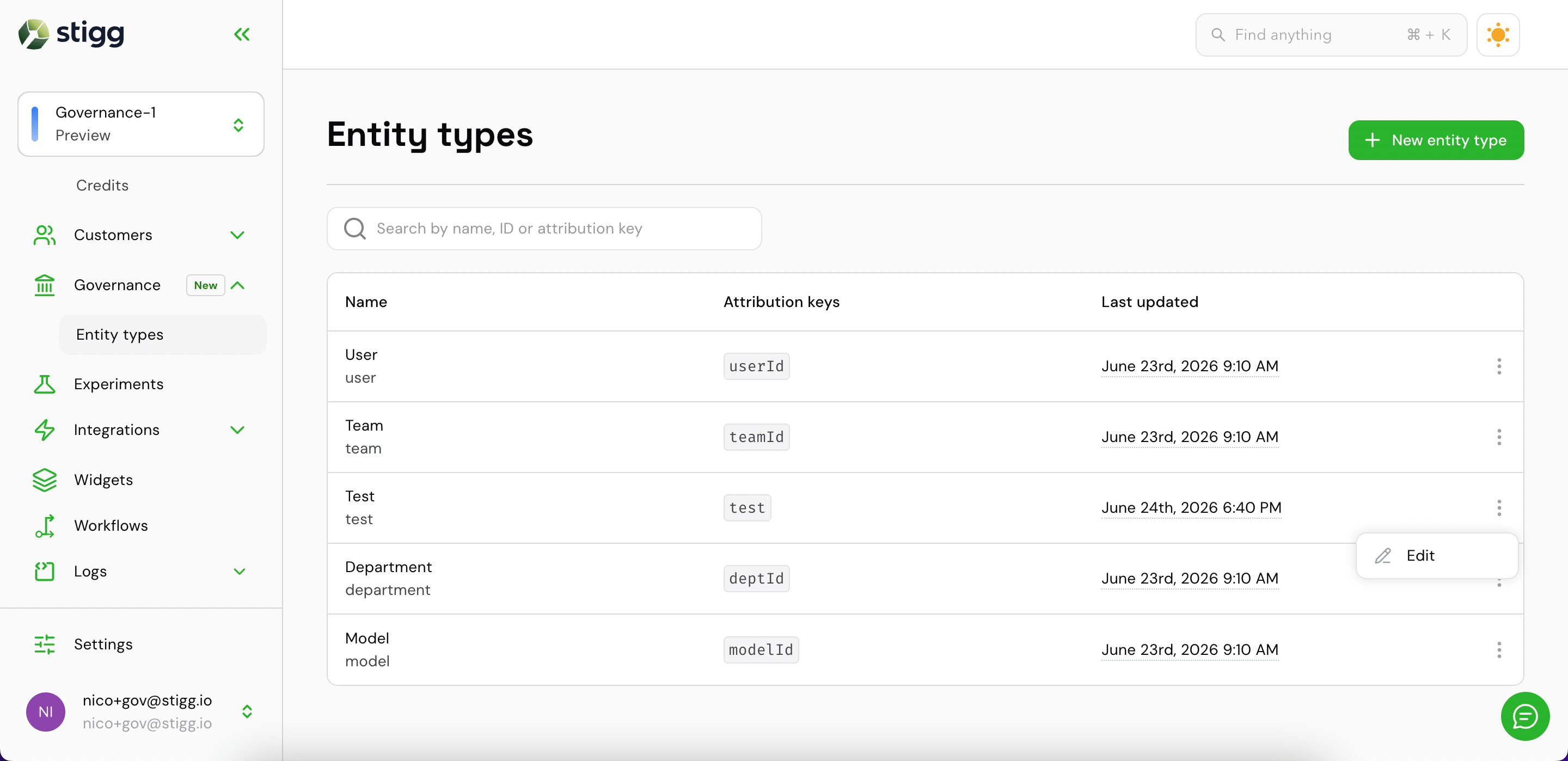
In the Stigg app, go to **Governance → Entity types**. The list shows all entity types defined for the environment, along with their attribution keys and the last time each was updated.
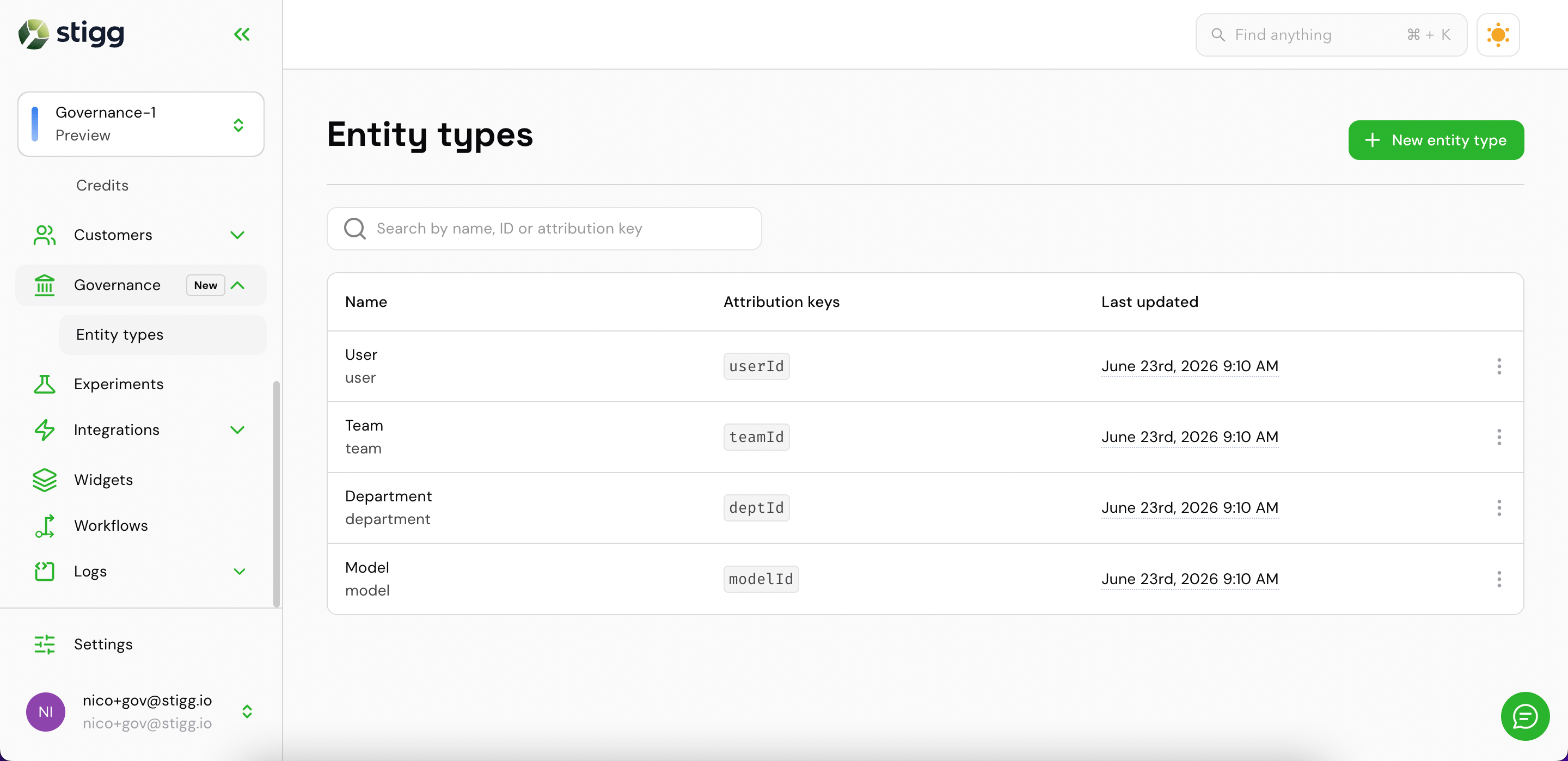 Click **+ New entity type** to open the creation drawer.
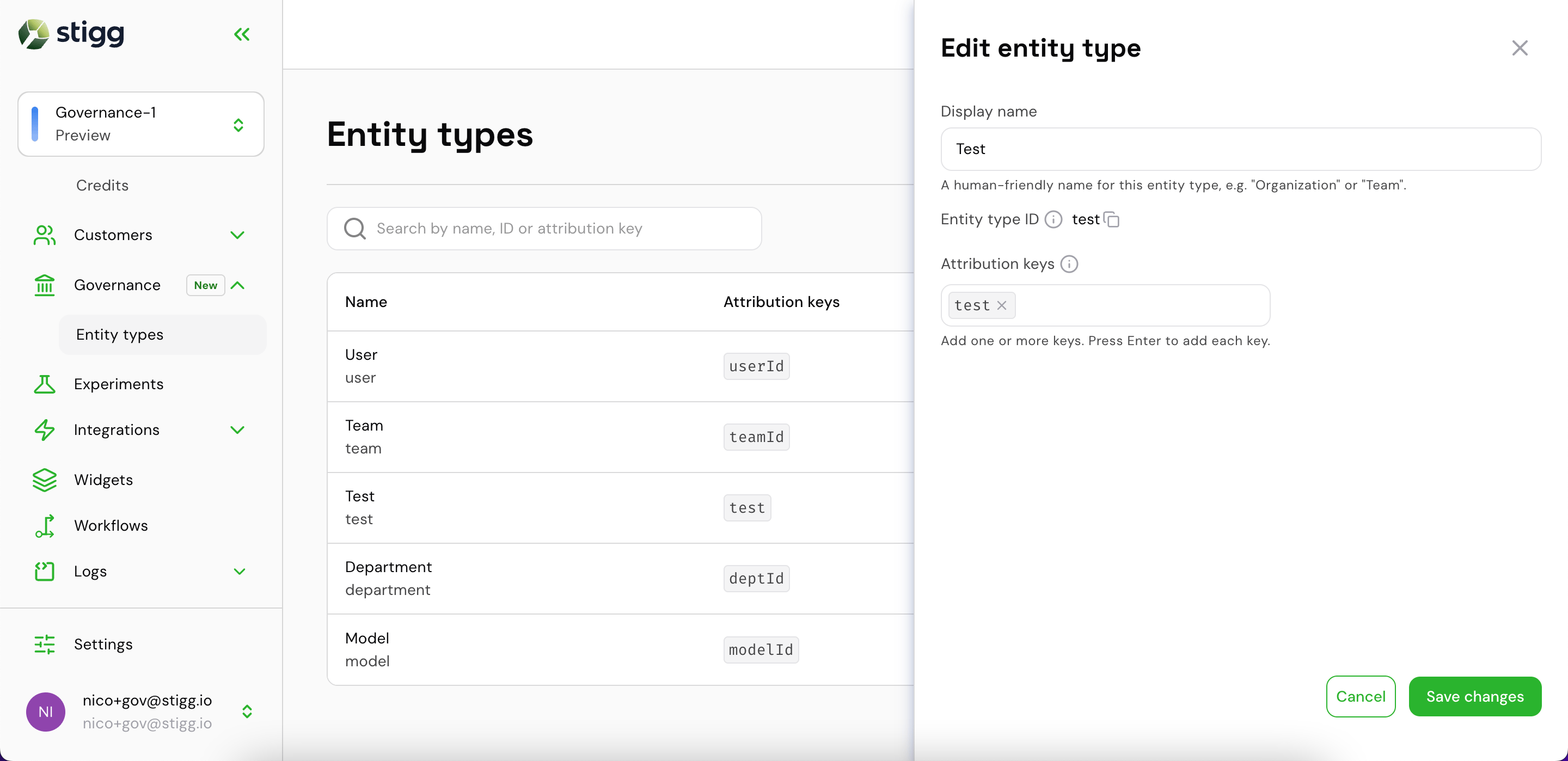
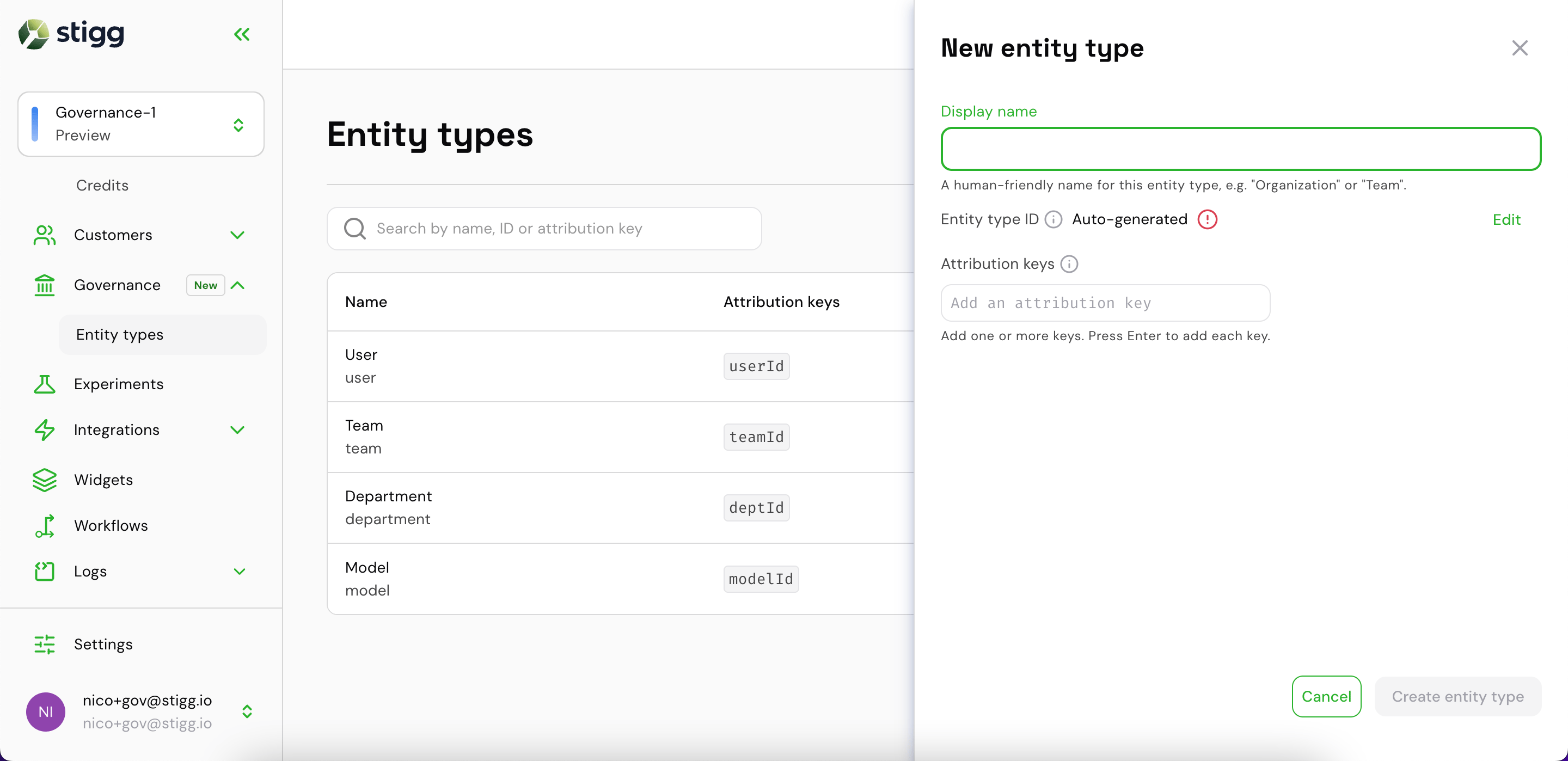 Fill in:
* **Display name** — a human-readable label (e.g. `Organization`). The entity type ID is auto-generated from it and can be edited.
* **Attribution keys** — the dimension keys your usage events carry to identify instances of this type (e.g. `orgId`). Type a key and press Enter to add it; multiple keys are supported.
Fill in:
* **Display name** — a human-readable label (e.g. `Organization`). The entity type ID is auto-generated from it and can be edited.
* **Attribution keys** — the dimension keys your usage events carry to identify instances of this type (e.g. `orgId`). Type a key and press Enter to add it; multiple keys are supported.
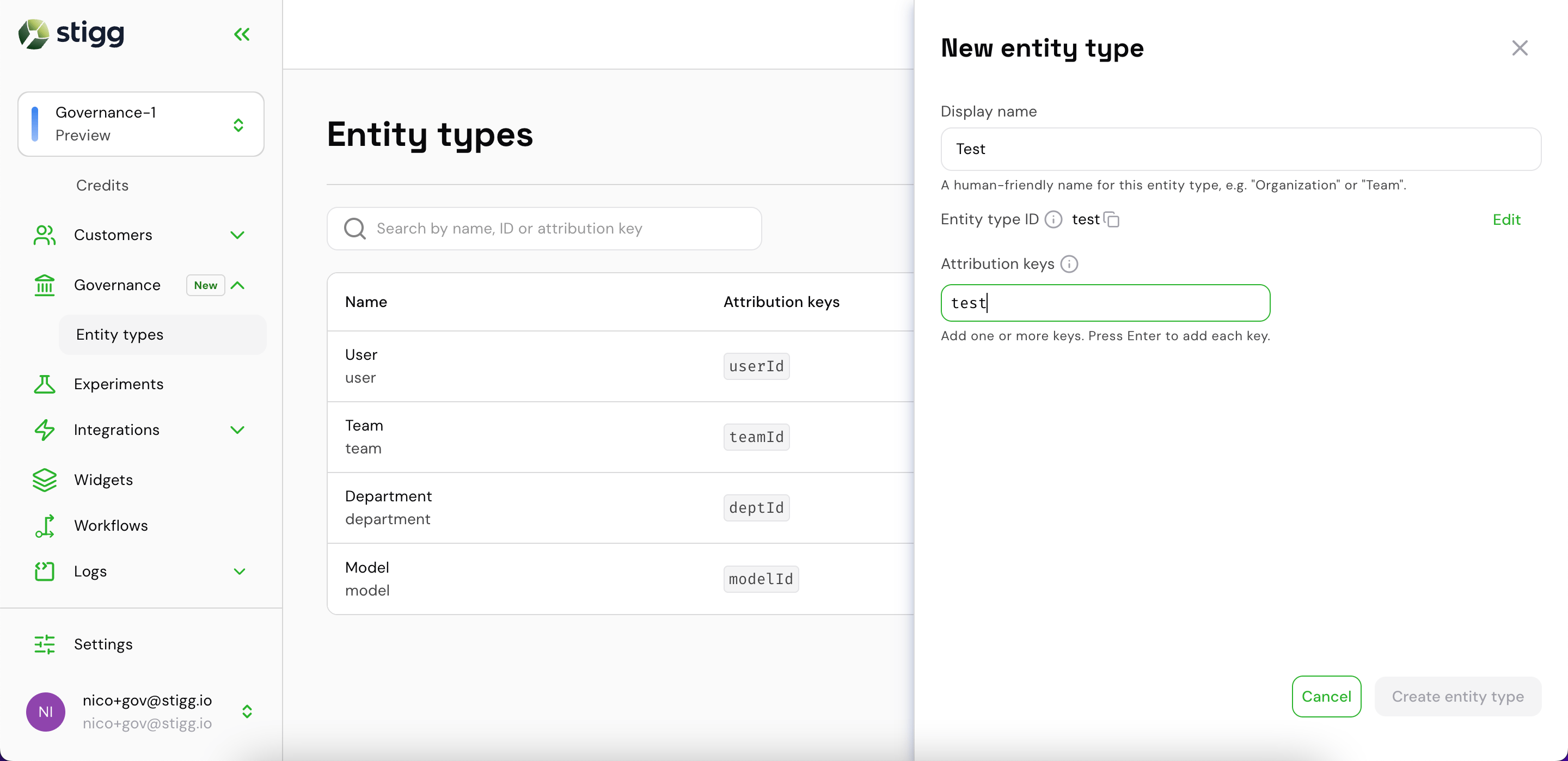
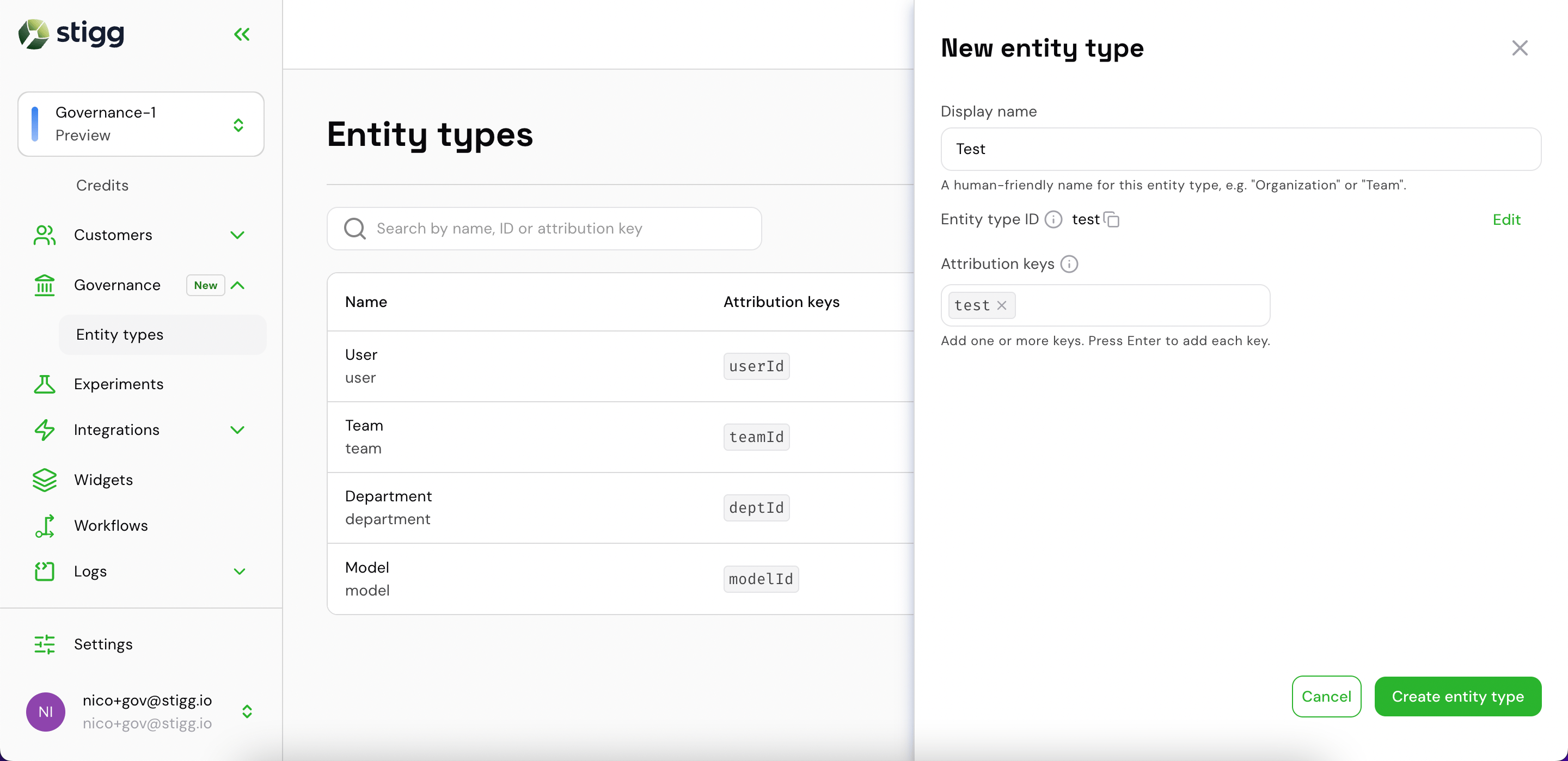 Once created, the new type appears in the list. Hover a row and click the **⋮** menu to **Edit** it.
 ### View and manage entities for a customer
To view governance data for a specific customer:
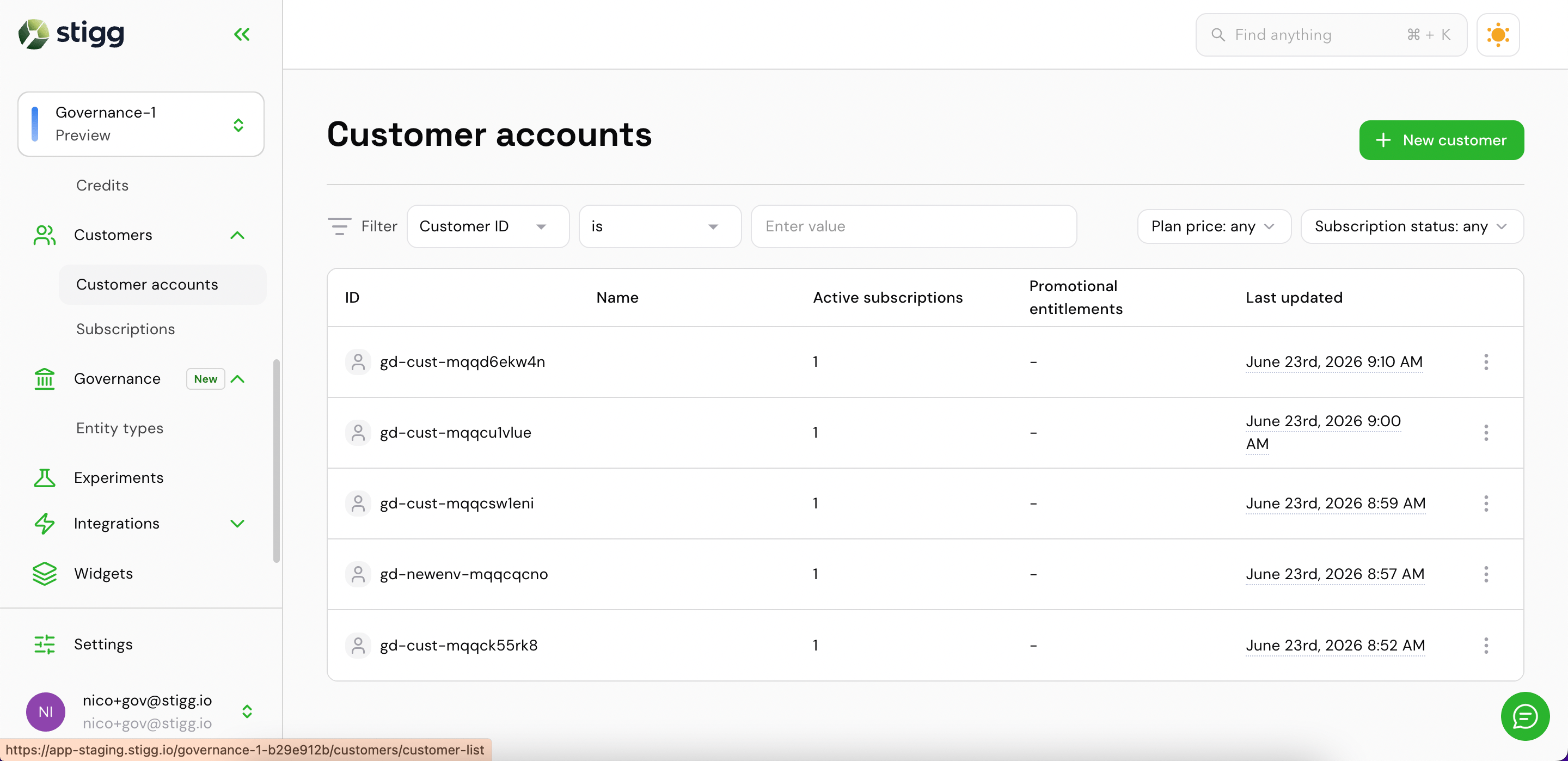
1. Go to **Customers → Customer accounts** and open the customer record.
### View and manage entities for a customer
To view governance data for a specific customer:
1. Go to **Customers → Customer accounts** and open the customer record.
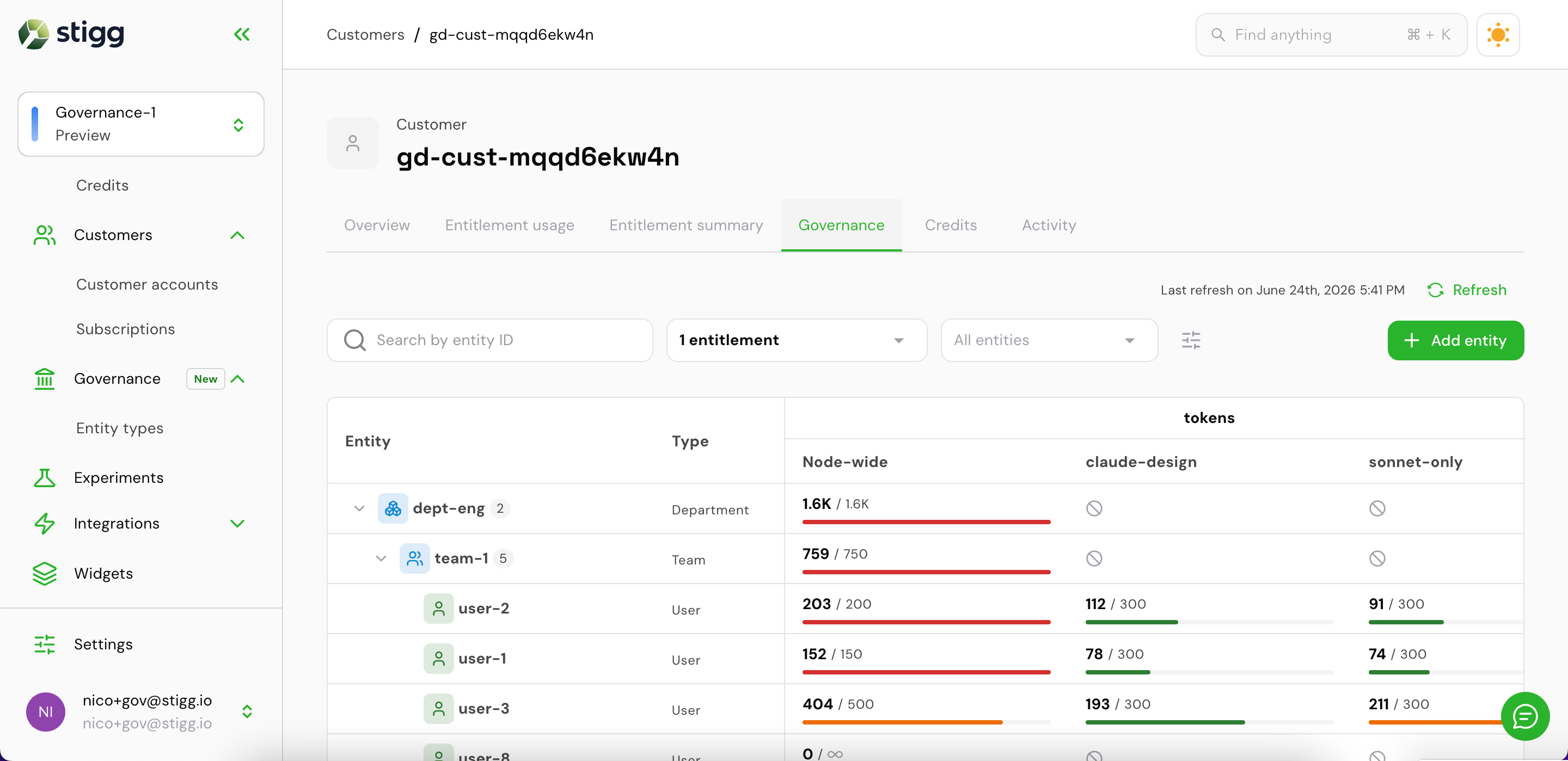
 2. Click the **Governance** tab.
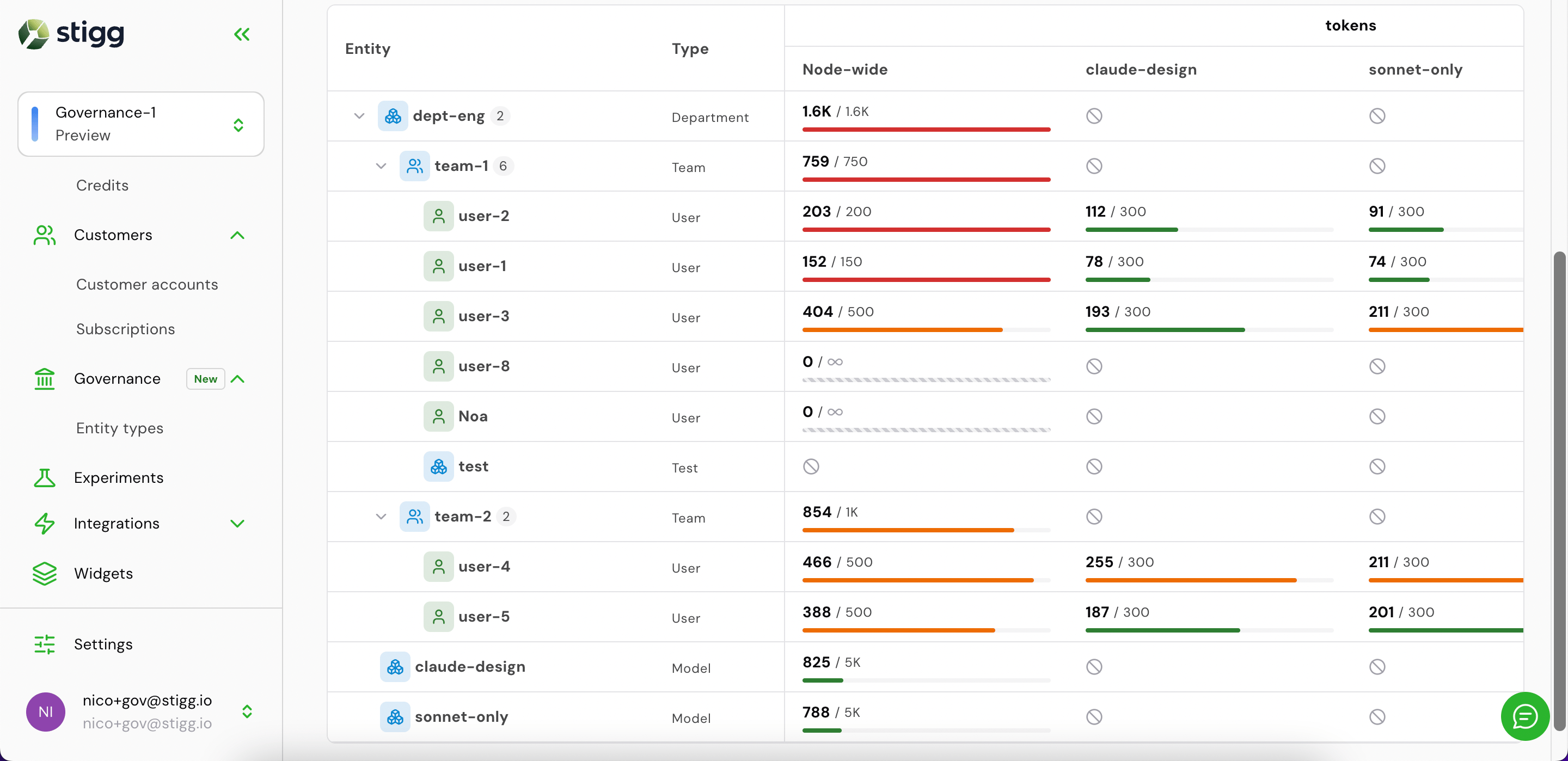
The tab shows the customer's entity hierarchy on the left, their entity types in the **Type** column, and — for each entitlement — the current usage vs. limit broken out by scope (Node-wide and per-model or other dimension).
2. Click the **Governance** tab.
The tab shows the customer's entity hierarchy on the left, their entity types in the **Type** column, and — for each entitlement — the current usage vs. limit broken out by scope (Node-wide and per-model or other dimension).
 ### Sort and prioritize entities
Use the **Order by** control (the sliders icon next to the type filter) to rank entities by consumption. Two modes are available:
* **Usage** — ranks by absolute consumption, so the heaviest consumers appear first
* **Utilization** — ranks by percentage of limit used, so entities closest to being blocked surface first
### Sort and prioritize entities
Use the **Order by** control (the sliders icon next to the type filter) to rank entities by consumption. Two modes are available:
* **Usage** — ranks by absolute consumption, so the heaviest consumers appear first
* **Utilization** — ranks by percentage of limit used, so entities closest to being blocked surface first
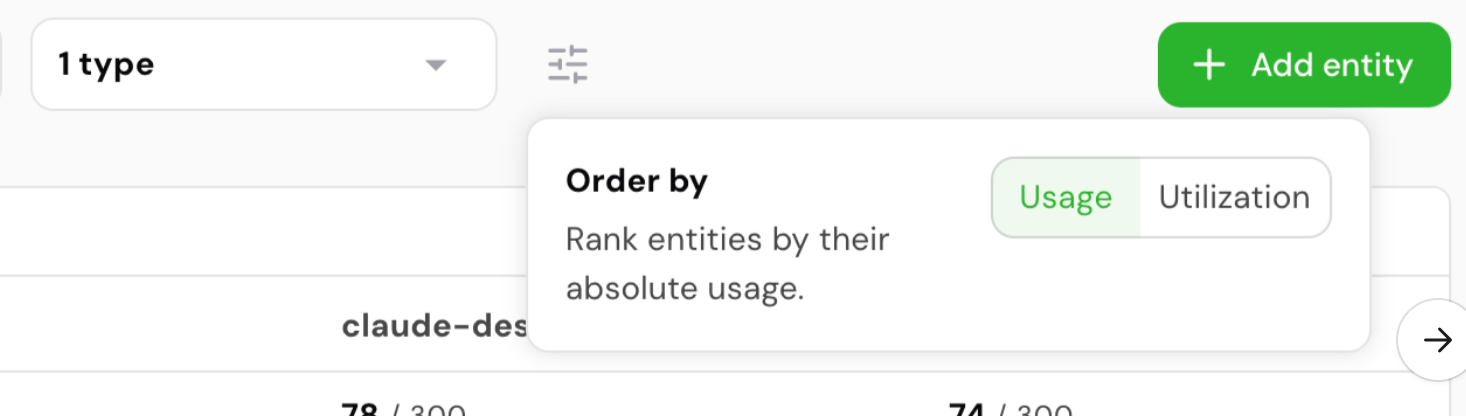 Switching to **Utilization** is the fastest way to spot entities that are about to hit their limit and may need a budget increase or intervention before they get blocked.
### Add an entity to a customer
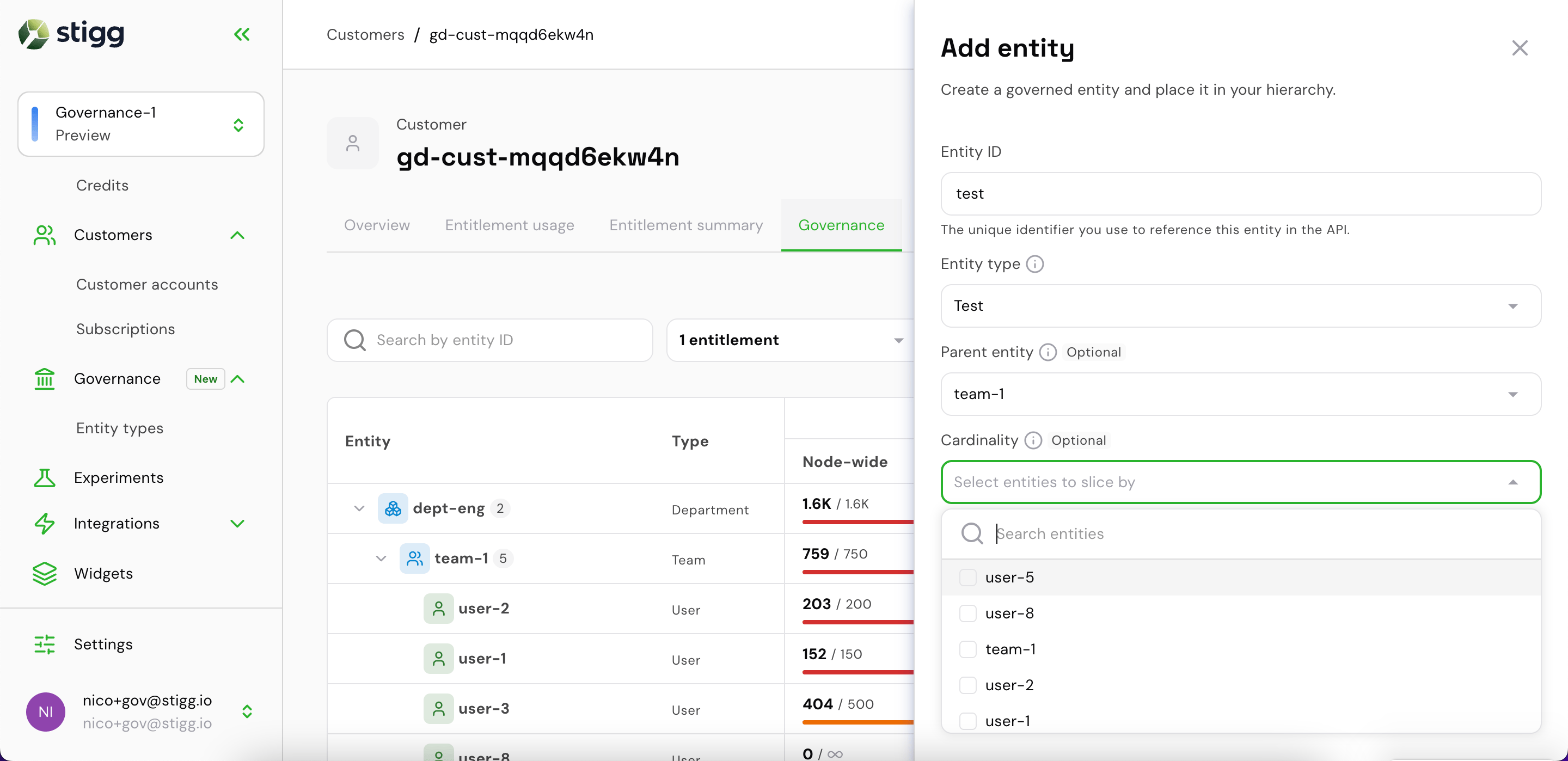
Click **+ Add entity** to open the drawer.
Switching to **Utilization** is the fastest way to spot entities that are about to hit their limit and may need a budget increase or intervention before they get blocked.
### Add an entity to a customer
Click **+ Add entity** to open the drawer.
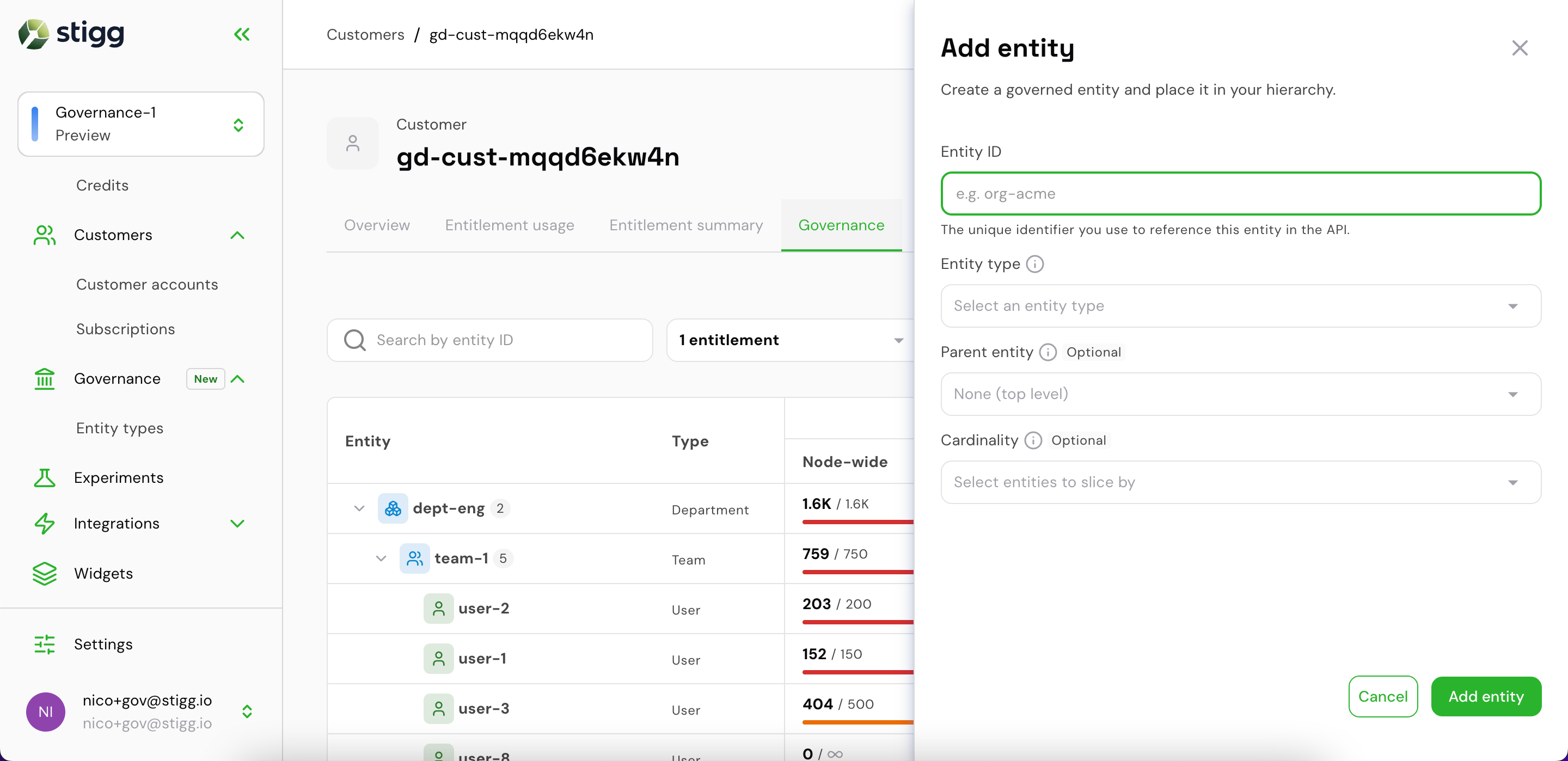 Fill in:
* **Entity ID** — the unique identifier used in API calls (e.g. `org-acme`)
* **Entity type** — select from the entity types defined for this environment
Fill in:
* **Entity ID** — the unique identifier used in API calls (e.g. `org-acme`)
* **Entity type** — select from the entity types defined for this environment
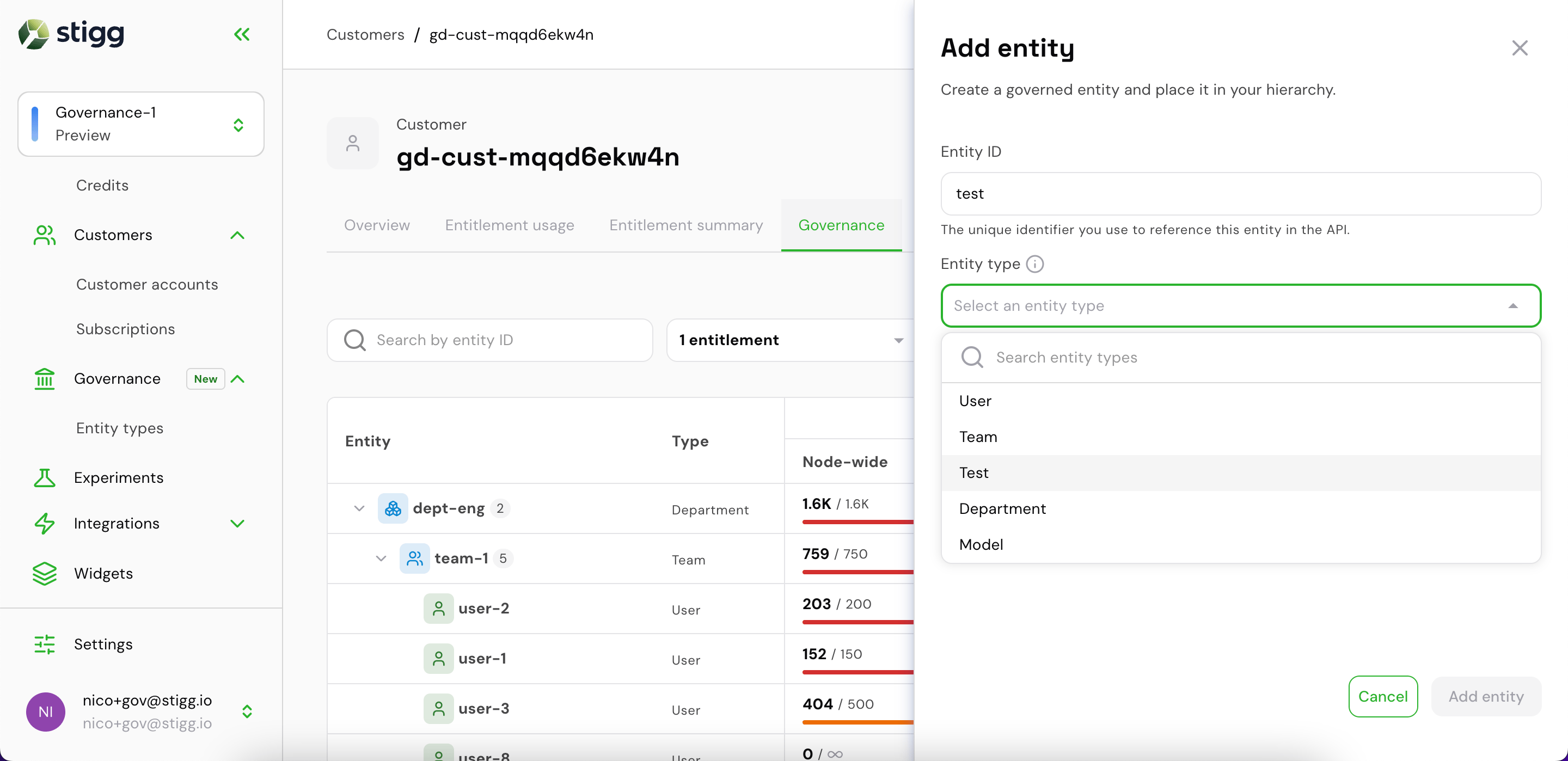 * **Parent entity** *(optional)* — place this entity under a parent in the hierarchy (e.g. nest a user under a team)
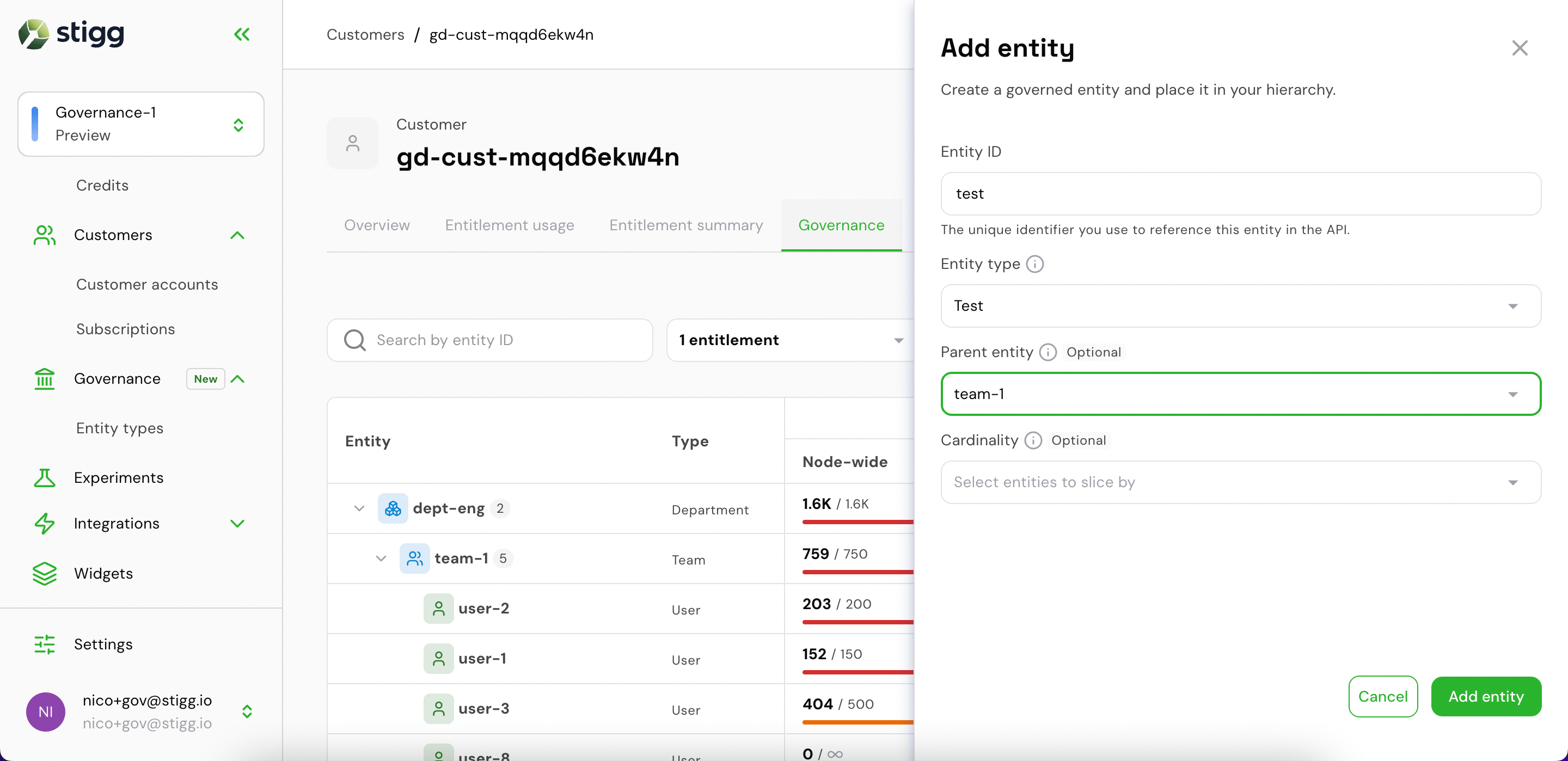 * **Cardinality** *(optional)* — restrict this entity's budget to a specific sub-context by selecting entities to slice by
 After adding entities, the full hierarchy is visible in the Governance tab with all entitlement columns.
 ### Edit an entitlement value inline
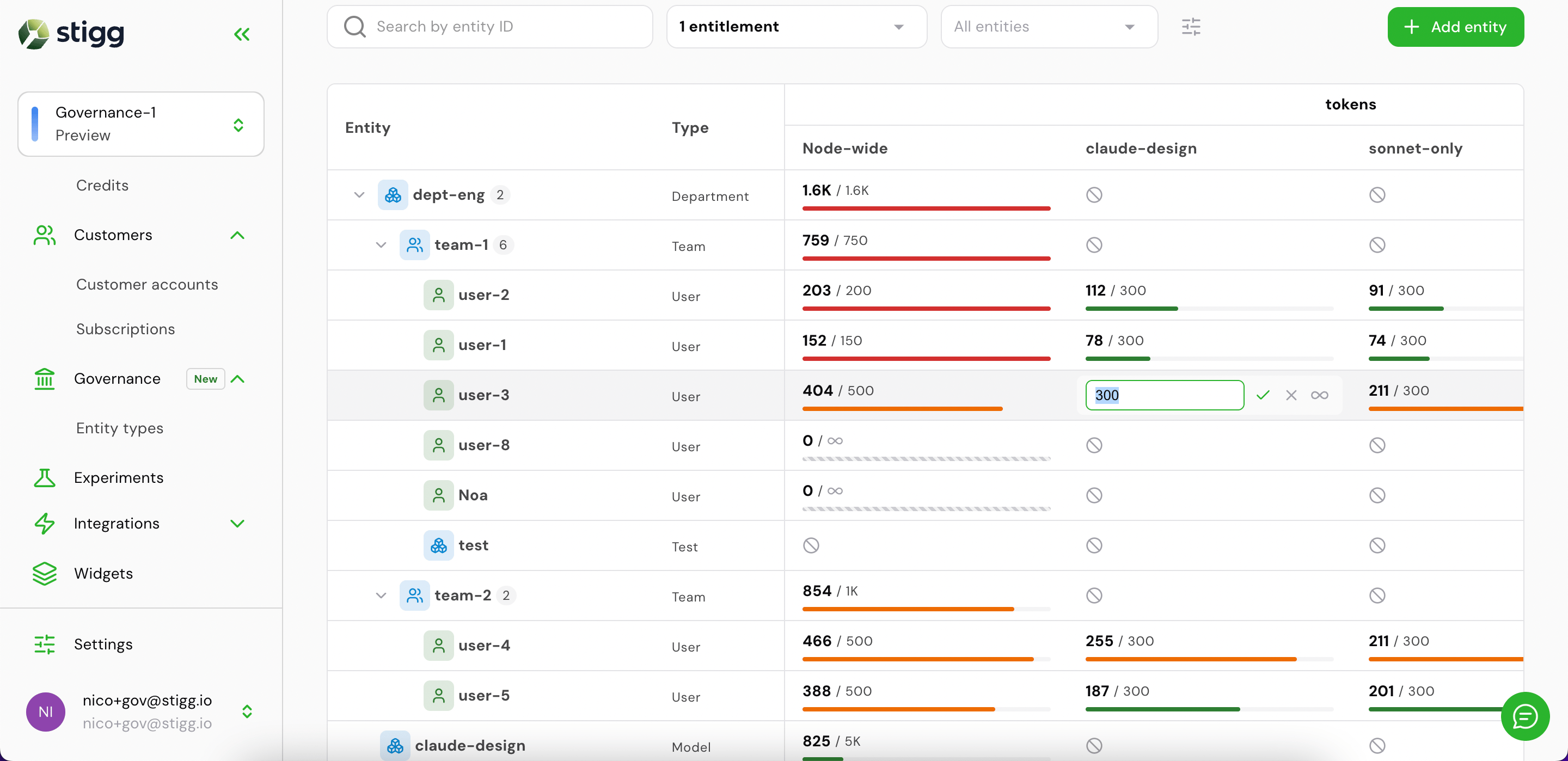
Click any entitlement cell in the Governance tab to edit the limit value inline, then confirm with the checkmark.
### Edit an entitlement value inline
Click any entitlement cell in the Governance tab to edit the limit value inline, then confirm with the checkmark.
 ***
## Via the SDK
### Installation
```shell npm theme={null}
npm install @stigg/governance-client
```
```shell yarn theme={null}
yarn add @stigg/governance-client
```
### Initializing the client
Create one client instance per process and reuse it across your codebase.
```typescript TypeScript theme={null}
import { createGovernanceClient } from '@stigg/governance-client';
const governance = createGovernanceClient({
baseUrl: process.env.GOVERNANCE_API_URL,
accessToken: process.env.GOVERNANCE_ACCESS_TOKEN,
accountId: process.env.STIGG_ACCOUNT_ID,
environmentId: process.env.STIGG_ENVIRONMENT_ID,
caller: 'my-app',
});
```
| Option | Description |
| --------------- | ------------------------------------------------------------ |
| `baseUrl` | Base URL of the Governance API |
| `accessToken` | Static Bearer token for server-to-server auth |
| `auth` | M2M client-credentials config (alternative to `accessToken`) |
| `accountId` | Your Stigg account ID |
| `environmentId` | The target environment ID |
| `caller` | Identifier for the calling service, used in logs |
The client exposes six namespaces: `governance.entityTypes`, `governance.entities`, `governance.capabilities`, `governance.assignments`, `governance.check`, `governance.ingest`.
Every method returns an Axios response — access `.data` to get the payload.
***
## Step 1 — Define entity types
Entity types are the categories of resource you want to govern (e.g., `org`, `team`, `user`, `agent`). Define them once per environment. The `attributionKeys` are the dimension keys your ingest events carry to identify instances of each type.
```typescript TypeScript theme={null}
const { data: entityTypes } = await governance.entityTypes.entityTypeControllerUpsert({
types: [
{ id: 'org', displayName: 'Organization', attributionKeys: ['orgId'] },
{ id: 'team', displayName: 'Team', attributionKeys: ['teamId'] },
{ id: 'user', displayName: 'User', attributionKeys: ['userId'] },
{ id: 'agent', displayName: 'AI agent', attributionKeys: ['agentId'] },
],
});
// entityTypes: EntityTypeResponse[]
```
```bash curl theme={null}
curl -X PUT https:///entity-types \
-H "Authorization: Bearer " \
-H "x-stigg-account-id: " \
-H "x-stigg-environment-id: " \
-H "Content-Type: application/json" \
-d '{
"types": [
{ "id": "org", "displayName": "Organization", "attributionKeys": ["orgId"] },
{ "id": "team", "displayName": "Team", "attributionKeys": ["teamId"] },
{ "id": "user", "displayName": "User", "attributionKeys": ["userId"] },
{ "id": "agent", "displayName": "AI agent", "attributionKeys": ["agentId"] }
]
}'
```
The upsert is **idempotent** — re-submitting the same payload is safe. Up to 100 types per request.
**Response** (`200 OK`):
```json theme={null}
[
{
"id": "org",
"displayName": "Organization",
"attributionKeys": ["orgId"],
"createdAt": "2026-01-15T10:00:00.000Z",
"updatedAt": "2026-01-15T10:00:00.000Z"
}
]
```
### Listing entity types
```typescript TypeScript theme={null}
const { data } = await governance.entityTypes.entityTypeControllerList(
undefined, // after cursor
undefined, // before cursor
20, // limit
);
// data.data: EntityTypeResponse[]
// data.pagination: { next, prev }
```
```bash curl theme={null}
curl "https:///entity-types?limit=20" \
-H "Authorization: Bearer " \
-H "x-stigg-account-id: " \
-H "x-stigg-environment-id: "
```
***
## Step 2 — Define capabilities
Capabilities are the metered resources you track (e.g., `api-calls`, `ai-tokens`, `seats`). All capabilities are of type `METER` in V1.
```typescript TypeScript theme={null}
const { data: capabilities } = await governance.capabilities.capabilityControllerUpsert({
capabilities: [
{ id: 'api-calls', type: 'METER' },
{ id: 'ai-tokens', type: 'METER' },
{ id: 'seats', type: 'METER' },
],
});
```
```bash curl theme={null}
curl -X PUT https:///capabilities \
-H "Authorization: Bearer " \
-H "x-stigg-account-id: " \
-H "x-stigg-environment-id: " \
-H "Content-Type: application/json" \
-d '{
"capabilities": [
{ "id": "api-calls", "type": "METER" },
{ "id": "ai-tokens", "type": "METER" }
]
}'
```
**Response** (`200 OK`):
```json theme={null}
[
{
"id": "api-calls",
"type": "METER",
"createdAt": "2026-01-15T10:00:00.000Z",
"updatedAt": "2026-01-15T10:00:00.000Z"
}
]
```
### Fetching a single capability
```typescript TypeScript theme={null}
const { data: capability } = await governance.capabilities.capabilityControllerGet('api-calls');
```
```bash curl theme={null}
curl "https:///capabilities/api-calls" \
-H "Authorization: Bearer " \
-H "x-stigg-account-id: " \
-H "x-stigg-environment-id: "
```
***
## Step 3 — Provision entities per customer
When a customer creates an org, team, or user in your product, provision the corresponding entity in governance. The `ownerId` is the customer's ID in your system.
```typescript TypeScript theme={null}
const customerId = 'cus-acme';
const { data: entities } = await governance.entities.entityControllerUpsert(customerId, {
entities: [
{ id: 'org-acme', typeRefId: 'org', metadata: { plan: 'enterprise' } },
{ id: 'team-eng', typeRefId: 'team' },
{ id: 'team-product', typeRefId: 'team' },
{ id: 'agent-claude', typeRefId: 'agent' },
],
});
```
```bash curl theme={null}
curl -X PUT https:///owners/cus-acme/entities \
-H "Authorization: Bearer " \
-H "x-stigg-account-id: " \
-H "x-stigg-environment-id: " \
-H "Content-Type: application/json" \
-d '{
"entities": [
{ "id": "org-acme", "typeRefId": "org", "metadata": { "plan": "enterprise" } },
{ "id": "team-eng", "typeRefId": "team" },
{ "id": "team-product", "typeRefId": "team" },
{ "id": "agent-claude", "typeRefId": "agent" }
]
}'
```
Up to 100 entities per request. Idempotent — safe to re-run during re-syncs.
**Metadata patch semantics**: keys present in `metadata` are merged over existing values. Set a key to `""` to delete it. Omitting `metadata` entirely leaves the stored metadata unchanged.
**Response** (`200 OK`):
```json theme={null}
[
{
"id": "org-acme",
"typeId": "org",
"metadata": { "plan": "enterprise" },
"archivedAt": null,
"createdAt": "2026-01-15T10:00:00.000Z",
"updatedAt": "2026-01-15T10:00:00.000Z"
}
]
```
### Listing entities
```typescript TypeScript theme={null}
// All active entities for the customer
const { data } = await governance.entities.entityControllerList('cus-acme');
// Filter by entity type
const { data: teams } = await governance.entities.entityControllerList(
'cus-acme',
undefined, // after
undefined, // before
20, // limit
'team', // refId (type filter)
);
// Include archived
const { data: all } = await governance.entities.entityControllerList(
'cus-acme',
undefined, undefined, 20,
undefined,
'true', // includeArchived
);
```
```bash curl theme={null}
# All active entities
curl "https:///owners/cus-acme/entities?limit=20" \
-H "Authorization: Bearer " \
-H "x-stigg-account-id: " \
-H "x-stigg-environment-id: "
```
### Getting a single entity
```typescript TypeScript theme={null}
const { data: entity } = await governance.entities.entityControllerGet('cus-acme', 'org-acme');
```
```bash curl theme={null}
curl "https:///owners/cus-acme/entities/org-acme" \
-H "Authorization: Bearer " \
-H "x-stigg-account-id: " \
-H "x-stigg-environment-id: "
```
### Archiving and unarchiving entities
Archiving is a soft-delete: the entity disappears from the list but remains accessible via GET-by-ID.
```typescript TypeScript theme={null}
// Archive
await governance.entities.entityControllerArchive('cus-acme', { ids: ['team-old-project'] });
// Unarchive
await governance.entities.entityControllerUnarchive('cus-acme', { ids: ['team-old-project'] });
```
```bash curl theme={null}
# Archive
curl -X POST https:///owners/cus-acme/entities/archive \
-H "Authorization: Bearer " \
-H "x-stigg-account-id: " \
-H "x-stigg-environment-id: " \
-H "Content-Type: application/json" \
-d '{ "ids": ["team-old-project"] }'
```
Both return `204 No Content`.
***
## Step 4 — Create assignments
Assignments set the usage limit for an `(entity, capability)` pair — they are the governance equivalent of entitlements, and appear as entitlement columns in the Stigg console's Governance tab. They are typically created by your customers through an in-app interface, but you can also set them programmatically.
```typescript TypeScript theme={null}
const { data: assignments } = await governance.assignments.assignmentControllerUpsert('cus-acme', {
assignments: [
{
entityId: 'org-acme',
capabilityId: 'ai-tokens',
usageLimit: 1_000_000,
cadence: 'P1M',
},
{
entityId: 'team-eng',
capabilityId: 'ai-tokens',
parentId: 'org-acme', // places team-eng under org-acme in the hierarchy
usageLimit: 200_000,
cadence: 'P1M',
},
],
});
```
```bash curl theme={null}
curl -X PUT https:///owners/cus-acme/assignments \
-H "Authorization: Bearer " \
-H "x-stigg-account-id: " \
-H "x-stigg-environment-id: " \
-H "Content-Type: application/json" \
-d '{
"assignments": [
{
"entityId": "org-acme",
"capabilityId": "ai-tokens",
"usageLimit": 1000000,
"cadence": "P1M"
},
{
"entityId": "team-eng",
"capabilityId": "ai-tokens",
"parentId": "org-acme",
"usageLimit": 200000,
"cadence": "P1M"
}
]
}'
```
**Patch semantics**: on re-upsert, omitting `usageLimit` or `cadence` preserves the existing value. On first create, both are required.
**`usageLimit: null` — tracked but unlimited**: setting `usageLimit` to `null` means usage is still counted and appears in check responses, but the limit never blocks. Useful for observability before enforcing.
**Response** (`200 OK`):
```json theme={null}
[
{
"id": "a1b2c3d4-5e6f-4a7b-8c9d-0e1f2a3b4c5d",
"entityId": "org-acme",
"capabilityId": "ai-tokens",
"scopeEntityIds": [],
"usageLimit": 1000000,
"cadence": "P1M",
"parentId": null,
"createdAt": "2026-01-15T10:00:00.000Z",
"updatedAt": "2026-01-15T10:00:00.000Z"
}
]
```
### Hierarchy — placing entities in a tree
The `parentId` field places an entity under a parent in the governance hierarchy. The check endpoint evaluates every budget in the chain from the target entity to the root — a request is only granted when all budgets along the path allow it.
`parentId` is tri-state: **omitting** it leaves the current parent unchanged (new nodes default to root); **`null`** detaches the entity to root; a **refId** sets or changes the parent. Reparenting is only allowed for leaf nodes — a node with children cannot be moved.
### Dimension-scoped sub-budgets
Add a tighter budget for a specific context by setting `scopeEntityIds`. The scoped budget applies only when every listed entity is present in the resolved set for the request.
```typescript TypeScript theme={null}
await governance.assignments.assignmentControllerUpsert('cus-acme', {
assignments: [
// Node-wide budget — always applies
{ entityId: 'team-eng', capabilityId: 'ai-tokens', scopeEntityIds: [], usageLimit: 200_000, cadence: 'P1M' },
// Tighter budget — applies only when model-gpt4o is in the request context
{ entityId: 'team-eng', capabilityId: 'ai-tokens', scopeEntityIds: ['model-gpt4o'], usageLimit: 10_000, cadence: 'P1M' },
],
});
```
### Listing assignments
```typescript TypeScript theme={null}
// All assignments for the customer
const { data } = await governance.assignments.assignmentControllerList('cus-acme');
// Filter by entity
const { data: byEntity } = await governance.assignments.assignmentControllerList(
'cus-acme',
undefined, undefined, 20,
'team-eng', // entityId filter
);
// Filter by capability
const { data: byCap } = await governance.assignments.assignmentControllerList(
'cus-acme',
undefined, undefined, 20,
undefined,
'ai-tokens', // capabilityId filter
);
```
```bash curl theme={null}
curl "https:///owners/cus-acme/assignments?entityId=team-eng" \
-H "Authorization: Bearer " \
-H "x-stigg-account-id: " \
-H "x-stigg-environment-id: "
```
## What's next
Gate access before consumption and record usage after
Fetch usage and budget data for dashboards and admin UIs
***
## Via the SDK
### Installation
```shell npm theme={null}
npm install @stigg/governance-client
```
```shell yarn theme={null}
yarn add @stigg/governance-client
```
### Initializing the client
Create one client instance per process and reuse it across your codebase.
```typescript TypeScript theme={null}
import { createGovernanceClient } from '@stigg/governance-client';
const governance = createGovernanceClient({
baseUrl: process.env.GOVERNANCE_API_URL,
accessToken: process.env.GOVERNANCE_ACCESS_TOKEN,
accountId: process.env.STIGG_ACCOUNT_ID,
environmentId: process.env.STIGG_ENVIRONMENT_ID,
caller: 'my-app',
});
```
| Option | Description |
| --------------- | ------------------------------------------------------------ |
| `baseUrl` | Base URL of the Governance API |
| `accessToken` | Static Bearer token for server-to-server auth |
| `auth` | M2M client-credentials config (alternative to `accessToken`) |
| `accountId` | Your Stigg account ID |
| `environmentId` | The target environment ID |
| `caller` | Identifier for the calling service, used in logs |
The client exposes six namespaces: `governance.entityTypes`, `governance.entities`, `governance.capabilities`, `governance.assignments`, `governance.check`, `governance.ingest`.
Every method returns an Axios response — access `.data` to get the payload.
***
## Step 1 — Define entity types
Entity types are the categories of resource you want to govern (e.g., `org`, `team`, `user`, `agent`). Define them once per environment. The `attributionKeys` are the dimension keys your ingest events carry to identify instances of each type.
```typescript TypeScript theme={null}
const { data: entityTypes } = await governance.entityTypes.entityTypeControllerUpsert({
types: [
{ id: 'org', displayName: 'Organization', attributionKeys: ['orgId'] },
{ id: 'team', displayName: 'Team', attributionKeys: ['teamId'] },
{ id: 'user', displayName: 'User', attributionKeys: ['userId'] },
{ id: 'agent', displayName: 'AI agent', attributionKeys: ['agentId'] },
],
});
// entityTypes: EntityTypeResponse[]
```
```bash curl theme={null}
curl -X PUT https:///entity-types \
-H "Authorization: Bearer " \
-H "x-stigg-account-id: " \
-H "x-stigg-environment-id: " \
-H "Content-Type: application/json" \
-d '{
"types": [
{ "id": "org", "displayName": "Organization", "attributionKeys": ["orgId"] },
{ "id": "team", "displayName": "Team", "attributionKeys": ["teamId"] },
{ "id": "user", "displayName": "User", "attributionKeys": ["userId"] },
{ "id": "agent", "displayName": "AI agent", "attributionKeys": ["agentId"] }
]
}'
```
The upsert is **idempotent** — re-submitting the same payload is safe. Up to 100 types per request.
**Response** (`200 OK`):
```json theme={null}
[
{
"id": "org",
"displayName": "Organization",
"attributionKeys": ["orgId"],
"createdAt": "2026-01-15T10:00:00.000Z",
"updatedAt": "2026-01-15T10:00:00.000Z"
}
]
```
### Listing entity types
```typescript TypeScript theme={null}
const { data } = await governance.entityTypes.entityTypeControllerList(
undefined, // after cursor
undefined, // before cursor
20, // limit
);
// data.data: EntityTypeResponse[]
// data.pagination: { next, prev }
```
```bash curl theme={null}
curl "https:///entity-types?limit=20" \
-H "Authorization: Bearer " \
-H "x-stigg-account-id: " \
-H "x-stigg-environment-id: "
```
***
## Step 2 — Define capabilities
Capabilities are the metered resources you track (e.g., `api-calls`, `ai-tokens`, `seats`). All capabilities are of type `METER` in V1.
```typescript TypeScript theme={null}
const { data: capabilities } = await governance.capabilities.capabilityControllerUpsert({
capabilities: [
{ id: 'api-calls', type: 'METER' },
{ id: 'ai-tokens', type: 'METER' },
{ id: 'seats', type: 'METER' },
],
});
```
```bash curl theme={null}
curl -X PUT https:///capabilities \
-H "Authorization: Bearer " \
-H "x-stigg-account-id: " \
-H "x-stigg-environment-id: " \
-H "Content-Type: application/json" \
-d '{
"capabilities": [
{ "id": "api-calls", "type": "METER" },
{ "id": "ai-tokens", "type": "METER" }
]
}'
```
**Response** (`200 OK`):
```json theme={null}
[
{
"id": "api-calls",
"type": "METER",
"createdAt": "2026-01-15T10:00:00.000Z",
"updatedAt": "2026-01-15T10:00:00.000Z"
}
]
```
### Fetching a single capability
```typescript TypeScript theme={null}
const { data: capability } = await governance.capabilities.capabilityControllerGet('api-calls');
```
```bash curl theme={null}
curl "https:///capabilities/api-calls" \
-H "Authorization: Bearer " \
-H "x-stigg-account-id: " \
-H "x-stigg-environment-id: "
```
***
## Step 3 — Provision entities per customer
When a customer creates an org, team, or user in your product, provision the corresponding entity in governance. The `ownerId` is the customer's ID in your system.
```typescript TypeScript theme={null}
const customerId = 'cus-acme';
const { data: entities } = await governance.entities.entityControllerUpsert(customerId, {
entities: [
{ id: 'org-acme', typeRefId: 'org', metadata: { plan: 'enterprise' } },
{ id: 'team-eng', typeRefId: 'team' },
{ id: 'team-product', typeRefId: 'team' },
{ id: 'agent-claude', typeRefId: 'agent' },
],
});
```
```bash curl theme={null}
curl -X PUT https:///owners/cus-acme/entities \
-H "Authorization: Bearer " \
-H "x-stigg-account-id: " \
-H "x-stigg-environment-id: " \
-H "Content-Type: application/json" \
-d '{
"entities": [
{ "id": "org-acme", "typeRefId": "org", "metadata": { "plan": "enterprise" } },
{ "id": "team-eng", "typeRefId": "team" },
{ "id": "team-product", "typeRefId": "team" },
{ "id": "agent-claude", "typeRefId": "agent" }
]
}'
```
Up to 100 entities per request. Idempotent — safe to re-run during re-syncs.
**Metadata patch semantics**: keys present in `metadata` are merged over existing values. Set a key to `""` to delete it. Omitting `metadata` entirely leaves the stored metadata unchanged.
**Response** (`200 OK`):
```json theme={null}
[
{
"id": "org-acme",
"typeId": "org",
"metadata": { "plan": "enterprise" },
"archivedAt": null,
"createdAt": "2026-01-15T10:00:00.000Z",
"updatedAt": "2026-01-15T10:00:00.000Z"
}
]
```
### Listing entities
```typescript TypeScript theme={null}
// All active entities for the customer
const { data } = await governance.entities.entityControllerList('cus-acme');
// Filter by entity type
const { data: teams } = await governance.entities.entityControllerList(
'cus-acme',
undefined, // after
undefined, // before
20, // limit
'team', // refId (type filter)
);
// Include archived
const { data: all } = await governance.entities.entityControllerList(
'cus-acme',
undefined, undefined, 20,
undefined,
'true', // includeArchived
);
```
```bash curl theme={null}
# All active entities
curl "https:///owners/cus-acme/entities?limit=20" \
-H "Authorization: Bearer " \
-H "x-stigg-account-id: " \
-H "x-stigg-environment-id: "
```
### Getting a single entity
```typescript TypeScript theme={null}
const { data: entity } = await governance.entities.entityControllerGet('cus-acme', 'org-acme');
```
```bash curl theme={null}
curl "https:///owners/cus-acme/entities/org-acme" \
-H "Authorization: Bearer " \
-H "x-stigg-account-id: " \
-H "x-stigg-environment-id: "
```
### Archiving and unarchiving entities
Archiving is a soft-delete: the entity disappears from the list but remains accessible via GET-by-ID.
```typescript TypeScript theme={null}
// Archive
await governance.entities.entityControllerArchive('cus-acme', { ids: ['team-old-project'] });
// Unarchive
await governance.entities.entityControllerUnarchive('cus-acme', { ids: ['team-old-project'] });
```
```bash curl theme={null}
# Archive
curl -X POST https:///owners/cus-acme/entities/archive \
-H "Authorization: Bearer " \
-H "x-stigg-account-id: " \
-H "x-stigg-environment-id: " \
-H "Content-Type: application/json" \
-d '{ "ids": ["team-old-project"] }'
```
Both return `204 No Content`.
***
## Step 4 — Create assignments
Assignments set the usage limit for an `(entity, capability)` pair — they are the governance equivalent of entitlements, and appear as entitlement columns in the Stigg console's Governance tab. They are typically created by your customers through an in-app interface, but you can also set them programmatically.
```typescript TypeScript theme={null}
const { data: assignments } = await governance.assignments.assignmentControllerUpsert('cus-acme', {
assignments: [
{
entityId: 'org-acme',
capabilityId: 'ai-tokens',
usageLimit: 1_000_000,
cadence: 'P1M',
},
{
entityId: 'team-eng',
capabilityId: 'ai-tokens',
parentId: 'org-acme', // places team-eng under org-acme in the hierarchy
usageLimit: 200_000,
cadence: 'P1M',
},
],
});
```
```bash curl theme={null}
curl -X PUT https:///owners/cus-acme/assignments \
-H "Authorization: Bearer " \
-H "x-stigg-account-id: " \
-H "x-stigg-environment-id: " \
-H "Content-Type: application/json" \
-d '{
"assignments": [
{
"entityId": "org-acme",
"capabilityId": "ai-tokens",
"usageLimit": 1000000,
"cadence": "P1M"
},
{
"entityId": "team-eng",
"capabilityId": "ai-tokens",
"parentId": "org-acme",
"usageLimit": 200000,
"cadence": "P1M"
}
]
}'
```
**Patch semantics**: on re-upsert, omitting `usageLimit` or `cadence` preserves the existing value. On first create, both are required.
**`usageLimit: null` — tracked but unlimited**: setting `usageLimit` to `null` means usage is still counted and appears in check responses, but the limit never blocks. Useful for observability before enforcing.
**Response** (`200 OK`):
```json theme={null}
[
{
"id": "a1b2c3d4-5e6f-4a7b-8c9d-0e1f2a3b4c5d",
"entityId": "org-acme",
"capabilityId": "ai-tokens",
"scopeEntityIds": [],
"usageLimit": 1000000,
"cadence": "P1M",
"parentId": null,
"createdAt": "2026-01-15T10:00:00.000Z",
"updatedAt": "2026-01-15T10:00:00.000Z"
}
]
```
### Hierarchy — placing entities in a tree
The `parentId` field places an entity under a parent in the governance hierarchy. The check endpoint evaluates every budget in the chain from the target entity to the root — a request is only granted when all budgets along the path allow it.
`parentId` is tri-state: **omitting** it leaves the current parent unchanged (new nodes default to root); **`null`** detaches the entity to root; a **refId** sets or changes the parent. Reparenting is only allowed for leaf nodes — a node with children cannot be moved.
### Dimension-scoped sub-budgets
Add a tighter budget for a specific context by setting `scopeEntityIds`. The scoped budget applies only when every listed entity is present in the resolved set for the request.
```typescript TypeScript theme={null}
await governance.assignments.assignmentControllerUpsert('cus-acme', {
assignments: [
// Node-wide budget — always applies
{ entityId: 'team-eng', capabilityId: 'ai-tokens', scopeEntityIds: [], usageLimit: 200_000, cadence: 'P1M' },
// Tighter budget — applies only when model-gpt4o is in the request context
{ entityId: 'team-eng', capabilityId: 'ai-tokens', scopeEntityIds: ['model-gpt4o'], usageLimit: 10_000, cadence: 'P1M' },
],
});
```
### Listing assignments
```typescript TypeScript theme={null}
// All assignments for the customer
const { data } = await governance.assignments.assignmentControllerList('cus-acme');
// Filter by entity
const { data: byEntity } = await governance.assignments.assignmentControllerList(
'cus-acme',
undefined, undefined, 20,
'team-eng', // entityId filter
);
// Filter by capability
const { data: byCap } = await governance.assignments.assignmentControllerList(
'cus-acme',
undefined, undefined, 20,
undefined,
'ai-tokens', // capabilityId filter
);
```
```bash curl theme={null}
curl "https:///owners/cus-acme/assignments?entityId=team-eng" \
-H "Authorization: Bearer " \
-H "x-stigg-account-id: " \
-H "x-stigg-environment-id: "
```
## What's next
Gate access before consumption and record usage after
Fetch usage and budget data for dashboards and admin UIs