> ## Documentation Index
> Fetch the complete documentation index at: https://docs.stigg.io/llms.txt
> Use this file to discover all available pages before exploring further.
# Bring Your Own Solution
# Overview
The common way to integrate with Stigg is by using Stigg SDKs or API, but it's also possible to use Stigg's cloud services and UI to manage your product catalog and subscriptions, but still own a replica of the data, and build a custom integration on top of that. We like to call that "Bring Your Own Solution" (or BYOS) type of integration.
If any of the following is true, you might consider the BYOS approach:
1. You already have an entitlement management solution that provisions customers with access to your product, and switching over is too much effort.
2. You prefer not to depend on the availability of Stigg cloud services or SDKs for enforcing access to features.
As an alternative to other integration methods, it's possible to keep using your existing solution (or build one) by sourcing its data from Stigg to keep it in sync.
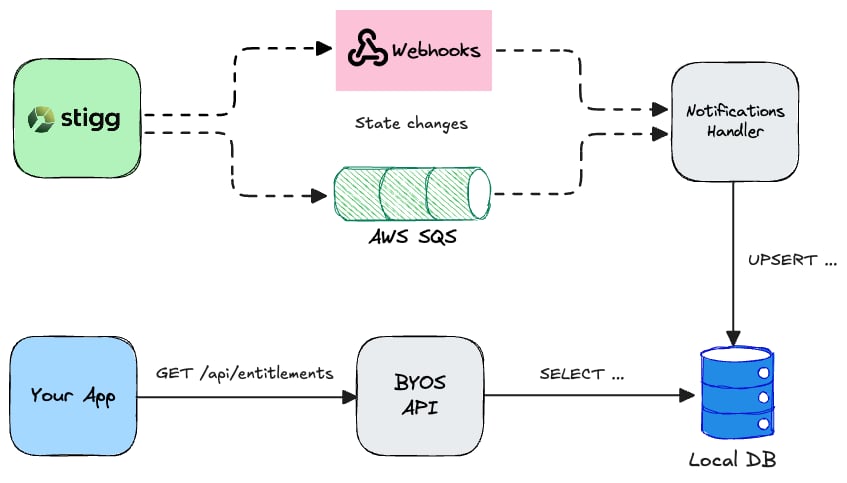 In this tutorial, we'll run a BYOS application that consumes events from Stigg, over a webhook, stores their data in relational DB, and exposes it over a GraphQL API.
Stigg provides durable queues (e.g., AWS SQS) for delivering notifications instead of webhooks. Contact support if you’d like one provisioned.
## Example
We'll implement a Node.js [Express app](https://expressjs.com/) and use [Postgraphile](https://www.graphile.org/postgraphile/) to generate a GraphQL API based on a relational database schema, for which will use PostgreSQL.
The full source code is available [here](https://github.com/stiggio/stigg-byos-example).
**1. Preparing the DB and the data model**
Let's start by preparing the init script that will define the database schema:
```sql sql theme={null}
CREATE TABLE public.customers
(
created_at TIMESTAMP DEFAULT CURRENT_TIMESTAMP,
updated_at TIMESTAMP DEFAULT CURRENT_TIMESTAMP,
customer_id VARCHAR(255) NOT NULL UNIQUE PRIMARY KEY,
name TEXT,
email TEXT,
billing_id VARCHAR(255),
entitlements JSON NOT NULL DEFAULT '[]'::JSON
);
COMMENT
ON TABLE public.customers IS 'Customer records.';
comment on column public.customers.entitlements is E'@overrideType Entitlement[]';
CREATE TABLE public.subscriptions
(
created_at TIMESTAMP DEFAULT CURRENT_TIMESTAMP,
updated_at TIMESTAMP DEFAULT CURRENT_TIMESTAMP,
subscription_id VARCHAR(255) NOT NULL UNIQUE PRIMARY KEY,
customer_id VARCHAR(255) NOT NULL REFERENCES public.customers (customer_id),
status VARCHAR(255) NOT NULL,
plan_id VARCHAR(255) NOT NULL,
plan_name TEXT NOT NULL,
billing_id VARCHAR(255),
start_date TIMESTAMP NOT NULL,
end_date TIMESTAMP,
cancellation_date TIMESTAMP,
trial_end_date TIMESTAMP
);
COMMENT
ON TABLE public.subscriptions IS 'Subscription records.';
```
**2. Creating the endpoint**
We will populate the above tables with data from Stigg, so for that, we'll add an endpoint to handle the incoming webhooks:
```typescript TypeScript theme={null}
// Endpoint to handle incoming webhooks from Stigg
app.post('/webhook', async (req, res) => {
// Naive verification of the webhook origin, HMAC signatures will be added later
if (req.header('stigg-webhooks-secret') !== process.env.STIGG_WEBHOOK_SECRET) {
res.status(401).send('Unauthorized');
return;
}
try {
// Process the event here ...
await processEvent(req.body);
res.status(200).json({ success: true });
} catch (err) {
res.status(500).json({ success: false });
}
});
```
**3. Subscribing to events**
Add the webhook in Stigg, and point it to `/webhook` endpoint we've just added. Subscribe to the following events:
* `customer.created`
* `customer.updated`
* `customer.deleted`
* `entitlements.updated`
* `measurement.reported`
* `subscription.created`
* `subscription.updated`
* `subscription.canceled`
* `subscription.expired`
* `subscription.trial_expired`
**4. Writing the event processor**
We'll need an event processor to handle the arriving events, extract the relevant state and update our local app's database:
```typescript TypeScript theme={null}
export async function processEvent(event: WebhookEvent) {
console.log(`Processing event: ${event.messageId}`, event);
try {
await applyEvent(event);
} catch (err) {
console.error(`Failed to process event: ${event.messageId}`, err);
throw err;
}
console.log(`Event processed: ${event.messageId}`);
}
async function applyEvent(event: WebhookEvent) {
switch (event.type) {
case 'customer.created':
return onCustomerCreated(event);
case 'customer.updated':
return onCustomerUpdated(event);
case 'customer.deleted':
return onCustomerDeleted(event);
case 'entitlements.updated':
return onEntitlementsUpdated(event);
case 'measurement.reported':
return onMeasurementReported(event);
case 'subscription.created':
return onSubscriptionCreated(event);
case 'subscription.updated':
case 'subscription.canceled':
case 'subscription.expired':
case 'subscription.trial_expired':
return onSubscriptionUpdated(event);
}
}
async function onCustomerCreated(event: CustomerEvent) {
await DB.customers.insert({
created_at: new Date(event.timestamp),
customer_id: event.id,
...mapCustomerState(event),
});
}
async function onCustomerUpdated(event: CustomerEvent) {
await DB.customers.where({ customer_id: event.id }).update({
updated_at: new Date(event.timestamp),
...mapCustomerState(event),
});
}
async function onCustomerDeleted(event: CustomerEvent) {
await DB.customers.where({ customer_id: event.id }).delete();
}
// ... rest of the logic
```
The full file is available [here](https://github.com/stiggio/stigg-byos-example/blob/master/src/event-processor.ts).
**4. GraphQL API**
To expose the data over an API, we'll add the `postgraphile` middleware to our express app:
```typescript TypeScript theme={null}
// Exposing the GraphQL API generated from the database public schema, accessible at /graphql
app.use(
postgraphile(process.env.DATABASE_URL, 'public', {
subscriptions: true,
watchPg: true,
dynamicJson: true,
setofFunctionsContainNulls: false,
ignoreRBAC: false,
showErrorStack: 'json',
extendedErrors: ['hint', 'detail', 'errcode'],
appendPlugins: [require('@graphile-contrib/pg-simplify-inflector')],
skipPlugins: [require('graphile-build').NodePlugin],
graphiql: true,
enhanceGraphiql: true,
enableQueryBatching: true,
legacyRelations: 'omit',
disableQueryLog: true,
}),
);
```
**5. Querying the data**
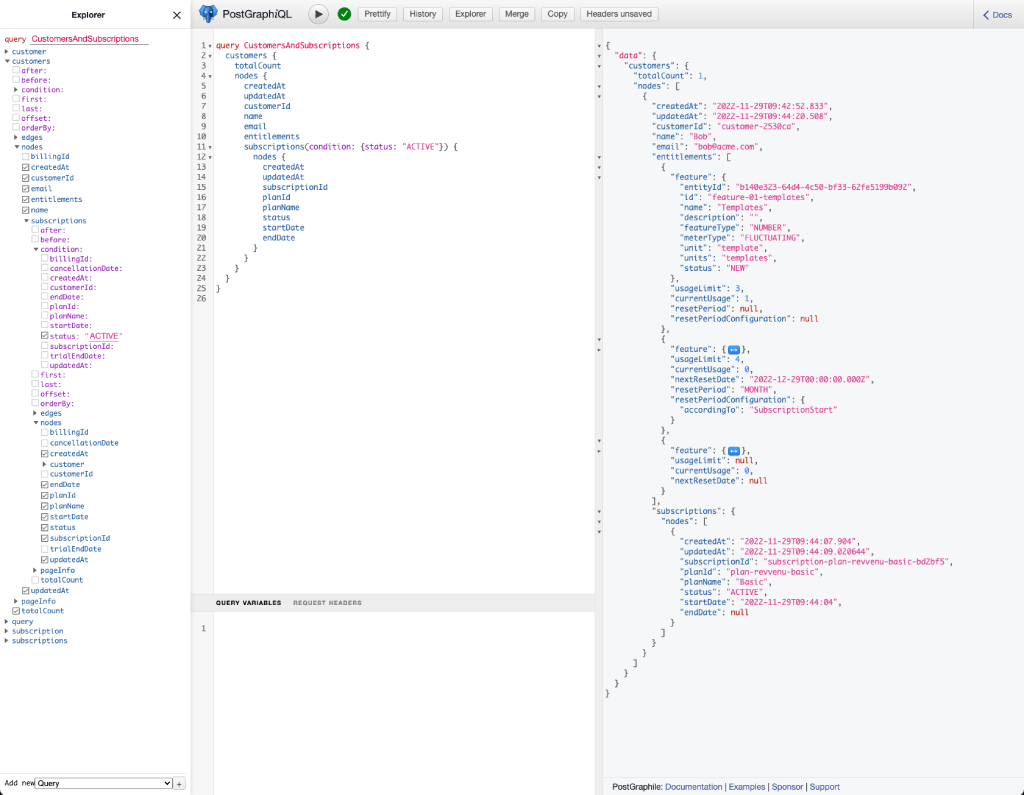
Now we can access the generated GraphQL API, to make our life easier we'll use the GraphiQL interactive UI (at `/graphiql`) and run queries like so:
In this tutorial, we'll run a BYOS application that consumes events from Stigg, over a webhook, stores their data in relational DB, and exposes it over a GraphQL API.
Stigg provides durable queues (e.g., AWS SQS) for delivering notifications instead of webhooks. Contact support if you’d like one provisioned.
## Example
We'll implement a Node.js [Express app](https://expressjs.com/) and use [Postgraphile](https://www.graphile.org/postgraphile/) to generate a GraphQL API based on a relational database schema, for which will use PostgreSQL.
The full source code is available [here](https://github.com/stiggio/stigg-byos-example).
**1. Preparing the DB and the data model**
Let's start by preparing the init script that will define the database schema:
```sql sql theme={null}
CREATE TABLE public.customers
(
created_at TIMESTAMP DEFAULT CURRENT_TIMESTAMP,
updated_at TIMESTAMP DEFAULT CURRENT_TIMESTAMP,
customer_id VARCHAR(255) NOT NULL UNIQUE PRIMARY KEY,
name TEXT,
email TEXT,
billing_id VARCHAR(255),
entitlements JSON NOT NULL DEFAULT '[]'::JSON
);
COMMENT
ON TABLE public.customers IS 'Customer records.';
comment on column public.customers.entitlements is E'@overrideType Entitlement[]';
CREATE TABLE public.subscriptions
(
created_at TIMESTAMP DEFAULT CURRENT_TIMESTAMP,
updated_at TIMESTAMP DEFAULT CURRENT_TIMESTAMP,
subscription_id VARCHAR(255) NOT NULL UNIQUE PRIMARY KEY,
customer_id VARCHAR(255) NOT NULL REFERENCES public.customers (customer_id),
status VARCHAR(255) NOT NULL,
plan_id VARCHAR(255) NOT NULL,
plan_name TEXT NOT NULL,
billing_id VARCHAR(255),
start_date TIMESTAMP NOT NULL,
end_date TIMESTAMP,
cancellation_date TIMESTAMP,
trial_end_date TIMESTAMP
);
COMMENT
ON TABLE public.subscriptions IS 'Subscription records.';
```
**2. Creating the endpoint**
We will populate the above tables with data from Stigg, so for that, we'll add an endpoint to handle the incoming webhooks:
```typescript TypeScript theme={null}
// Endpoint to handle incoming webhooks from Stigg
app.post('/webhook', async (req, res) => {
// Naive verification of the webhook origin, HMAC signatures will be added later
if (req.header('stigg-webhooks-secret') !== process.env.STIGG_WEBHOOK_SECRET) {
res.status(401).send('Unauthorized');
return;
}
try {
// Process the event here ...
await processEvent(req.body);
res.status(200).json({ success: true });
} catch (err) {
res.status(500).json({ success: false });
}
});
```
**3. Subscribing to events**
Add the webhook in Stigg, and point it to `/webhook` endpoint we've just added. Subscribe to the following events:
* `customer.created`
* `customer.updated`
* `customer.deleted`
* `entitlements.updated`
* `measurement.reported`
* `subscription.created`
* `subscription.updated`
* `subscription.canceled`
* `subscription.expired`
* `subscription.trial_expired`
**4. Writing the event processor**
We'll need an event processor to handle the arriving events, extract the relevant state and update our local app's database:
```typescript TypeScript theme={null}
export async function processEvent(event: WebhookEvent) {
console.log(`Processing event: ${event.messageId}`, event);
try {
await applyEvent(event);
} catch (err) {
console.error(`Failed to process event: ${event.messageId}`, err);
throw err;
}
console.log(`Event processed: ${event.messageId}`);
}
async function applyEvent(event: WebhookEvent) {
switch (event.type) {
case 'customer.created':
return onCustomerCreated(event);
case 'customer.updated':
return onCustomerUpdated(event);
case 'customer.deleted':
return onCustomerDeleted(event);
case 'entitlements.updated':
return onEntitlementsUpdated(event);
case 'measurement.reported':
return onMeasurementReported(event);
case 'subscription.created':
return onSubscriptionCreated(event);
case 'subscription.updated':
case 'subscription.canceled':
case 'subscription.expired':
case 'subscription.trial_expired':
return onSubscriptionUpdated(event);
}
}
async function onCustomerCreated(event: CustomerEvent) {
await DB.customers.insert({
created_at: new Date(event.timestamp),
customer_id: event.id,
...mapCustomerState(event),
});
}
async function onCustomerUpdated(event: CustomerEvent) {
await DB.customers.where({ customer_id: event.id }).update({
updated_at: new Date(event.timestamp),
...mapCustomerState(event),
});
}
async function onCustomerDeleted(event: CustomerEvent) {
await DB.customers.where({ customer_id: event.id }).delete();
}
// ... rest of the logic
```
The full file is available [here](https://github.com/stiggio/stigg-byos-example/blob/master/src/event-processor.ts).
**4. GraphQL API**
To expose the data over an API, we'll add the `postgraphile` middleware to our express app:
```typescript TypeScript theme={null}
// Exposing the GraphQL API generated from the database public schema, accessible at /graphql
app.use(
postgraphile(process.env.DATABASE_URL, 'public', {
subscriptions: true,
watchPg: true,
dynamicJson: true,
setofFunctionsContainNulls: false,
ignoreRBAC: false,
showErrorStack: 'json',
extendedErrors: ['hint', 'detail', 'errcode'],
appendPlugins: [require('@graphile-contrib/pg-simplify-inflector')],
skipPlugins: [require('graphile-build').NodePlugin],
graphiql: true,
enhanceGraphiql: true,
enableQueryBatching: true,
legacyRelations: 'omit',
disableQueryLog: true,
}),
);
```
**5. Querying the data**
Now we can access the generated GraphQL API, to make our life easier we'll use the GraphiQL interactive UI (at `/graphiql`) and run queries like so:
 **6. Entitlement checks**
Let's add an endpoint that we can use to perform a check if a customer can access a feature or not, so our other services can use it:
```typescript TypeScript theme={null}
app.post('/check-access', async (req, res) => {
const { customerId, featureId, requestedUsage } = req.body;
if (!customerId || !featureId) {
res.status(400).send('customerId and featureId are required');
return;
}
const decision = await checkAccess(customerId, featureId, requestedUsage);
if (decision.hasAccess) {
res.status(200).json(decision);
} else {
res.status(403).json(decision);
}
});
```
The logic of the `checkAccess`function can be found [here](https://github.com/stiggio/stigg-byos-example/blob/master/src/access-checker.ts).
## Source code
For your convenience, we prepared a runnable example project that demonstrates this approach. You can find the source code of the example on GitHub👇
An example of integrating Stigg using webhooks to sync entitlements into your own database, exposing a GraphQL API and access checks.
**6. Entitlement checks**
Let's add an endpoint that we can use to perform a check if a customer can access a feature or not, so our other services can use it:
```typescript TypeScript theme={null}
app.post('/check-access', async (req, res) => {
const { customerId, featureId, requestedUsage } = req.body;
if (!customerId || !featureId) {
res.status(400).send('customerId and featureId are required');
return;
}
const decision = await checkAccess(customerId, featureId, requestedUsage);
if (decision.hasAccess) {
res.status(200).json(decision);
} else {
res.status(403).json(decision);
}
});
```
The logic of the `checkAccess`function can be found [here](https://github.com/stiggio/stigg-byos-example/blob/master/src/access-checker.ts).
## Source code
For your convenience, we prepared a runnable example project that demonstrates this approach. You can find the source code of the example on GitHub👇
An example of integrating Stigg using webhooks to sync entitlements into your own database, exposing a GraphQL API and access checks.